

You have a Tajima embroidery machine, and you want to unlock its full potential with the right digitizing software. Maybe you are tired of buying pre-made designs or struggling with complicated tools. This guide covers the best digitizing software for Tajima embroidery machines in 2026 and focuses on two powerful options from Embrilliance: Essentials and StitchArtist Level 1. Whether you are a hobbyist or a small business owner, these programs make it easy to digitize and customize designs. For more insights on embroidery tools, check out our Sewing & Embroidery category.

Pros
- Easy learning curve with intuitive interface and plenty of YouTube tutorials.
- Affordable modular pricing compared to traditional embroidery software.
- Excellent customer support with quick and helpful responses.
- Powerful resizing and lettering capabilities that preserve stitch integrity.
- Compatible with a wide range of machine formats and cutting machines.
Cons
- Does not convert JPG or other graphics to embroidery designs (requires separate StitchArtist software).
- Official website can be confusing for new users when navigating software versions and tutorials.
- Price may feel high for occasional hobbyists, though justifiable by the features offered.
Embrilliance Essentials is a modular embroidery software designed for both Mac and PC users who want to take full control of their machine embroidery projects. It is specifically built for those who already have embroidery stitch files and need a powerful yet approachable tool to resize, add lettering, and combine designs. Whether you are a seasoned embroiderer or a beginner, this software provides the essential features to customize your work without the complexity and cost of traditional programs.
The standout capability is the ability to resize any embroidery stitch file with automatic stitch recalculation. This means your designs scale up or down smoothly without distorting the stitching quality. The lettering tools are equally impressive, offering Multi-Line, Monogram, Circle, and Spiral modes, plus 21 quality fonts out of the box. You can also purchase additional BX fonts from a wide community of creators online, making your projects truly unique. Overlapping designs with automatic removal of underlying stitching is another time-saving feature that works flawlessly.
In real-world use, the software proves to be highly intuitive. Many users report a quick learning curve, partly thanks to the abundance of YouTube tutorials and responsive customer support. Saving designs in your specific machine format is straightforward, and exporting appliques for ScanNCut or Silhouette cutting machines adds extra versatility. Free, downloadable updates ensure you stay current with the latest OS versions without extra cost.
A notable limitation is that Embrilliance Essentials does not convert JPG or other graphic images into embroidery designs. For that, you would need the company's StitchArtist series. Some users have also found the official website confusing when trying to differentiate software versions or locate version-specific tutorials. While the price is reasonable for the features offered, occasional hobbyists may find it a bit steep compared to free or basic alternatives.
Overall, Embrilliance Essentials is a must-have addition for anyone serious about machine embroidery. It delivers professional results with minimal hassle, backed by strong community support and a modular approach that lets you grow your toolkit as needed. If you already have designs to work with and want to personalize them with ease, this software is an excellent investment.
Brand: Embrilliance
Product Name: Essentials
Compatibility: Windows and MacOS (current operating systems)
Included Components: 21 fonts, disk-free installer
Key Features: Resize with stitch recalculation, Multi-Line/Monogram/Circle/Spiral lettering, overlap with auto removal, export to machine formats and cutting machines
Note: Does not convert JPG or graphics to embroidery designs
Manufacturer: Briton Leap
Model Number: ABCD (Part B1510)

Pros
- Very easy to use, even for beginners with no digitizing experience.
- Affordable compared to high end digitizing software with a modular upgrade path.
- Compatible on multiple computers (up to 4) per single license.
- Wide variety of stitch types and applique tools in the base level.
- Strong online support with tutorials and active user community.
Cons
- Level 1 is limited; advanced users may need to purchase higher levels for more complex features.
- There is a learning curve for mastering all tools, though online resources help.
- Some users may find the price a bit high compared to free alternatives, but it offers professional results.
Embrilliance StitchArtist Level 1 is a digitizing embroidery software designed specifically for home hobbyists and beginners who want to create custom machine embroidery designs without a steep learning curve or a massive financial commitment. This program focuses on the essential stitch types and tools you need to start designing right away, making it an ideal entry point into the world of digitizing.
The standout feature of StitchArtist Level 1 is its carefully curated set of stitch types that includes manual, run, fill, satin, applique, stipple, motif, cross stitch, and freestanding lace background stitches. Real world performance is impressive: users report being able to trace images, create applique designs with automatic placement guides, and generate plotter cutter files with ease. The software runs smoothly on both Mac and PC, and the ability to install on multiple computers is a major plus.
In terms of design and build quality, the software offers an intuitive interface with multiple drawing tools such as freehand pen, magic wand, and Bezier curves. The on screen simulation of applique designs and the ability to recolor with custom palettes add to the user experience. The physical disk delivery ensures you have a permanent copy, and free downloadable updates keep the software current.
A few drawbacks to consider: Level 1 intentionally limits some advanced features, so you may need to upgrade to higher levels as your skills grow. Some users mention a learning curve, but the extensive online tutorials and YouTube videos mitigate this. While the price is very reasonable compared to professional software, it is still an investment for a hobby tool. However, the modular upgrade path means you only pay for what you need.
Overall, Embrilliance StitchArtist Level 1 is an excellent choice for anyone wanting to start digitizing embroidery designs. It balances affordability with functionality, and the positive user reviews confirm its reliability and ease of use. If you are a hobby embroiderer looking to create your own patterns without breaking the bank, this software is highly recommended.

Pros
- Versatile 2-in-1 machine saves space and money compared to buying separate units.
- Wireless design transfer is quick and convenient, no USB hassle.
- Large touchscreen makes editing and selecting designs intuitive.
- Built-in stitches and designs cover a wide range of projects, from repairs to decorative sewing.
Cons
- Embroidery area is limited to 4x4 inches, which may be too small for larger projects.
- Some users report the touchscreen can be slow to respond at times.
- The included manual lacks detailed instructions for advanced embroidery techniques.
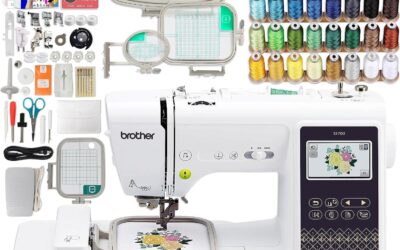
The Brother SE700 is a computerized sewing and embroidery combo machine designed for crafters who want to explore both sewing and embroidery without buying two separate machines. It is an excellent choice for beginners stepping into embroidery as well as intermediate sewists looking for a reliable upgrade.
With 135 built-in embroidery designs, 103 sewing stitches, and wireless LAN capability, the SE700 offers great creative freedom. The wireless feature works seamlessly with the Artspira app and Design Database Transfer software: you can send patterns from your phone or PC directly to the machine. The 3.7-inch color touchscreen allows you to edit, rotate, and preview designs on the fly.
Build quality is typical Brother: sturdy metal frame with durable plastic casing, weighing 15.6 pounds. The automatic needle threader and jam-resistant bobbin are time-savers. The included 8 sewing feet and 4x4 inch embroidery hoop cover most common projects like monogramming, patches, and home decor items.
One drawback is the 4x4 inch embroidery field, which can be limiting for larger designs without a larger hoop accessory. Also, the touchscreen can feel a bit laggy compared to higher-end models. The user manual could be more detailed for advanced embroidery techniques.
Overall, the Brother SE700 delivers excellent value for its price point. It is a versatile, user-friendly machine that grows with your skills. For anyone wanting a reliable sewing and embroidery combo with modern connectivity, the SE700 is a top recommendation.
Buying Guide
Compatibility with Tajima Machines
Tajima machines use specific file formats like .dst and .pes. The best digitizing software must save designs in these formats. Embrilliance Essentials and StitchArtist Level 1 both support common output formats. They work seamlessly with Tajima and other commercial machines. Always check that the software can export to your machine’s native format before buying.
Ease of Use for Beginners
Digitizing can feel intimidating if you are new to embroidery. Look for software with an intuitive interface and guided tools. Embrilliance Essentials offers direct resizing and lettering features without a steep learning curve. StitchArtist Level 1 goes a step further with digitizing tools for creating original stitches. Both programs include free updates and disk-free installers for modern operating systems. If you need a broader overview of embroidery software, visit our Home & Hobby section.
Digitizing Capabilities: Editing vs. Creating
Decide whether you need to edit existing designs or create new ones from scratch. Essentials focuses on resizing, overlapping, and adding text to pre-made files. It does not convert images to stitches. For full creation, StitchArtist Level 1 provides manual digitizing, fill stitches, satin columns, and applique tools. This distinction matters when matching your workflow. Many Tajima users start with Essentials and upgrade to StitchArtist as their skills grow.
Additional Features Worth Considering
Look for software that includes lettering fonts and applique support. Embrilliance Essentials comes with 21 built-in fonts and spiral text capabilities. StitchArtist Level 1 adds motif fills and cross-stitch options for decorative elements. Both programs remove underlying stitching when overlapping designs, saving you time. For those using cutting machines alongside embroidery, Essentials can save applique files for ScanNCut and Silhouette.
Final Thoughts
After evaluating these options, the right choice depends on your needs. If you primarily edit and resize existing designs or add lettering, Embrilliance Essentials, Embroidery Software is a reliable and affordable solution. For those who want to create original digitized patterns from scratch, Embrilliance StitchArtist Level 1 offers the essential digitizing tools without overwhelming complexity. Both programs work flawlessly with Tajima machines, and you can start with one and upgrade later as your embroidery projects grow.
Frequently Asked Questions
Can Embrilliance Essentials digitize my own artwork?
No, Embrilliance Essentials does not convert JPEG or other graphics into stitch files. It is designed to resize, recalculate, and combine existing embroidery designs. For digitizing your own artwork, consider Embrilliance StitchArtist Level 1 or higher.
Does Embrilliance StitchArtist Level 1 work with Tajima embroidery machines?
Yes, StitchArtist Level 1 saves designs in common formats like .dst and .pes, which are compatible with Tajima machines. It also supports other commercial brands. You can transfer the files via USB or wireless if your machine supports it.
What is the difference between Embrilliance Essentials and StitchArtist Level 1?
Essentials is for editing and resizing existing designs plus adding text. StitchArtist Level 1 lets you digitize new designs from scratch using manual stitches, fills, and applique tools. Both run on Windows and macOS and receive free updates in 2026.
Is there embroidery software that works on both Mac and PC?
Yes, Embrilliance software is available for both Windows and MacOS. The company provides disk-free installers and regular updates. This cross-platform compatibility is rare among embroidery digitizing programs, making Embrilliance a popular choice for Tajima users.
Write Your Review
No reviews yet. Be the first to share your experience!