

You have a vision for a custom embroidered jacket, a monogrammed tote bag, or a personalized gift, but the design you want isn’t built into your machine. That is where a USB port becomes essential. With a machine that accepts USB drives, you can upload your own embroidery files and stitch exactly what you imagine. In this guide, we evaluate seven of the best machines for embroidery with USB port available in 2026, focusing on models from leading brands like Brother and Poolin. Whether you are a beginner or an experienced embroiderer, our comparison will help you find the right fit for your studio. For more home hobby insights, check out our Sewing & Embroidery category.
Pros
- Large embroidery area for bigger creative projects
- Intuitive 7 inch touchscreen for easy design editing
- Convenient features like auto thread trim and quick needle threading
- Wi-Fi and USB design transfer for custom patterns
- Comprehensive bundle with 80 thread colors and 144 bobbins
Cons
- Higher price point may be a barrier for casual hobbyists
- Plastic construction might feel less durable than metal alternatives
- Limited built-in designs, relying on user-uploaded files
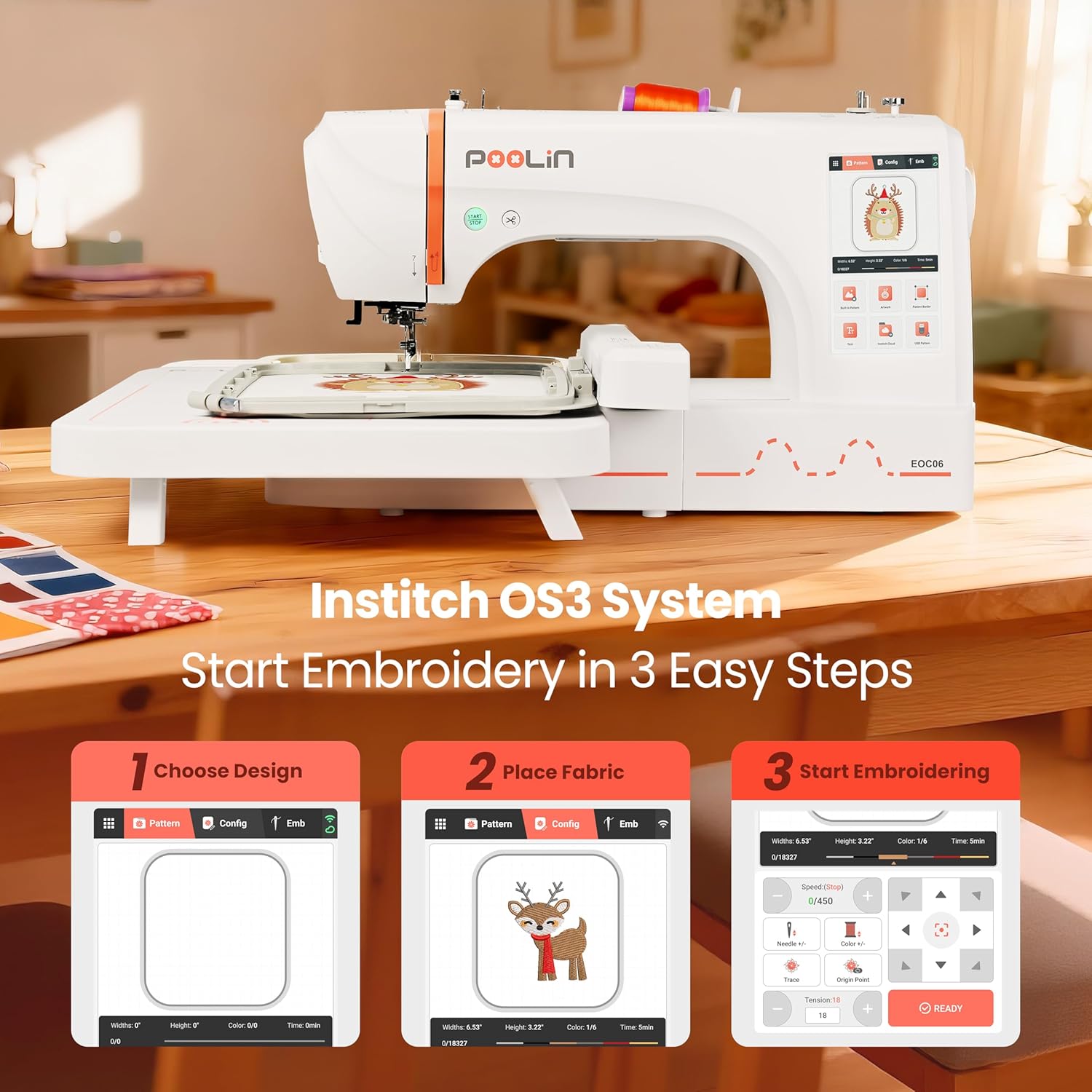
The Poolin EOC06 embroidery machine bundle is designed for home creators and small business owners who want to turn their passion into personalized projects. With a generous 7.9 x 11 inch embroidery area, it accommodates larger designs on apparel, tote bags, home décor, and gifts. This all in one package includes 80 thread colors and 144 prewound bobbins, so you can start stitching immediately.
Standout features include a 7 inch touchscreen that lets you preview, position, resize, and rotate designs before stitching. This real time editing saves time and reduces wasted materials. Wi-Fi and USB transfer options allow you to upload your own DST and DSB files, giving you unlimited creative possibilities. The machine also simplifies setup with quick needle threading, automatic thread trimming, bobbin winding, and thread-break alerts.
The build quality is typical for a plastic framed machine in this price range. It feels sturdy enough for regular use, though it may not withstand heavy industrial workloads. The electronic tension adjustment helps maintain consistent stitch quality across different fabrics, which is a nice touch for beginners. The bundle includes ample supplies, so you can experiment without constantly reordering thread.
One potential drawback is the price, which may be steep for casual hobbyists. Additionally, the machine relies on user uploaded designs, as built in patterns are limited. The plastic construction might not appeal to those seeking a metal chassis. However, given the positive user reviews and responsive customer service, these concerns are manageable for the target audience.
Overall, the Poolin EOC06 is a well equipped bundle for anyone serious about embroidery. It combines a large work area, intuitive controls, and generous supplies to support both learning and business growth. If you value convenience and creative freedom, this machine is a strong investment.

Pros
- Versatile 2-in-1 functionality saves space and money
- Wireless LAN connectivity simplifies design transfer without cables
- User-friendly LCD touchscreen makes navigation and editing straightforward
- Comprehensive bundle includes essential accessories for immediate use
- High customer satisfaction with ease of use and reliable performance
Cons
- Internet connectivity setup can be tricky for some users
- Software installation (Artspire) may require extra effort
- Limited number of reviews available, though mostly positive
The Brother SE700 bundle is a comprehensive sewing and embroidery solution designed for hobbyists and intermediate crafters. It combines a computerized machine with a starter kit of threads, needles, and bobbins, making it an all-in-one package for those looking to expand their creative projects.
With 135 built-in embroidery designs, 103 sewing stitches, and wireless LAN connectivity, the SE700 offers flexibility and convenience. The large color LCD touchscreen allows for easy on-screen editing and design selection. Users praise its ease of use and reliable stitching, calling it a workhorse.
The machine features a modern aesthetic with a generous workspace, automatic needle threading, and a drop-in bobbin system. Its sturdy build ensures stability during operation, and the included accessories complement the machine nicely.
Some users report difficulty with the wireless setup and software installation, particularly with Artspire. The internet connectivity feature may require patience to configure. However, these issues do not detract from the machine's core performance.
Overall, the Brother SE700 bundle is an excellent investment for anyone serious about sewing and embroidery. It delivers professional-quality results with a user-friendly interface. The included accessories add significant value, making it a top choice in its category.

Pros
- Extensive built-in designs and stitches provide ready-to-use options for various projects
- Wireless connectivity simplifies transferring designs from a computer
- Touchscreen interface makes editing and navigation easy for all skill levels
- Comprehensive bundle includes threads, hoops, and accessories, so little extra purchase needed
- Excellent customer feedback highlights its ease of use and quality stitching
Cons
- Embroidery field limited to 4x4 inches, restricting larger designs
- Does not include embroidery stabilizer, which beginners may need to buy separately
- Some users may find the learning curve steep for advanced features
The Brother SE700 is a powerful combination sewing and embroidery machine designed for hobbyists and beginners who want to explore both crafts without investing in two separate machines. Replacing the popular SE600, this model boasts a refined modern look and a larger workspace while keeping the compact footprint of its predecessor. It comes bundled with four embroidery hoops, a 40-spool thread set, and a variety of presser feet, making it a turnkey solution for anyone starting their sewing and embroidery journey.
With 135 built-in embroidery designs and 103 sewing stitches, the SE700 offers ample creative options for monogramming, decorative patches, and garment construction. The color LCD touchscreen allows for easy on-screen editing, including resizing, rotating, and combining designs. Wireless LAN connectivity enables direct transfer of designs from a PC using free Design Database Transfer software, eliminating the need for USB drives. Real-world users praise the quiet operation and consistent stitch quality across both sewing and embroidery modes.
The machine feels solid with a metal internal frame and plastic housing, weighing 15 pounds for stability during use. The included accessories bundle adds significant value: snap-on feet for various techniques, bobbins, needles, and a detailed manual. The 4x4 embroidery field is the standard for home machines, suitable for most DIY projects like tote bags, pillowcases, and shirts. The foot controller and thread spool net are thoughtful touches that enhance usability.
One drawback is the 4x4 embroidery hoop size, which limits the area for larger designs without re-hooping. Additionally, the SE700 does not include embroidery stabilizer, a necessary consumable for best results. Beginners may need to research stabilizer types and practice hooping technique. The sewing machine interface, while intuitive for embroidery, has its own learning curve for those transitioning from basic mechanical machines.
Overall, the Brother SE700 is an excellent choice for anyone seeking a reliable, feature-rich combo machine without a huge investment. The bundle saves money and time, and the wireless connectivity adds modern convenience. Whether you are personalizing gifts, starting a small business, or just exploring a new hobby, this machine delivers impressive value and performance. We recommend it for its ease of use, comprehensive features, and strong customer satisfaction.

Pros
- Large 5x7 inch embroidery field for bigger projects
- Easy-to-use with a bright color touchscreen display
- USB port for importing custom designs
- Auto needle threader saves time and eye strain
- Extensive built-in design library including fonts and frames
Cons
- Requires quality thread and accessories to avoid tension and breakage issues
- Some users report the bobbin sensor can be unreliable at times
- Only 120V US voltage, not suitable for international use without a converter
The Brother PE800 is a dedicated embroidery machine built for home enthusiasts who want to expand their creative projects. It sits in the middle of Brother's range, offering a large 5x7 inch hoop area and a 3.2 inch color LCD touchscreen that streamline design selection and editing. This machine is perfect for those who want a user-friendly, computer-friendly embroidery platform that can handle everything from monograms to intricate floral and quilt patterns.
Out of the box, the PE800 shines with 138 built-in designs and 11 fonts. The color touchscreen makes previewing design changes such as a breeze, and the USB port allows you to load your own digital patterns. Real-world performance is solid: with quality thread and proper tension, testse produce even, smooth stitches on most fabrics. The included tutorials on the screen help new users quickly master threading and hooped steps.
Build quality is typical of Brother: stable, with a metal and plastic chassis that stands up to moderate use. The 5x7 hoop is more generous than many entry-level models, and the machine's memory automatically saves your stitching location if the power is interrupted. The auto needle threader is a reliable and time-saver.
Some minor drawbacks to consider: the bobbin sensor can be unreliable, so users may need to check the bobbin manually. Also, using cheap thread or accessories can cause tension issues—stick to branded embroidary thread and add a sponge pad on the spindle to prevent thread tangling. The machine is also designed for 120V U.S. only, so international buyers should be cautious.
Verdict: The Brother PE800 delivers excellent value for its price, with a strong balance of automation, built-in creativity, and capacity. It’s a wonderful, dedicated machine for home embroiderers who want to grow their skills and work with digital patterns. Recommended with the tip to invest in quality supplies for best results.

Pros
- Easy to use, even for beginners with no embroidery experience.
- Wireless connectivity for convenient design transfer without cables.
- Large touchscreen makes editing, previewing, and positioning designs simple.
- Great value with many built-in designs, fonts, and included accessories.
- Durable construction and positive user reviews highlight reliability and performance.
Cons
- Embroidery-only machine; it does not function as a sewing machine.
- 4x4 inch hoop size may be limiting for larger projects like jackets or large towels.
- Requires 120V outlet and is intended for US use only, which voids warranty if used elsewhere.
The Brother PE545 is a dedicated wireless embroidery machine designed for beginners and hobbyists who want to add personalized touches to clothing, accessories, and home decor. With a 4x4 inch embroidery field, 135 built-in designs, and a large color touchscreen, it offers a straightforward and enjoyable embroidery experience right out of the box.
Standout features include wireless connectivity via the Artspira mobile app and Design Database Transfer software, allowing you to send custom designs from your phone or computer without USB cables. The 3.7-inch LCD touchscreen lets you drag and drop patterns, make edits, and preview your design in color before stitching. Built-in tutorial videos and an easy needle threading system further lower the learning curve for new users.
The machine is built with a durable metal frame and weighs only 14.1 pounds, making it sturdy yet portable. The included accessory kit is generous, with needles, bobbins, scissors, a seam ripper, and more. Users consistently praise its ease of use, reliability, and value, with many noting they started a small business after mastering the basics.
However, the PE545 is an embroidery-only machine, so it cannot sew seams or perform other sewing tasks. The 4x4 inch hoop is ideal for small projects like monograms and patches but may feel restrictive for larger items. Additionally, it is designed for 120V outlets in the US, and using it elsewhere voids the warranty.
Overall, the Brother PE545 delivers excellent performance and convenience for its price point. It is a smart investment for anyone looking to explore embroidery as a hobby or start a small personalization business. With its wireless capabilities, intuitive touchscreen, and wealth of built-in designs, it makes embroidery accessible and fun.
Pros
- Intuitive color touchscreen makes design previewing and editing simple
- Large library of 80 built-in designs and 9 font styles right out of the box
- USB port allows you to add your own embroidery patterns easily
- Easy to learn for complete beginners, as confirmed by many positive user reviews
- Reliable stitch quality over years of use according to long-term owners
Cons
- Touchscreen can be slightly unresponsive; may require multiple taps
- 4x4 inch hoop size limits project scale; cannot embroider large designs in one go
- Embroidery only machine not a sewing machine, so it cannot be used for regular sewing
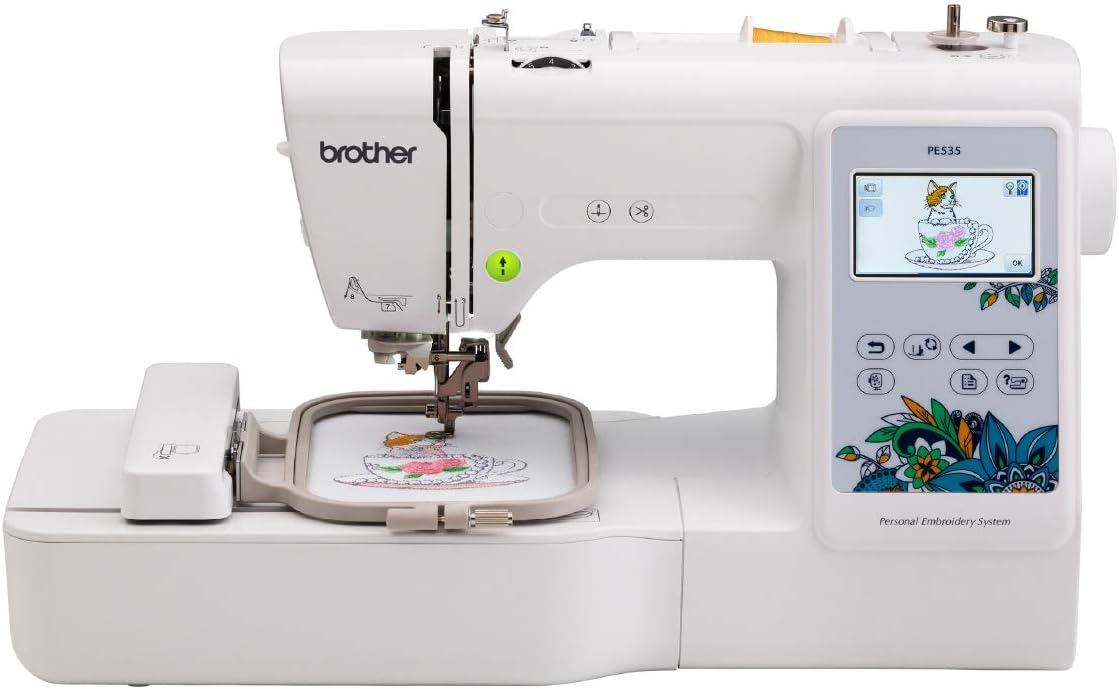
The Brother PE535 is a dedicated embroidery machine designed for hobbyists and beginners who want to add custom embroidery to clothing, accessories, and home decor. With a compact 4x4 inch hoop, it's perfect for monogramming pillowcases, personalizing a child's backpack, or embellishing small quilt blocks. It does not function as a sewing machine, so it's best for those who already own a standard sewing machine or only need embroidery functions.
Standout features include an easy-to-use 3.2 inch color touchscreen that lets you preview, drag, and drop design elements before stitching. The machine comes with 80 built-in designs covering kids' themes, holidays, florals, and more, plus 9 lettering fonts (6 English, 3 Japanese) for monograms. A USB port allows you to import your own designs, and the built-in memory stores them for future use. The auto needle threading system and included tutorial videos shorten the learning curve significantly.
Build quality is what you'd expect from Brother: a strong metal core and plastic casing keep the machine lightweight but stable. Users report that after years of use, the PE535 still stitches evenly and quietly. The one-button threading and adjustable stitch density make it a pleasure to work with for consistent results on most fabrics from denim to delicate satins. The 25-year limited warranty adds extra peace of mind.
One common real-world complaint is that the touchscreen occasionally is less responsive and requires multiple taps to register a command. Also, the 4x4 inch hoop, while ideal for small projects, is limiting for those who want to embroider larger designs like full backs of jackets or large tote bags. Similarly, the machine's font selection is basic, so for advanced lettering, many users invest in separate embroidery software to digitize custom fonts.
Overall, the Brother PE535 is a fantastic entry-level or step-up machine for anyone serious about home embroidery. It strikes a great balance between affordability, ease of use, and functionality. While its hoop size and screen sensitivity are minor drawbacks, the stitch quality, wide design library, and strong customer support make it an excellent value for personal projects and small gifts. Highly recommended for beginners and experienced embroiderers looking for a dedicated embroidery machine.
Brand: Brother
Model: PE535
Product Dimensions: 7.8"D x 16.5"W x 12"H
Weight: 15 lb
Power Source: Corded Electric, 120 volts (US only)
Hoop Area: 4" x 4"
Colors: Built-in designs and LCD touchscreen
Built-in Designs: 80
Built-in Fonts: 9 (6 English, 3 Japanese)
USB Port: Yes, for importing designs
Warranty: 25-year limited, free phone support for life
Included Components: Machine, embroidery arm, 4x4 hoop, embroidery foot, instructional DVD, bilingual user manual
Are you a beginner? The PE535 is one of the easiest machines to learn on, with clear tutorial videos, color touchscreen previews, and automatic needle threading. It's ideal for first-time users who want to start with small, manageable projects.
Consider hoop size: The 4x4 inch hoop is compact and easy to manage, but it limits you to small designs. If you need to embroider larger items (like the back of a jacket or tote bag), consider a machine with a larger hoop or a multi-hoop option. You can also stitch multiple designs to create a larger pattern, as many user reviews confirm.
Computer compatibility: Since the PE535 has a USB port, you can import designs you download or create with embroidery software. This expands its versatility dramatically. A basic embroidery software can help you design custom monograms and alphabets beyond the built-in fonts.
Maintenance tips: Keep the bobbin clean and replaced, use high quality thread to avoid breakage, and follow the manual for oiling. The machine comes with a 25-year warranty, so contact Brother support for any mechanical issue.
Recommended accessories: Extra 4x4 hoops (if you want to work on multiple projects at once), a variety of embroidery threads, stabilizers to prevent puckering, and a basic embroidery software for custom designs.

Pros
- Versatile 2-in-1 machine saves space and money compared to buying separate units.
- Wireless design transfer is quick and convenient, no USB hassle.
- Large touchscreen makes editing and selecting designs intuitive.
- Built-in stitches and designs cover a wide range of projects, from repairs to decorative sewing.
Cons
- Embroidery area is limited to 4x4 inches, which may be too small for larger projects.
- Some users report the touchscreen can be slow to respond at times.
- The included manual lacks detailed instructions for advanced embroidery techniques.
The Brother SE700 is a computerized sewing and embroidery combo machine designed for crafters who want to explore both sewing and embroidery without buying two separate machines. It is an excellent choice for beginners stepping into embroidery as well as intermediate sewists looking for a reliable upgrade.
With 135 built-in embroidery designs, 103 sewing stitches, and wireless LAN capability, the SE700 offers great creative freedom. The wireless feature works seamlessly with the Artspira app and Design Database Transfer software: you can send patterns from your phone or PC directly to the machine. The 3.7-inch color touchscreen allows you to edit, rotate, and preview designs on the fly.
Build quality is typical Brother: sturdy metal frame with durable plastic casing, weighing 15.6 pounds. The automatic needle threader and jam-resistant bobbin are time-savers. The included 8 sewing feet and 4x4 inch embroidery hoop cover most common projects like monogramming, patches, and home decor items.
One drawback is the 4x4 inch embroidery field, which can be limiting for larger designs without a larger hoop accessory. Also, the touchscreen can feel a bit laggy compared to higher-end models. The user manual could be more detailed for advanced embroidery techniques.
Overall, the Brother SE700 delivers excellent value for its price point. It is a versatile, user-friendly machine that grows with your skills. For anyone wanting a reliable sewing and embroidery combo with modern connectivity, the SE700 is a top recommendation.
What to Look for in an Embroidery Machine with USB Port
Embroidery Area Size
The embroidery field determines the maximum size of your design without re-hooping. A 4″ x 4″ area works well for small monograms and patches, while a 5″ x 7″ or larger field allows for bigger projects like jacket backs or quilt blocks. The Poolin EOC06 offers a generous 7.9″ x 11″ area, ideal for ambitious creations. Consider what you plan to stitch most often before choosing a hoop size.
Built-in Designs and Fonts
Even with USB import, having a library of built-in designs saves time and inspires creativity. Machines like the Brother PE800 include 138 built-in designs and 11 fonts, while the Brother PE535 offers 80 designs and 9 fonts. Look for a variety of styles, including florals, holidays, and alphabets, to get started immediately.
Connectivity Options
A USB port is the core requirement, but wireless LAN connectivity adds convenience. Models like the Brother SE700 and Brother PE545 let you transfer designs from your computer or mobile device via Wi-Fi. This eliminates the need for a physical drive and speeds up your workflow. For a look at how we evaluate other home appliances, see our furnace filter guide as an example of our thorough review process.
Ease of Use and Touchscreen
A large, color touchscreen makes it easy to preview, resize, and position your designs before stitching. The Brother PE800 and PE545 have 3.2-inch and 3.7-inch screens respectively, while the Poolin EOC06 features a 7-inch display. Automatic needle threading, thread trimming, and bobbin winding also reduce setup time and frustration.
Final Thoughts
After reviewing these seven machines, we found that the Poolin EOC06 Embroidery Machine Bundle stands out for its massive embroidery area and extensive thread bundle, making it perfect for large-scale projects and those who want a complete starter kit. On the other hand, the Brother PE800 Embroidery Machine offers a proven track record, a generous 5″ x 7″ hoop, and a user-friendly touchscreen at a more accessible price point, ideal for enthusiasts who prioritize reliability and built-in design variety. Whichever you choose, a USB port unlocks endless creative possibilities for your embroidery journey.
Frequently Asked Questions
Can I use my own designs with these machines? Yes, all the machines featured here include a USB port that allows you to import your own embroidery files (typically DST, PES, or DSB formats). Some models also support wireless transfer for added convenience.
What is the best embroidery machine for beginners with a USB port? For beginners, the Brother PE535 offers an easy-to-use touchscreen, 80 built-in designs, and a USB port at an affordable price. The Brother SE700 combo machine also provides sewing functionality, making it versatile for new crafters.
Do these machines work with Mac and Windows computers? Most modern embroidery machines are compatible with both operating systems. Brother machines often include free software like Design Database Transfer for wireless file transfer. Always check the manufacturer’s specifications for your system.
How large of a design can I embroider with a 4″ x 4″ hoop? A 4″ x 4″ hoop is suitable for small to medium designs such as monograms, patches, and decorative accents. For larger projects, consider a machine with a 5″ x 7″ or bigger field, like the Brother PE800 or the Poolin EOC06. For more guidance on choosing home equipment, visit our Home & Hobby section.
Write Your Review
No reviews yet. Be the first to share your experience!