

You have a vision for a custom embroidered tote bag or a monogrammed baby blanket, but the machine in front of you feels like a barrier to your creativity. Picking the right embroidery machine can be overwhelming, especially when you are trying to balance features with a sensible budget. This guide covers six top-rated models from Brother and PooLin that are consistently praised by hobbyists and small business owners. Whether you are a beginner or an experienced stitcher, you will find a machine here that fits your needs.
We evaluated each product based on its built-in designs, hoop size, ease of use, and connectivity options. Our goal is to help you avoid costly mistakes and find a machine that delivers beautiful results from the first stitch. For more background on choosing home appliances, you might also like our guide to top furnace filters which follows a similar value-first approach.
Product Comparison Table

Pros
- Extensive built-in designs and stitches provide ready-to-use options for various projects
- Wireless connectivity simplifies transferring designs from a computer
- Touchscreen interface makes editing and navigation easy for all skill levels
- Comprehensive bundle includes threads, hoops, and accessories, so little extra purchase needed
- Excellent customer feedback highlights its ease of use and quality stitching
Cons
- Embroidery field limited to 4x4 inches, restricting larger designs
- Does not include embroidery stabilizer, which beginners may need to buy separately
- Some users may find the learning curve steep for advanced features
The Brother SE700 is a powerful combination sewing and embroidery machine designed for hobbyists and beginners who want to explore both crafts without investing in two separate machines. Replacing the popular SE600, this model boasts a refined modern look and a larger workspace while keeping the compact footprint of its predecessor. It comes bundled with four embroidery hoops, a 40-spool thread set, and a variety of presser feet, making it a turnkey solution for anyone starting their sewing and embroidery journey.
With 135 built-in embroidery designs and 103 sewing stitches, the SE700 offers ample creative options for monogramming, decorative patches, and garment construction. The color LCD touchscreen allows for easy on-screen editing, including resizing, rotating, and combining designs. Wireless LAN connectivity enables direct transfer of designs from a PC using free Design Database Transfer software, eliminating the need for USB drives. Real-world users praise the quiet operation and consistent stitch quality across both sewing and embroidery modes.
The machine feels solid with a metal internal frame and plastic housing, weighing 15 pounds for stability during use. The included accessories bundle adds significant value: snap-on feet for various techniques, bobbins, needles, and a detailed manual. The 4x4 embroidery field is the standard for home machines, suitable for most DIY projects like tote bags, pillowcases, and shirts. The foot controller and thread spool net are thoughtful touches that enhance usability.
One drawback is the 4x4 embroidery hoop size, which limits the area for larger designs without re-hooping. Additionally, the SE700 does not include embroidery stabilizer, a necessary consumable for best results. Beginners may need to research stabilizer types and practice hooping technique. The sewing machine interface, while intuitive for embroidery, has its own learning curve for those transitioning from basic mechanical machines.
Overall, the Brother SE700 is an excellent choice for anyone seeking a reliable, feature-rich combo machine without a huge investment. The bundle saves money and time, and the wireless connectivity adds modern convenience. Whether you are personalizing gifts, starting a small business, or just exploring a new hobby, this machine delivers impressive value and performance. We recommend it for its ease of use, comprehensive features, and strong customer satisfaction.

Pros
- Large 5x7 inch embroidery field for bigger projects
- Easy-to-use with a bright color touchscreen display
- USB port for importing custom designs
- Auto needle threader saves time and eye strain
- Extensive built-in design library including fonts and frames
Cons
- Requires quality thread and accessories to avoid tension and breakage issues
- Some users report the bobbin sensor can be unreliable at times
- Only 120V US voltage, not suitable for international use without a converter
The Brother PE800 is a dedicated embroidery machine built for home enthusiasts who want to expand their creative projects. It sits in the middle of Brother's range, offering a large 5x7 inch hoop area and a 3.2 inch color LCD touchscreen that streamline design selection and editing. This machine is perfect for those who want a user-friendly, computer-friendly embroidery platform that can handle everything from monograms to intricate floral and quilt patterns.
Out of the box, the PE800 shines with 138 built-in designs and 11 fonts. The color touchscreen makes previewing design changes such as a breeze, and the USB port allows you to load your own digital patterns. Real-world performance is solid: with quality thread and proper tension, testse produce even, smooth stitches on most fabrics. The included tutorials on the screen help new users quickly master threading and hooped steps.
Build quality is typical of Brother: stable, with a metal and plastic chassis that stands up to moderate use. The 5x7 hoop is more generous than many entry-level models, and the machine's memory automatically saves your stitching location if the power is interrupted. The auto needle threader is a reliable and time-saver.
Some minor drawbacks to consider: the bobbin sensor can be unreliable, so users may need to check the bobbin manually. Also, using cheap thread or accessories can cause tension issues—stick to branded embroidary thread and add a sponge pad on the spindle to prevent thread tangling. The machine is also designed for 120V U.S. only, so international buyers should be cautious.
Verdict: The Brother PE800 delivers excellent value for its price, with a strong balance of automation, built-in creativity, and capacity. It’s a wonderful, dedicated machine for home embroiderers who want to grow their skills and work with digital patterns. Recommended with the tip to invest in quality supplies for best results.

Pros
- Versatile 2-in-1 machine saves space and money compared to buying separate units.
- Wireless design transfer is quick and convenient, no USB hassle.
- Large touchscreen makes editing and selecting designs intuitive.
- Built-in stitches and designs cover a wide range of projects, from repairs to decorative sewing.
Cons
- Embroidery area is limited to 4x4 inches, which may be too small for larger projects.
- Some users report the touchscreen can be slow to respond at times.
- The included manual lacks detailed instructions for advanced embroidery techniques.
The Brother SE700 is a computerized sewing and embroidery combo machine designed for crafters who want to explore both sewing and embroidery without buying two separate machines. It is an excellent choice for beginners stepping into embroidery as well as intermediate sewists looking for a reliable upgrade.
With 135 built-in embroidery designs, 103 sewing stitches, and wireless LAN capability, the SE700 offers great creative freedom. The wireless feature works seamlessly with the Artspira app and Design Database Transfer software: you can send patterns from your phone or PC directly to the machine. The 3.7-inch color touchscreen allows you to edit, rotate, and preview designs on the fly.
Build quality is typical Brother: sturdy metal frame with durable plastic casing, weighing 15.6 pounds. The automatic needle threader and jam-resistant bobbin are time-savers. The included 8 sewing feet and 4x4 inch embroidery hoop cover most common projects like monogramming, patches, and home decor items.
One drawback is the 4x4 inch embroidery field, which can be limiting for larger designs without a larger hoop accessory. Also, the touchscreen can feel a bit laggy compared to higher-end models. The user manual could be more detailed for advanced embroidery techniques.
Overall, the Brother SE700 delivers excellent value for its price point. It is a versatile, user-friendly machine that grows with your skills. For anyone wanting a reliable sewing and embroidery combo with modern connectivity, the SE700 is a top recommendation.
Pros
- Spacious 5x7 inch hoop for larger designs.
- Wireless LAN connectivity for convenient file transfer.
- Extensive built-in design library with 193 patterns and 13 fonts.
- User-friendly touchscreen with editing capabilities.
- Reliable Brother quality backed by a 25-year warranty on the chassis.
Cons
- Embroidery-only machine, does not function as a sewing machine.
- Requires firmware update and USB drive (not included) to access free Artspira designs.
- Designed for 120V US electrical systems; use elsewhere may void warranty.
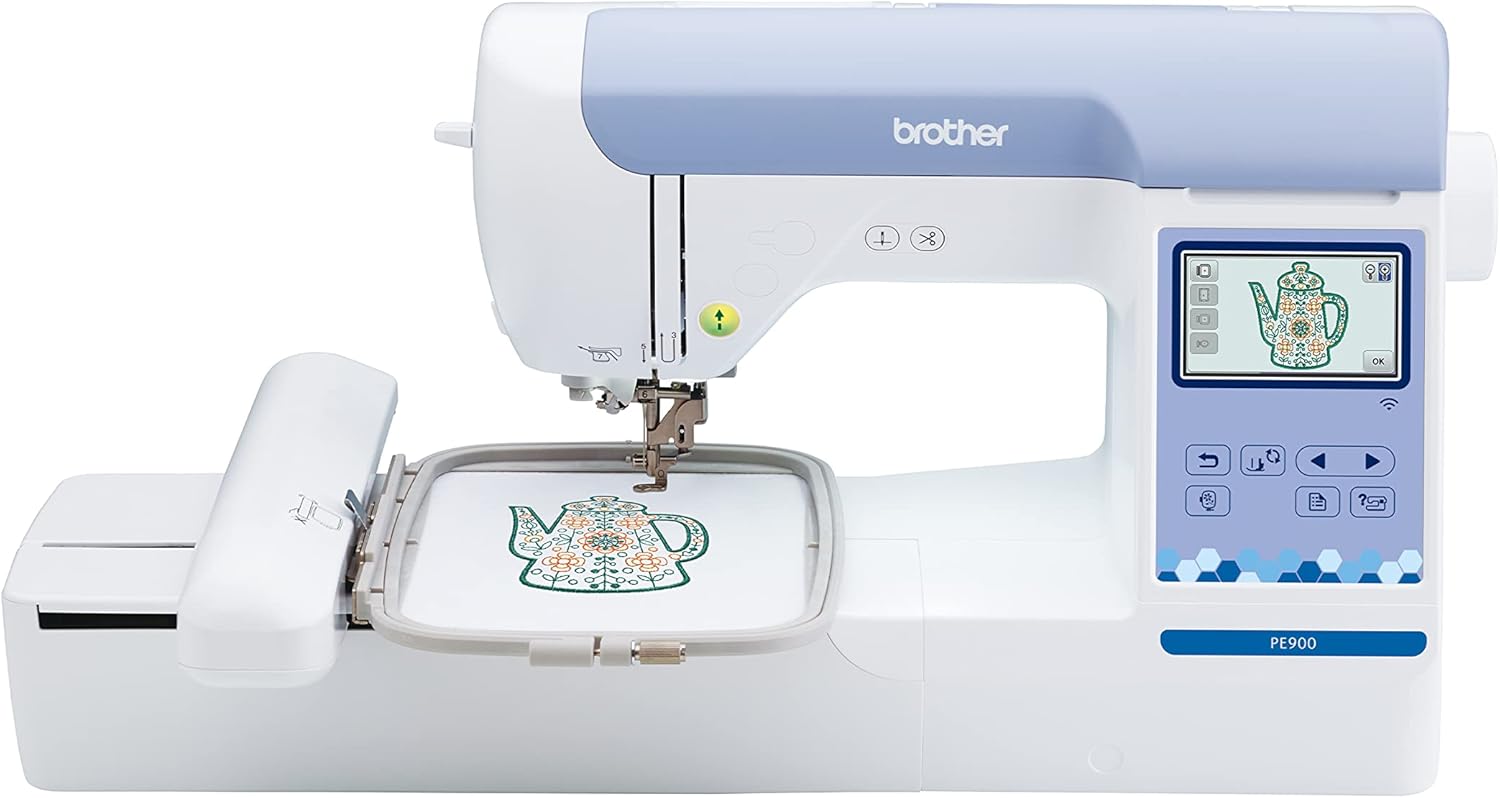
The Brother PE900 is a dedicated embroidery machine that focuses solely on stitching beautiful designs. It is perfect for home embroiderers who want a reliable, easy-to-use machine for larger projects like jackets, bags, and quilts. With its 5x7 inch embroidery field, you have plenty of room to create impressive pieces without being limited to small hoops.
Standout features include wireless connectivity via WLAN, which lets you transfer designs from your PC or the Artspira mobile app without needing a USB drive. The 193 built-in designs and 13 fonts give you a great starting point, and the 50 free bonus designs from the app expand your options. The large 3.7 inch color touchscreen makes editing intuitive: you can rotate, resize, mirror, and combine designs before stitching. Real-world performance is excellent, with users praising the automatic needle threader, color sort function, and jump stitch trimming that save time and reduce frustration.
Build quality is solid, typical of Brother machines. The machine is lightweight at 21 pounds and easy to set up. The included accessories like multiple bobbins, needles, and a dust cover add value. The 25-year warranty on the chassis and lifetime technical support provide peace of mind.
One drawback is that the PE900 is an embroidery-only machine, so if you need a sewing machine as well, you will need a separate unit. Also, to access the free Artspira designs, you must update the firmware using a USB drive (not included) and download the app. Some users might find the initial setup slightly involved, but the on-screen tutorials help.
Overall, the Brother PE900 offers an excellent balance of features, ease of use, and value for home embroiderers. It is a workhorse that can handle frequent use and larger projects. If you are looking for a dedicated embroidery machine with wireless convenience and a generous hoop size, the PE900 is a top choice.
Brand: Brother
Model: PE900
Machine Type: Dedicated embroidery machine
Embroidery Field: 5 x 7 inches (13 x 18 cm)
Built-in Designs: 193 (including 10 frame designs) plus 50 free from Artspira app
Built-in Fonts: 13 (9 English, 3 Japanese, 1 Cyrillic)
Display: 3.7 inch color LCD touchscreen
Connectivity: Wireless LAN, USB port
Special Features: Automatic needle threader, color sort, jump stitch trimming, on-screen editing
Dimensions: 17 x 10 x 12 inches (DxWxH)
Weight: 21 pounds
Power: 120V, 60Hz (US only)
Warranty: 25 years on chassis, 2 years on electronics, 1 year on parts and labor

Pros
- Large bundle saves money on hoops, thread, and software vouchers
- Wireless connectivity for easy design transfer from PC or phone
- Intuitive 3.7 inch touchscreen with drag-and-drop editing
- Automatic needle threader and thread cutter save time and frustration
- Lightweight and compact design (15 lbs) fits on most desks or sewing cabinets
Cons
- Embroidery area is limited to 4x4 inches, which may require re-hooping for larger designs
- Learning curve for beginners to master the Artspira app and wireless setup
- No built-in USB port; all file transfers rely on WiFi or Design Database Transfer software
The Brother PE545 embroidery machine is an excellent choice for crafters who want a reliable, affordable way to add custom embroidery to their projects. Out of the box, you get four hoops, 40 spools of polyester thread, and a $500 voucher for thousands of commercial-use designs. This bundle is designed to help you start stitching immediately without extra purchases.
Standout features include wireless connectivity via the Artspira app and Design Database Transfer software. You can draw designs on your phone or tablet and send them directly to the machine. The 3.7 inch color LCD makes it easy to preview, position, and edit patterns. With 135 built-in designs and 10 fonts, you have plenty of variety for personalizing clothing, bags, and home decor.
In real-world use, the automatic needle threader and thread cutter noticeably speed up your workflow. The machine runs quietly and stitches smoothly up to 400 SPM. The drag-and-drop editing on the touchscreen is responsive, and the wireless file transfer works well once you set up your WiFi network. The bundle includes a medium 4x4 hoop, a larger 4x6.75 hoop, and two small hoops for intricate projects.
Potential drawbacks: The embroidery area is limited to 4x4 inches, so large designs require multiple hoops or splitting. Beginners may need a little time to master the app and WiFi connection. There is no USB port, so all design transfers rely on a wireless network. The included software voucher is for a third-party site, so read the terms carefully.
For the price, the Brother PE545 offers exceptional value with its hoops, thread, and digital tools. It is ideal for hobbyists and small business owners who want a dedicated embroidery machine without a huge investment. If you need a larger work area, consider the Brother PE800 or PE900 series, but for most home projects, the PE545 delivers great results.

Pros
- Beginner-friendly with an intuitive interface and guided video tutorials.
- Two hoop sizes provide versatility for small and slightly larger projects.
- WiFi design transfer and free software let you create truly custom embroidery.
- Comprehensive starter kit saves you from buying extra supplies separately.
- Active user community and one-on-one engineer support help you learn and troubleshoot.
Cons
- The 3.9-star average rating suggests some users may experience occasional quality or performance hiccups.
- Embroidery area maxes out at 4x9.25 inches, which may be limiting for larger designs or bulky items.
- As a relatively new brand, long-term reliability and parts availability are less proven than established competitors.
The PooLin EOC03 embroidery machine is purpose-built for beginners who want to dive into home embroidery without the complexity of professional-grade equipment. With a 4x4 and 4x9.25 inch embroiderable area, it balances project variety and ease of use. The included starter kit, WiFi design transfer, and 130 built-in designs mean you can start personalizing clothing and accessories right out of the box.
Standout features include the Institch operating system, which offers clear on-screen navigation and simple editing controls. The wireless design transfer works reliably through the companion software, allowing you to import your own artwork or text. Real-world performance is solid for light-to-medium use, with consistent stitch quality on cotton, polyester, and stabilizer-backed fabrics. The machine runs smoothly and quietly for a home model.
Build quality feels sturdy thanks to the metal frame, yet the machine remains portable at 15 pounds. The hoop change mechanism is straightforward, and bobbin winding is automated. However, the plastic components on the thread stand and thread guide may feel less premium. The included accessories (stabilizers, bobbins, threads) are a nice bonus for absolute beginners.
Potential drawbacks include a learning curve for sizing and positioning designs across different hoop sizes, and the occasional need to adjust tension for thicker fabrics. The customer reviews average 3.9 stars, indicating some reports of software glitches or inconsistent stitch density, though most low ratings relate to user error or expectations. The brand's support team is responsive, offering one-on-one online help, which mitigates these issues.
Overall, the PooLin EOC03 delivers excellent value for hobbyists and first-time embroiderers. If you're looking for an approachable machine with room to grow into custom designs, this model is a strong choice. It may not satisfy advanced users needing large embroidery fields or high-speed production, but for home DIY projects, it hits the right notes of simplicity, versatility, and support.
Brand: Poolin
Model: EOC03
Embroidery Area: 4x4 inches and 4x9.25 inches
Built-in Designs: 130
Built-in Fonts: 8
Connectivity: WiFi design transfer
Dimensions: 15.35 x 18.11 x 16.54 inches
Weight: 15 pounds
Power Source: Corded electric, 110V
Included Components: Machine, table, thread stand, 6 threads, 20 stabilizers, 25 prewound bobbins, tool kit
This machine is ideal for beginners, but consider your typical project size: the 4x9.25 hoop works well for small to medium items like shirt pockets, towels, and bags. If you plan to embroider larger or bulky items (e.g., hoodies back panels), you may need a machine with a bigger hoop. Also, be sure to use quality stabilizers to avoid puckering. The WiFi transfer feature requires a stable network; offline USB transfer is not available. Finally, check that the included threads and bobbins match your preferred colors or purchase additional supplies for diverse projects.
Buying Guide: What to Look for in a Embroidery Machine
Hoop Size and Workspace
The maximum embroidery area determines how large a design you can stitch in one go. A 4″ x 4″ hoop is standard for most home projects, but a 5″ x 7″ field like the one on the Brother PE800 allows you to tackle larger patterns without rehooping. If you plan to embroider jackets or full-size quilt blocks, prioritize a larger hoop.
Many machines come with multiple hoops. For example, the Brother PE545 bundle includes four different sizes, giving you flexibility for small monograms and medium designs alike. Consider your typical projects before deciding.
Built-in Designs and Fonts
A library of built-in designs saves you from buying or downloading patterns right away. The Brother PE900 offers 193 designs, while the PooLin EOC03 includes 130. Look for a variety of florals, scrollwork, and alphabets. If monogramming is your priority, check the number and style of built-in fonts.
Most models also allow importing designs via USB or WiFi. The Brother SE700 even works with the Artspira mobile app so you can draw custom patterns on your phone and transfer them wirelessly.
Ease of Use and Display
A large color touchscreen makes previewing and editing designs much more pleasant. The 3.7″ LCD on the Brother PE545 and SE700 is sharp and intuitive. For beginners, an automatic needle threader and jam-resistant drop-in bobbin save time and frustration.
The PooLin EOC03 introduces an “Institch” operating system designed specifically for first-time users, with clear navigation and step-by-step guidance. If you are completely new to embroidery, such a system can shorten the learning curve dramatically.
Connectivity and Software
Wireless LAN capability allows you to transfer design files from your computer or mobile device without USB cables. The Brother PE900 and the SE700 both support this feature. Free companion apps and software (like Artspira and Design Database Transfer) let you create, edit, and organize patterns.
If you plan to expand your design collection, look for USB ports and compatibility with popular embroidery file formats. The Sewing & Embroidery category page on our site has more detailed comparisons.
Final Thoughts
After reviewing all six machines, our overall recommendation leans toward the Brother PE800 Embroidery Machine for its generous 5″ x 7″ hoop, 138 built-in designs, and proven reliability among thousands of users. For beginners or those on a tighter budget, the PooLin EOC03 Embroidery Machine 4×4 & 4×9.25 offers an approachable interface and a generous accessory kit that makes starting out effortless. Whichever you choose, both machines deliver the precision and creativity you need to bring your embroidered visions to life.
Frequently Asked Questions
Can I use an embroidery machine without a computer? Yes, all the models reviewed have built-in designs and fonts that you can stitch directly from the machine. Some also have USB ports or WiFi for importing designs later when you are ready.
What is the best embroidery machine for a beginner in 2026? For a beginner, we recommend the Brother SE700 or the PooLin EOC03. Both have user-friendly touchscreens, automatic needle threaders, and plenty of built-in content to start creating right away.
How large of a design can I stitch with a 4″ x 4″ hoop? A 4″ x 4″ hoop accommodates designs up to that size, which is perfect for monograms, small patches, and decorative elements on garments. For larger projects, consider a machine like the Brother PE800 with a 5″ x 7″ hoop.
Do I need a separate sewing machine if I buy an embroidery-only machine? Yes, embroidery-only machines like the Brother PE800 and PE900 cannot sew seams, so you will need a standard sewing machine for garment construction. Combo machines like the Brother SE700 give you both functions in one unit.
Write Your Review
No reviews yet. Be the first to share your experience!