

You’ve finally decided to organize your craft space, create custom labels for your home, or start a small sticker business. But when you search for a cutting machine, you’re overwhelmed by options. You need a die cut vinyl machine that delivers clean cuts, handles various materials, and fits your skill level. This guide covers two top contenders: the Cricut Joy Xtra Cutting Machine and Smart Vinyl and the Likcut S41 Vinyl Cutter Machine with Print Then. Whether you’re a beginner or a seasoned crafter, we’ll help you choose the right tool for your projects.
We’ve assessed these machines based on real-world usability, features, and value. Our goal is to simplify your decision, so you can spend more time creating and less time researching. For more home and hobby insights, check out our Home & Hobby category.

Pros
- Compact and portable design saves space and is easy to store or travel with
- Mat-free Smart Vinyl cutting speeds up workflow and simplifies setup
- Bundle includes essential tools and vinyl, so you can start right away
- High customer satisfaction with a rating of 4.6 out of 5 stars
- Versatile for various projects from labels to iron-on designs
Cons
- Smart Vinyl is required for mat-free cutting, which can be more expensive than regular vinyl
- Limited cutting width compared to larger Cricut models, may not suit oversized projects
- Some users may find the Cricut Design Space app has a learning curve
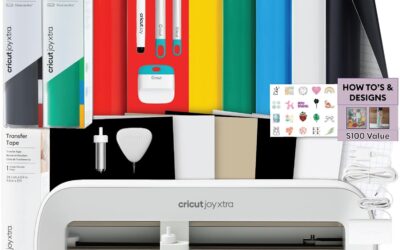
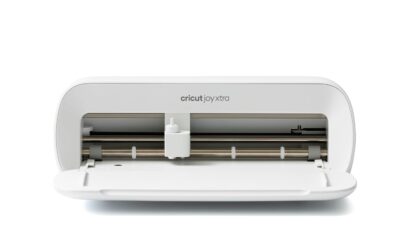
The Cricut Joy Xtra Cutting Machine Bundle is an all-in-one solution for hobbyists, teachers, and DIY enthusiasts who want to create custom labels, decals, and personalized gifts without a steep learning curve. This compact machine is designed for small spaces and is perfect for those who craft occasionally or on the go.
Its standout feature is the ability to cut Smart Vinyl without a cutting mat, which simplifies the process and allows for longer continuous cuts. The included rainbow vinyl sampler and transfer tape let you start projects immediately, while the essential tools (weeder, spatula, etc.) make weeding and applying designs a breeze. Users praise the machine's precision and the vibrant colors of the vinyl.
Build quality is solid, with a sleek, space-saving design that fits neatly on a desk. The setup is quick, and the Cricut Design Space app offers a library of designs and fonts, though some beginners may need a short time to familiarize themselves with the software. The machine is also portable, making it easy to take to craft nights or workshops.
Potential drawbacks include the need to purchase Smart Vinyl for mat-free cutting, which can be pricier than standard vinyl, and the limited cutting width (about 5.5 inches) compared to larger Cricut models. However, for most small-to-medium projects, this is not a limitation.
Overall, the Cricut Joy Xtra bundle is an excellent choice for beginners and experienced crafters alike who value convenience and portability. Its ease of use, versatility, and included accessories make it a great value, earning a strong recommendation from satisfied users.

Pros
- AI text-to-design saves beginners from learning graphic software.
- Exceptional cut accuracy (0.2mm) for professional-looking stickers.
- Simple 3-step process reduces time from idea to finished product.
- Wide 8.5-inch cutting width handles standard paper and larger projects.
- Reliable wired and wireless connections for flexible workspace setup.
Cons
- AI design generation requires a stable internet connection for cloud processing, limiting offline use.
- The included vinyl starter bundle is small; additional materials are needed for larger projects.
- Plastic construction may feel less robust than metal machines, though it keeps the weight manageable.
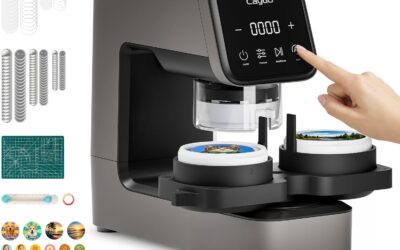
The Likcut S41 is a vinyl cutter machine that brings AI-powered sticker making to crafters of all skill levels. With its ability to turn voice commands or text prompts into custom designs, it targets anyone who wants to create personalized stickers, room decor, or HTV projects without mastering complex software. The machine is especially suited for adults who enjoy DIY crafts and want quick, professional results.
The standout feature is the 3-step workflow: design in the app, cut with micro-precision, and peel. The AI generation works surprisingly well for simple prompts, though it relies on an internet connection. The cut accuracy of 0.2mm is reliable for intricate patterns, and the expanded 8.5-inch width handles US letter materials in one pass, saving time on large stickers. Dual-mode connectivity (USB-C and Bluetooth 5.0) ensures a stable link during cutting, reducing the risk of errors.
Build quality is a mixed bag. The light blue plastic body keeps the machine lightweight at 3.9 kg, but it doesn't feel as premium as metal alternatives. The included vinyl sample pack is basic, so plan to buy more for serious projects. The one-touch control screen is intuitive and provides clear feedback, making operation straightforward even for first-time users.
Potential drawbacks include the internet dependency for AI features and the limited starter materials. The plastic construction may also raise durability concerns for heavy use, though it's fine for most home crafters. Additionally, the print-then-cut function works best with compatible materials like back print film and glossy sheets.
Overall, the Likcut S41 is a solid choice for crafters who value speed and simplicity. Its AI design tool and precise cutting make it a time-saver for creating custom stickers and decor. While it has minor limitations, the combination of features at this price point offers excellent value for hobbyists and small business owners alike.
Buying Guide: What to Look for in Die Cut Vinyl Machines
Choosing the right die cut vinyl machine involves more than just picking a popular brand. You need to consider your project types, material compatibility, ease of use, and connectivity. Here are the essential factors to evaluate before making a purchase.
Cutting Width and Material Compatibility
The maximum cutting width determines the size of projects you can handle. If you plan to create large wall decals or long labels, a machine with a wider cutting path is beneficial. The Likcut S41 offers up to 8.5 inches, which easily accommodates US Letter size materials. Meanwhile, the Cricut Joy Xtra works with Smart Vinyl that doesn’t require a mat, allowing for longer continuous cuts.
Consider what materials you’ll use: vinyl, cardstock, HTV, or sticker paper. Both machines handle common crafting materials, but the Cricut Joy Xtra is known for its versatility with Cricut’s extensive material library. The Likcut S41 focuses on sticker making and cardstock, but also supports HTV for apparel projects.
Ease of Use and Setup
For beginners, a machine that’s simple to set up and operate is crucial. The Cricut Joy Xtra comes as a complete bundle with tools and design guides, making it ready to use out of the box. Its Smart Vinyl loads directly without a mat, simplifying the workflow.
The Likcut S41 features a 3-step workflow and an intuitive app interface, reducing the learning curve. Its one-touch controls on the machine allow for quick start/stop and load/unload operations. If you’re new to die cutting, look for machines with clear instructions and responsive customer support.
Precision and Cutting Accuracy
Clean, precise cuts are the hallmark of a good die cut vinyl machine. The Likcut S41 boasts a micro-precision control system with an accuracy tolerance of 0.2mm, ensuring intricate designs are cut perfectly. Its smart sensor automatically calibrates the cutting path for stable results.
The Cricut Joy Xtra is also known for its reliable cutting performance, especially with Cricut’s proprietary materials. When comparing precision, consider the complexity of your designs. For highly detailed stickers or decals, a machine with fine-tuned accuracy is essential.
Connectivity and Software
Modern cutting machines offer various connectivity options. The Likcut S41 supports both wired and wireless connections, providing flexibility and reducing interruptions. Its companion app includes AI-powered features, allowing you to generate designs from voice or text commands.
The Cricut Joy Xtra uses the Cricut Design Space app, which is widely regarded for its user-friendly interface and extensive design library. Consider whether you prefer a dedicated app with advanced features or a more straightforward design platform. For more tips on home organization, you might find our guide to furnace filters useful, but for now, focus on your crafting needs.
Final Thoughts
After evaluating both machines, we recommend the Cricut Joy Xtra Cutting Machine and Smart Vinyl for beginners and those who want a complete, hassle-free bundle with mat-free cutting and excellent support. For crafters who need a wider cutting width and AI-powered design generation, the Likcut S41 Vinyl Cutter Machine with Print Then is a fantastic choice. Both are top contenders in the best cutting machines die cut vinyl category, so pick the one that aligns with your project goals and creative style.
Frequently Asked Questions
Can these machines cut vinyl without a mat?
Yes, the Cricut Joy Xtra is designed to work with Smart Vinyl, which loads directly into the machine without a cutting mat. This feature simplifies setup and allows for longer cuts. The Likcut S41, on the other hand, typically requires a cutting mat for standard vinyl sheets, but it does support matless cutting for some materials if you use the included adapter.
What materials can I cut with these die cut machines?
Both machines can cut a variety of materials including vinyl, cardstock, HTV, and sticker paper. The Cricut Joy Xtra is compatible with Cricut’s extensive line of materials, including Smart Vinyl and Smart Paper. The Likcut S41 handles standard US Letter size materials and is particularly effective for stickers and cardstock. Always check the manufacturer’s guidelines for material thickness and type.
Are these cutting machines suitable for beginners?
Absolutely. The Cricut Joy Xtra is specifically designed for beginners, offering a complete bundle with tools and design guides. Its intuitive app and mat-free cutting make it easy to start. The Likcut S41 also features a simplified 3-step workflow and a user-friendly app, plus AI design generation that eliminates the need for complex software. Both are excellent choices for those new to die cutting.
How do I choose between the Cricut Joy Xtra and the Likcut S41?
Consider your primary projects and budget. If you want a machine that works out of the box with minimal setup and prefer a well-known brand with extensive support, the Cricut Joy Xtra is ideal. If you need a wider cutting width, AI-powered design tools, and dual connectivity, the Likcut S41 offers more advanced features at a similar price point. Think about the types of projects you’ll create most often and choose accordingly.
For more crafting inspiration and tips, explore our Craft & Cutting Machines category.
Write Your Review
No reviews yet. Be the first to share your experience!