

You’ve got a pile of vinyl sheets, a vision for custom decals, and a desire to personalize everything from water bottles to wall art. But without the right cutting machine, that vision stays stuck in your head. That’s where we come in. We’ve evaluated the best cutting machines for vinyl in 2026 to help you find a model that matches your skill level, project size, and budget. Whether you’re a hobbyist or a small business owner, this guide will point you to the perfect vinyl cutter. For more home and hobby recommendations, check out our Craft & Cutting Machines category.

Pros
- Compact and portable design saves space and is easy to store or travel with
- Mat-free Smart Vinyl cutting speeds up workflow and simplifies setup
- Bundle includes essential tools and vinyl, so you can start right away
- High customer satisfaction with a rating of 4.6 out of 5 stars
- Versatile for various projects from labels to iron-on designs
Cons
- Smart Vinyl is required for mat-free cutting, which can be more expensive than regular vinyl
- Limited cutting width compared to larger Cricut models, may not suit oversized projects
- Some users may find the Cricut Design Space app has a learning curve
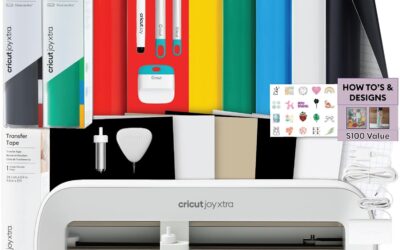
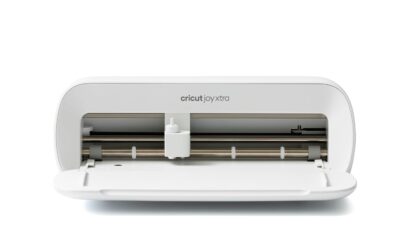
The Cricut Joy Xtra Cutting Machine Bundle is an all-in-one solution for hobbyists, teachers, and DIY enthusiasts who want to create custom labels, decals, and personalized gifts without a steep learning curve. This compact machine is designed for small spaces and is perfect for those who craft occasionally or on the go.
Its standout feature is the ability to cut Smart Vinyl without a cutting mat, which simplifies the process and allows for longer continuous cuts. The included rainbow vinyl sampler and transfer tape let you start projects immediately, while the essential tools (weeder, spatula, etc.) make weeding and applying designs a breeze. Users praise the machine's precision and the vibrant colors of the vinyl.
Build quality is solid, with a sleek, space-saving design that fits neatly on a desk. The setup is quick, and the Cricut Design Space app offers a library of designs and fonts, though some beginners may need a short time to familiarize themselves with the software. The machine is also portable, making it easy to take to craft nights or workshops.
Potential drawbacks include the need to purchase Smart Vinyl for mat-free cutting, which can be pricier than standard vinyl, and the limited cutting width (about 5.5 inches) compared to larger Cricut models. However, for most small-to-medium projects, this is not a limitation.
Overall, the Cricut Joy Xtra bundle is an excellent choice for beginners and experienced crafters alike who value convenience and portability. Its ease of use, versatility, and included accessories make it a great value, earning a strong recommendation from satisfied users.

Pros
- Exceptional cutting accuracy with 4-point registration system
- Ultra-quiet operation suitable for shared workspaces
- Versatile material compatibility (vinyl, fabric, cardstock, and more)
- Fast Sketch Mode saves time without losing detail
- Comprehensive software and accessories included in the box
Cons
- Requires some learning curve to master the Studio software
- Cutting mat size (12x24) may be limiting for very large or long projects
- Periodic replacement of blades and mats adds ongoing cost
The Silhouette Cameo 5 Alpha is a smart cutting machine designed for crafters, small business owners, and hobbyists who demand precision and versatility. It excels in print-and-cut applications, making stickers, labels, and heat transfers with exceptional accuracy thanks to its new 4-point registration system. This machine is a solid upgrade for anyone moving beyond basic die-cutting or looking for a quieter, faster alternative to older models.
Standout features include Fast Sketch Mode, which accelerates drawing without losing fine details, and Intelligent Path Technology that optimizes cut order for smoother results. The whisper-quiet motor operates at speeds up to 400mm/s, allowing you to work without disturbing others. In real-world use, the Cameo 5 Alpha handles vinyl, fabric, cardstock, and even glossy photo paper with ease, making it a true all-in-one creative tool.
Build quality is sturdy with a metal and plastic construction, and the classic white finish fits well in any workspace. The included AutoBlade, cutting mat, and Studio software provide everything you need to start creating immediately. The 12x24 inch cutting area is generous for most projects, though professionals may occasionally wish for a larger surface.
One potential drawback is the learning curve associated with the Silhouette Studio software; beginners may need time to explore its features. Additionally, consumables like blades and cutting mats require periodic replacement, adding to long-term costs. However, the machine's performance and accuracy justify the investment for serious creators.
Overall, the Silhouette Cameo 5 Alpha delivers on its promises of quiet operation, speed, and precision. It is a top choice for anyone who needs a reliable print-and-cut machine for business or personal projects. With its thoughtful features and solid build, it earns a strong recommendation for crafters ready to elevate their work.

Pros
- Cuts cleanly and quickly on a wide variety of materials including vinyl, cardstock, and iron-on
- Bundle includes ample supplies for up to 65 projects, ideal for starting multiple projects right away
- Compact and stylish design fits easily on a desk and can be moved around with ease
- Intuitive software with free content library and helpful tutorials (though some users find initial setup complex)
- Great value for the price, offering professional-looking results even for novice crafters
Cons
- Blade and tool compatibility: Explorer 5 series tools (like markers) are not interchangeable with older Explore models, which may require additional purchases
- Machine lacks a dust cover, so a separate bag or cover is recommended to protect it when not in use
- Some users report a learning curve with the Design Space software, requiring time to troubleshoot calibration and cut settings
The Cricut Explore 5 Essential Bundle is the latest evolution of Cricut’s popular 12-inch cutting machine, designed for crafters who want to create personalized projects quickly and easily. Whether you’re a scrapbooking enthusiast, a small business owner making custom decals, or a beginner looking to explore DIY crafting, this bundle offers a complete starter kit that includes tools and materials for up to 65 projects. Its compact size and modern Taupe finish make it a stylish addition to any workspace.
Performance-wise, the Cricut Explore 5 excels with top-tier precision cutting speeds that handle over 100 materials from vinyl and iron-on to cardstock and printable media. Users consistently praise the clean, professional cuts and the ability to create full-color stickers by printing from a home inkjet then letting the machine cut around the designs automatically. The Bluetooth connectivity and free Design Space app (with 3,000+ images, 100+ fonts, and 1,000+ projects) make it easy to start crafting right out of the box, though some beginners note a learning curve with the software
Design and build quality are standout features. The machine is 30% more compact than previous models, with a sleek, simplified interface and a snap-in pen holder that eliminates hassle. It works with six tools, including a deep cutting option for thicker materials like foam and rubber, but note that tools are specific to this series and not backward-compatible with older Explore machines. Additionally, the machine does not come with a dust cover, so you may want to purchase a bag or cover for storage.
Drawbacks include a few compatibility quirks: markers labeled for “Explorer 5” are required (older Explorer series markers won’t fit), and the debossing tool is not supported. Some users also report initial frustration with calibration and cut alignment, but this is often resolved by researching online tutorials. The limited warranty covers basic issues, but Cricut’s customer service is generally responsive.
Overall, the Cricut Explore 5 Essential Bundle delivers exceptional value for crafters of all skill levels. Its speed, precision, and generous supply kit make it a smart investment for anyone looking to create professional-quality projects at home. While there is a small learning curve and some tool compatibility constraints, the versatility and ease of use far outweigh these drawbacks. Highly recommended for scrapbooking, apparel decoration, and sticker making.

Pros
- AI text-to-design saves beginners from learning graphic software.
- Exceptional cut accuracy (0.2mm) for professional-looking stickers.
- Simple 3-step process reduces time from idea to finished product.
- Wide 8.5-inch cutting width handles standard paper and larger projects.
- Reliable wired and wireless connections for flexible workspace setup.
Cons
- AI design generation requires a stable internet connection for cloud processing, limiting offline use.
- The included vinyl starter bundle is small; additional materials are needed for larger projects.
- Plastic construction may feel less robust than metal machines, though it keeps the weight manageable.
The Likcut S41 is a vinyl cutter machine that brings AI-powered sticker making to crafters of all skill levels. With its ability to turn voice commands or text prompts into custom designs, it targets anyone who wants to create personalized stickers, room decor, or HTV projects without mastering complex software. The machine is especially suited for adults who enjoy DIY crafts and want quick, professional results.
The standout feature is the 3-step workflow: design in the app, cut with micro-precision, and peel. The AI generation works surprisingly well for simple prompts, though it relies on an internet connection. The cut accuracy of 0.2mm is reliable for intricate patterns, and the expanded 8.5-inch width handles US letter materials in one pass, saving time on large stickers. Dual-mode connectivity (USB-C and Bluetooth 5.0) ensures a stable link during cutting, reducing the risk of errors.
Build quality is a mixed bag. The light blue plastic body keeps the machine lightweight at 3.9 kg, but it doesn't feel as premium as metal alternatives. The included vinyl sample pack is basic, so plan to buy more for serious projects. The one-touch control screen is intuitive and provides clear feedback, making operation straightforward even for first-time users.
Potential drawbacks include the internet dependency for AI features and the limited starter materials. The plastic construction may also raise durability concerns for heavy use, though it's fine for most home crafters. Additionally, the print-then-cut function works best with compatible materials like back print film and glossy sheets.
Overall, the Likcut S41 is a solid choice for crafters who value speed and simplicity. Its AI design tool and precise cutting make it a time-saver for creating custom stickers and decor. While it has minor limitations, the combination of features at this price point offers excellent value for hobbyists and small business owners alike.
Buying Guide: What to Look for in a Vinyl Cutting Machine
Cutting Width and Material Compatibility
The size of your projects dictates the cutting width you need. Machines like the Cricut Explore 5 offer a 12-inch cutting path, ideal for standard vinyl rolls and cardstock. If you primarily work with small decals or labels, a compact model like the Cricut Joy Xtra handles up to 8.5 inches without a mat. Also consider material compatibility: the Silhouette Cameo 5 Alpha cuts materials up to 3mm thick, including fabric and chipboard. Ensure the machine you choose supports the vinyl types and other media you plan to use.
Ease of Use and Software
A user-friendly interface can make or break your crafting experience. Cricut’s Design Space app guides you step by step, while Silhouette Studio offers advanced features for experienced users. The Likcut S41 simplifies design with AI voice and text prompts, letting you generate custom stickers in seconds. For beginners, a machine with a straightforward setup and included project ideas reduces the learning curve. Just as selecting the right furnace filter for allergies requires understanding your home’s needs, choosing a vinyl cutter with intuitive software ensures you spend more time creating and less time troubleshooting. Learn more about choosing the right furnace filter for allergies.
Precision and Speed
Clean cuts are essential for professional-looking decals and stickers. The Silhouette Cameo 5 Alpha features a 4-point registration system and Intelligent Path Technology to optimize cut order and reduce material stress. The Likcut S41 boasts micro-precision control with 0.2mm accuracy. If you produce items in volume, cutting speed matters; the Cameo 5 Alpha runs at up to 400mm/s with whisper-quiet operation. Precision in vinyl cutting is as critical as ensuring your HVAC system has a high-quality air filter for cleaner air. Check out our guide to the best air 3000 furnace filters for cleaner air.
Connectivity and Workflow
Modern vinyl cutters offer both wired and wireless connectivity. The Likcut S41 supports dual-mode connections to prevent mid-cut interruptions, while Cricut machines rely on Bluetooth for seamless mobile design. A reliable connection streamlines your workflow, especially when working on complex multi-color projects. For pet owners who craft at home, a quiet machine like the Silhouette Cameo 5 Alpha is a bonus. Similarly, finding the best furnace filter for pet owners can improve your indoor air quality while you work. See our top furnace filters for pet owners.
Final Thoughts
Choosing the best cutting machine for vinyl ultimately depends on your project goals and experience level. For beginners and everyday crafting, the Cricut Joy Xtra Cutting Machine and Smart Vinyl bundle offers a complete, hassle-free start with its matless Smart Vinyl and included tools. If you need professional-grade precision and larger project capacity, the Silhouette America Cameo 5 Alpha delivers exceptional accuracy, quiet operation, and compatibility with a wide range of materials. Whichever you choose, you’ll be well on your way to turning vinyl rolls into personalized works of art.
Frequently Asked Questions
What is the best cutting machine for vinyl for beginners in 2026?
The Cricut Joy Xtra is an excellent entry-level machine because it uses Smart Vinyl without a cutting mat and comes with a bundle of supplies. Its Design Space app provides step-by-step guidance, making it easy to create labels, decals, and custom designs right away. For a similar approach to choosing home essentials, you might also explore our guide to the best 16x25x4 furnace filters for allergies to ensure a clean crafting environment.
Can I use a vinyl cutter for materials other than vinyl?
Yes, most modern vinyl cutting machines can handle a variety of materials. The Cricut Explore 5 works with over 100 materials including cardstock, iron-on, and printable materials. The Silhouette Cameo 5 Alpha can cut fabric, chipboard, and even thin leather. Always check the manufacturer’s material thickness guidelines before cutting.
How does AI integration improve the vinyl cutting experience?
The Likcut S41 uses AI to generate designs from voice commands or text prompts, eliminating the need for complex design software. You can simply say “a cute retro cat eating ice cream” and the machine creates a ready-to-cut digital design. This feature is perfect for beginners who want to create custom stickers without a steep learning curve.
What is the difference between Cricut and Silhouette cutting machines?
Cricut machines are known for their user-friendly software and large content library, while Silhouette machines offer more advanced features and compatibility with a wider range of third-party materials. The Cricut Joy Xtra is ideal for small, quick projects, whereas the Silhouette Cameo 5 Alpha excels in precision and speed for professional use.
Write Your Review
No reviews yet. Be the first to share your experience!