

Imagine turning a hand-drawn sketch into a perfectly cut vinyl decal in minutes, or scanning a cherished fabric swatch and having your machine replicate it precisely. That’s the power of a die cutting machine that can scan and import files. Whether you’re a small business owner creating custom stickers or a hobbyist exploring papercraft, this guide will help you choose the right tool. We’ll explore top models like the Cricut Maker 4, Brother ScanNCut, and VEVOR cutter, focusing on their scanning capabilities and file import flexibility.
For those who also care about air quality in their craft room, you might find our guide on furnace filters for allergies useful. But let’s dive into cutting machines that offer scanning and importing features.

Pros
- Fast cutting speed (2x faster than previous models) saves time on large projects
- Versatile material compatibility handles over 300 materials for diverse crafting
- All-inclusive bundle with essential starter materials eliminates guesswork
- High precision print-then-cut ensures professional sticker quality
- Durable waterproof sticker paper included for long-lasting results
Cons
- Requires Cricut Design Space subscription for advanced features and cloud access
- Some specialized tools (e.g., engraving, foiling) are sold separately
- Initial purchase price may be high for casual hobbyists
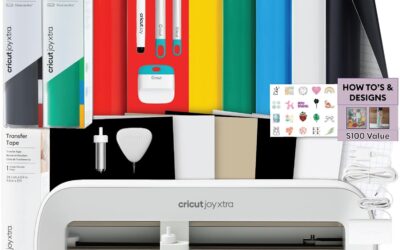
The Cricut Maker 4 Ultimate Sticker Making Bundle is a comprehensive kit designed for crafters and small business owners who want to create custom stickers and decals. It includes the Seashell-colored Maker 4 machine, printable sticker paper, adhesive vinyl, and essential tools, making it a ready-to-use solution for print-then-cut projects.
The Maker 4 cuts up to two times faster than its predecessors, handling over 300 materials from vinyl to leather. Its print-then-cut functionality works seamlessly with Cricut Design Space and an inkjet printer, delivering precise cuts around printed designs. The included waterproof sticker paper ensures durable, long-lasting results suitable for water bottles and packaging.
The machine boasts a sturdy build and a sleek Seashell color. It supports 13+ tools for writing, scoring, foiling, and engraving, though some are sold separately. Smart Materials allow matless cuts up to 12 feet, expanding creative possibilities. The bundle provides everything needed to start immediately.
One potential drawback is the reliance on Cricut Design Space software, which requires a subscription for advanced features. Additionally, the initial investment may be steep for casual hobbyists. Some users may need to purchase extra tools for specialized tasks.
Overall, the Cricut Maker 4 Ultimate Sticker Making Bundle delivers exceptional value for those serious about sticker making. Its speed, versatility, and all-in-one package make it a top choice for Etsy sellers and DIY enthusiasts. Highly recommended for its ease of use and professional results.
Brand: Cricut, Model: z20-11084-N4, Operation Mode: Automatic, Compatible Devices: Computers, Mobile Devices, Inkjet Printers, Included Components: Cricut Maker 4 Ultimate Sticker Making Bundle with Variety Materials, Warranty: 1 Year Against Manufacturer Defects.

Pros
- Exceptional cut precision (±0.1 mm) for detailed designs
- Comes with design software and multiple starter materials
- Broad material compatibility and adjustable blade pressure
- Generous cutting area suitable for large projects
- Easy-to-use touchscreen interface and solid metal build
Cons
- Included software is Windows-only, requiring third-party apps for Mac/Linux users
- No cutting mat included, so you may need to purchase separately for certain materials
- Some users report quality control issues with blade holder fitment
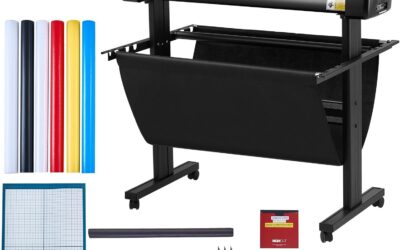
The VEVOR TT-450 automatic vinyl cutter is a powerful yet affordable tool designed for crafters, hobbyists, and small business owners. With its ability to cut over 100 materials and precise ±0.1mm accuracy, it excels at everything from custom stickers and heat transfer vinyl to cardstock and foam sheets.
Standout features include automatic edge detection for pattern alignment, adjustable cutting speed up to 400 mm/s, and 10 pressure levels. The included design software offers a huge library of templates and supports SVG, EPS, and AI files, making it easy to start creating right away. User reviews praise its accuracy and ease of use, though some note the included vinyl is best for practice.
The machine sports a modern white metal body with a bright color touchscreen for intuitive control. Its 17-inch feed width and 13-inch cut area accommodate sizable projects. However, the included software is Windows-only, and Mac/Linux users will need third-party alternatives like Sure-Cuts-A-Lot or InkCut, which may require some setup.
Potential drawbacks include the lack of a cutting mat, which may be needed for certain materials, and occasional reports of a poorly fitting blade holder. While build quality is generally solid, one user experienced damage during shipping due to packaging issues.
Overall, the VEVOR vinyl cutter offers outstanding value for its price. It delivers professional-quality cuts, comes with helpful starter materials, and provides the versatility needed for a wide range of craft and sign-making projects. If you are looking for an affordable entry point into vinyl cutting, this machine is a strong choice.

Pros
- Easy setup and intuitive 5-inch touchscreen interface, as praised by multiple 5-star reviews.
- Accurate scanning and cutting of stickers and simple designs without needing a computer connection.
- Quiet and fast operation, cutting through Mylar and stencil blanks with ease.
- No blade adjustment or material selection needed thanks to auto blade sensor.
- Generous internal memory and wireless file transfer for convenient project management.
Cons
- Scanning complex or multi-colored stickers may require manual trace files, as noted by some users.
- Lettering without a border may not scan correctly; a workaround using templates is needed.
- Limited to 120V US power, so it cannot be used overseas without a voltage converter.
The Brother SDX125E ScanNCut Electronic Cutting Machine is a versatile tool for home crafters and small business owners who work with stickers, fabric, vinyl, and other materials. Its standout feature is the built-in scanner, which lets you digitize drawings, printed patterns, or even fabric directly on the mat, eliminating the need for separate scanning and manual alignment. This makes it particularly appealing for sticker makers, quilters, and scrapbookers who want a streamlined workflow.
Real-world performance is strong, as reflected by a 4.3-star average rating from over 1,300 customers. Users particularly praise the auto blade system, which detects material thickness and adjusts automatically, saving time and reducing waste. The machine cuts consistently through paper, vinyl, craft foam, and even thin leather up to 3mm thick. The whisper-quiet operation is a bonus for late-night crafters, and the 5-inch touchscreen makes editing and selecting designs simple without a computer.
Build quality is solid for a home-use device, with a compact footprint (20.9 x 8.4 x 6.8 inches) that fits on most desks. The included accessories, such as a 12x12 mat, pen holder, and spatula, provide good value. However, some users have noted that the scanning function works best with simple, high-contrast designs; complex multicolored stickers or lettering without borders may require creating cut lines manually via the Canvas Workspace software.
Potential drawbacks include a steep learning curve for intricate designs and a price point that may be higher than comparable machines without scanners. Additionally, the manual trial cut is recommended for each new material, which can slow bulk production. Despite these minor issues, the ScanNCut's unique scanning capability and reliable cut accuracy make it a favorite among hobbyists who value convenience over pure speed.
Overall, the Brother SDX125E is a worthwhile investment for crafters who often work with custom patterns or want to eliminate manual tracing. It excels in user-friendliness and versatility, especially for those who create stickers, labels, and appliqué. While not perfect for every use case, its combination of scanning, auto blade, and wireless connectivity positions it as a top contender in the die-cut machine market.
Buying Guide
Built-in Scanner Resolution and Capabilities
The scanner’s resolution and ability to capture details directly affect the quality of your cuts. Higher DPI (dots per inch) means sharper scans, especially for intricate designs. The Brother SDX125E offers a 600 DPI built-in scanner, ideal for converting drawings into cut files.
Consider whether you need to scan flat materials like paper or fabric, and if the machine can handle thicker items. Some models, like the VEVOR, rely on edge detection rather than a scanner, which works well for printed materials.
File Format Compatibility and Software
Your machine should accept common file formats like SVG, EPS, PLT, and AI to import designs from various sources. The VEVOR cutter supports these formats and includes design software with a library of pre-made designs. The Cricut Maker 4 uses Cricut Design Space, which offers extensive import options.
Ensure the software is user-friendly and allows you to edit and combine designs seamlessly. A touchscreen interface, like on the Brother, can simplify the process.
Cutting Precision and Material Range
Look for machines that offer precise cuts across a variety of materials. The Cricut Maker 4 cuts over 300 materials, while the Brother handles up to 3mm thickness. The VEVOR boasts ±0.1mm precision and cuts over 100 materials.
If you plan to work with thick materials like balsa wood or chipboard, check the maximum cutting thickness. For more on choosing the right tools, you might also explore air filter guides for a clean workspace.
Ease of Use and Included Accessories
Consider the learning curve and what comes in the box. The Cricut Maker 4 Ultimate Beginner bundle includes everything you need to start making stickers. The Brother includes a standard mat, pens, and a pattern collection. The VEVOR comes with materials and software.
For craft room comfort, check out furnace filter recommendations to maintain a dust-free environment.
Final Thoughts
Choosing the right die cutting machine depends on your specific needs: if you prioritize a built-in scanner and versatility, the Brother SDX125E ScanNCut Electronic Cutting is a solid choice, while the Cricut Maker 4 Cutting Machine Ultimate Beginner excels in material variety and is perfect for sticker making. Both offer excellent scanning and file import capabilities, so consider your project types and budget to find your perfect match.
Frequently Asked Questions
Can die cutting machines scan and import files?
Yes, many modern die cutting machines have built-in scanners that allow you to scan drawings, printed patterns, or fabric, and then convert them into cut files. Others, like the VEVOR, use edge detection to import designs from printed media. Always check the machine’s specifications for scanning capabilities.
What file formats can I import into a die cutting machine?
Most machines support SVG, EPS, PLT, and AI files, which are standard for vector graphics. Some also accept JPEG and PNG for print-then-cut projects. The included software typically allows you to import and edit these formats easily.
Is a built-in scanner better than edge detection?
A built-in scanner gives you more flexibility because you can scan any flat object and turn it into a cut design. Edge detection, on the other hand, works best with printed materials that have registration marks. For hand-drawn artwork, a scanner is superior.
Can I use these machines for small business crafting?
Absolutely. Many crafters use these machines to create custom stickers, labels, and decals for Etsy shops. The Cricut Maker 4 bundle is designed for small business use, while the Brother offers a wide range of built-in designs for professional-looking projects. For more tips on maintaining your craft space, see air filter guides for home furnaces.
Write Your Review
No reviews yet. Be the first to share your experience!