

You have a stack of vinyl sheets, a fresh cutting mat, and a head full of ideas for custom stickers, labels, and shirt designs. But without the right machine, that creativity stalls before the first cut. Whether you’re a teacher making classroom labels, a small business owner producing decals, or a hobby crafter personalizing gifts, the best vinyl machines turn your ideas into polished, professional results.
This guide evaluates six top-rated vinyl cutters for 2026, including models from Cricut, Silhouette, VEVOR, and Likcut. We assess each machine’s cutting precision, software experience, material support, and ease of use. Whether you’re a parent creating custom shirts, a small business owner producing stickers, or a DIYer making home decor, you’ll find a clear recommendation. For more beginner tips, explore our craft and cutting machines category.

Pros
- Compact and portable design saves space and is easy to store or travel with
- Mat-free Smart Vinyl cutting speeds up workflow and simplifies setup
- Bundle includes essential tools and vinyl, so you can start right away
- High customer satisfaction with a rating of 4.6 out of 5 stars
- Versatile for various projects from labels to iron-on designs
Cons
- Smart Vinyl is required for mat-free cutting, which can be more expensive than regular vinyl
- Limited cutting width compared to larger Cricut models, may not suit oversized projects
- Some users may find the Cricut Design Space app has a learning curve
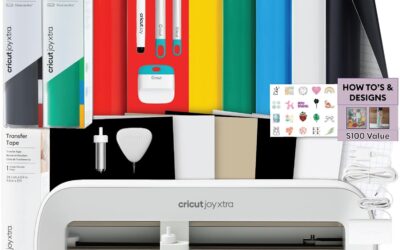
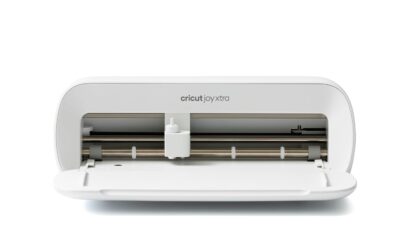
The Cricut Joy Xtra Cutting Machine Bundle is an all-in-one solution for hobbyists, teachers, and DIY enthusiasts who want to create custom labels, decals, and personalized gifts without a steep learning curve. This compact machine is designed for small spaces and is perfect for those who craft occasionally or on the go.
Its standout feature is the ability to cut Smart Vinyl without a cutting mat, which simplifies the process and allows for longer continuous cuts. The included rainbow vinyl sampler and transfer tape let you start projects immediately, while the essential tools (weeder, spatula, etc.) make weeding and applying designs a breeze. Users praise the machine's precision and the vibrant colors of the vinyl.
Build quality is solid, with a sleek, space-saving design that fits neatly on a desk. The setup is quick, and the Cricut Design Space app offers a library of designs and fonts, though some beginners may need a short time to familiarize themselves with the software. The machine is also portable, making it easy to take to craft nights or workshops.
Potential drawbacks include the need to purchase Smart Vinyl for mat-free cutting, which can be pricier than standard vinyl, and the limited cutting width (about 5.5 inches) compared to larger Cricut models. However, for most small-to-medium projects, this is not a limitation.
Overall, the Cricut Joy Xtra bundle is an excellent choice for beginners and experienced crafters alike who value convenience and portability. Its ease of use, versatility, and included accessories make it a great value, earning a strong recommendation from satisfied users.

Pros
- Exceptional cutting accuracy with 4-point registration system
- Ultra-quiet operation suitable for shared workspaces
- Versatile material compatibility (vinyl, fabric, cardstock, and more)
- Fast Sketch Mode saves time without losing detail
- Comprehensive software and accessories included in the box
Cons
- Requires some learning curve to master the Studio software
- Cutting mat size (12x24) may be limiting for very large or long projects
- Periodic replacement of blades and mats adds ongoing cost
The Silhouette Cameo 5 Alpha is a smart cutting machine designed for crafters, small business owners, and hobbyists who demand precision and versatility. It excels in print-and-cut applications, making stickers, labels, and heat transfers with exceptional accuracy thanks to its new 4-point registration system. This machine is a solid upgrade for anyone moving beyond basic die-cutting or looking for a quieter, faster alternative to older models.
Standout features include Fast Sketch Mode, which accelerates drawing without losing fine details, and Intelligent Path Technology that optimizes cut order for smoother results. The whisper-quiet motor operates at speeds up to 400mm/s, allowing you to work without disturbing others. In real-world use, the Cameo 5 Alpha handles vinyl, fabric, cardstock, and even glossy photo paper with ease, making it a true all-in-one creative tool.
Build quality is sturdy with a metal and plastic construction, and the classic white finish fits well in any workspace. The included AutoBlade, cutting mat, and Studio software provide everything you need to start creating immediately. The 12x24 inch cutting area is generous for most projects, though professionals may occasionally wish for a larger surface.
One potential drawback is the learning curve associated with the Silhouette Studio software; beginners may need time to explore its features. Additionally, consumables like blades and cutting mats require periodic replacement, adding to long-term costs. However, the machine's performance and accuracy justify the investment for serious creators.
Overall, the Silhouette Cameo 5 Alpha delivers on its promises of quiet operation, speed, and precision. It is a top choice for anyone who needs a reliable print-and-cut machine for business or personal projects. With its thoughtful features and solid build, it earns a strong recommendation for crafters ready to elevate their work.

Pros
- Includes free design software with no subscription needed
- Large built-in design library (20,000+ resources)
- Cuts, writes, and scores in one device
- Wireless and wired connectivity options
- Works with various materials for diverse projects
Cons
- Some users report needing a cutting mat for best results
- Included software may have limited Mac/Linux support (third-party alternatives work)
- Pen holder may not accommodate larger pens without modification
The VEVOR 12-inch vinyl cutting machine is a feature-rich die-cut machine designed for crafters, hobbyists, and small business owners who want to create custom stickers, cards, decals, and more. With over 20,000 built-in design resources and free design software, it eliminates the need for recurring subscriptions, making it an attractive option for budget-conscious creators.
Standout features include the included software that works online or offline, supporting PNG, JPG, SVG, and TIF files for easy image import. The 3-in-1 capability allows you to cut, write, and score with a simple switch, letting you handle detailed patterns and folded projects without extra tools. Its compatibility with Mac, Windows, Android, and iOS via USB, Bluetooth, or USB drive offers unmatched flexibility.
In real-world use, the machine delivers clean cuts on vinyl, cardstock, heat transfer paper, and more. Users praise its accuracy and ease of use, especially for large-scale projects. The 12-inch width handles most standard materials, and the button and screen interface makes operation straightforward for beginners.
Build quality is solid with ABS and Q235 materials, though the machine is relatively heavy at 18.1 pounds. Some users note that a cutting mat is recommended to prevent vinyl from wrapping around the roller bar, and the included pen holder may not fit larger pens without modifications. Additionally, while the software works well on Windows, Mac and Linux users may need third-party options like Sure-Cuts-a-Lot or InkCut.
Overall, the VEVOR vinyl cutter offers excellent value for its price, combining a huge design library, versatile connectivity, and multi-functionality. It is best suited for crafters who want a reliable, cost-effective machine for everyday DIY projects, though those needing advanced software support or larger pen compatibility should consider potential workarounds.
Brand: VEVOR
Model: Smart3
Cutting Width: 12 inches
Active Surface Area: 144 square inches
Connectivity: USB, Bluetooth, USB drive
Compatible Operating Systems: Mac, Windows, Android (5.1+), iOS (11.0+)
Supported File Formats: PNG, JPG, SVG, TIF
Included Software: Free design software (online/offline)
Built-in Design Resources: 20,000+
Material Compatibility: Vinyl, heat transfer paper, cardstock, foil, specialty paper
Functions: Cut, write/draw, score
Product Dimensions: 22.8 x 7.36 x 6.61 inches
Weight: 18.1 pounds
Material: ABS, Q235
Color: Blue
Input Voltage: 240 volts

Pros
- Cuts cleanly and quickly on a wide variety of materials including vinyl, cardstock, and iron-on
- Bundle includes ample supplies for up to 65 projects, ideal for starting multiple projects right away
- Compact and stylish design fits easily on a desk and can be moved around with ease
- Intuitive software with free content library and helpful tutorials (though some users find initial setup complex)
- Great value for the price, offering professional-looking results even for novice crafters
Cons
- Blade and tool compatibility: Explorer 5 series tools (like markers) are not interchangeable with older Explore models, which may require additional purchases
- Machine lacks a dust cover, so a separate bag or cover is recommended to protect it when not in use
- Some users report a learning curve with the Design Space software, requiring time to troubleshoot calibration and cut settings
The Cricut Explore 5 Essential Bundle is the latest evolution of Cricut’s popular 12-inch cutting machine, designed for crafters who want to create personalized projects quickly and easily. Whether you’re a scrapbooking enthusiast, a small business owner making custom decals, or a beginner looking to explore DIY crafting, this bundle offers a complete starter kit that includes tools and materials for up to 65 projects. Its compact size and modern Taupe finish make it a stylish addition to any workspace.
Performance-wise, the Cricut Explore 5 excels with top-tier precision cutting speeds that handle over 100 materials from vinyl and iron-on to cardstock and printable media. Users consistently praise the clean, professional cuts and the ability to create full-color stickers by printing from a home inkjet then letting the machine cut around the designs automatically. The Bluetooth connectivity and free Design Space app (with 3,000+ images, 100+ fonts, and 1,000+ projects) make it easy to start crafting right out of the box, though some beginners note a learning curve with the software
Design and build quality are standout features. The machine is 30% more compact than previous models, with a sleek, simplified interface and a snap-in pen holder that eliminates hassle. It works with six tools, including a deep cutting option for thicker materials like foam and rubber, but note that tools are specific to this series and not backward-compatible with older Explore machines. Additionally, the machine does not come with a dust cover, so you may want to purchase a bag or cover for storage.
Drawbacks include a few compatibility quirks: markers labeled for “Explorer 5” are required (older Explorer series markers won’t fit), and the debossing tool is not supported. Some users also report initial frustration with calibration and cut alignment, but this is often resolved by researching online tutorials. The limited warranty covers basic issues, but Cricut’s customer service is generally responsive.
Overall, the Cricut Explore 5 Essential Bundle delivers exceptional value for crafters of all skill levels. Its speed, precision, and generous supply kit make it a smart investment for anyone looking to create professional-quality projects at home. While there is a small learning curve and some tool compatibility constraints, the versatility and ease of use far outweigh these drawbacks. Highly recommended for scrapbooking, apparel decoration, and sticker making.

Pros
- AI text-to-design saves beginners from learning graphic software.
- Exceptional cut accuracy (0.2mm) for professional-looking stickers.
- Simple 3-step process reduces time from idea to finished product.
- Wide 8.5-inch cutting width handles standard paper and larger projects.
- Reliable wired and wireless connections for flexible workspace setup.
Cons
- AI design generation requires a stable internet connection for cloud processing, limiting offline use.
- The included vinyl starter bundle is small; additional materials are needed for larger projects.
- Plastic construction may feel less robust than metal machines, though it keeps the weight manageable.
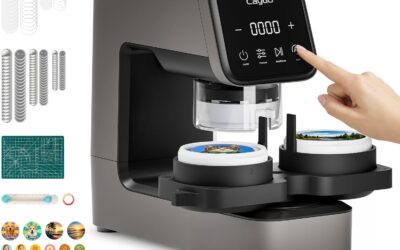
The Likcut S41 is a vinyl cutter machine that brings AI-powered sticker making to crafters of all skill levels. With its ability to turn voice commands or text prompts into custom designs, it targets anyone who wants to create personalized stickers, room decor, or HTV projects without mastering complex software. The machine is especially suited for adults who enjoy DIY crafts and want quick, professional results.
The standout feature is the 3-step workflow: design in the app, cut with micro-precision, and peel. The AI generation works surprisingly well for simple prompts, though it relies on an internet connection. The cut accuracy of 0.2mm is reliable for intricate patterns, and the expanded 8.5-inch width handles US letter materials in one pass, saving time on large stickers. Dual-mode connectivity (USB-C and Bluetooth 5.0) ensures a stable link during cutting, reducing the risk of errors.
Build quality is a mixed bag. The light blue plastic body keeps the machine lightweight at 3.9 kg, but it doesn't feel as premium as metal alternatives. The included vinyl sample pack is basic, so plan to buy more for serious projects. The one-touch control screen is intuitive and provides clear feedback, making operation straightforward even for first-time users.
Potential drawbacks include the internet dependency for AI features and the limited starter materials. The plastic construction may also raise durability concerns for heavy use, though it's fine for most home crafters. Additionally, the print-then-cut function works best with compatible materials like back print film and glossy sheets.
Overall, the Likcut S41 is a solid choice for crafters who value speed and simplicity. Its AI design tool and precise cutting make it a time-saver for creating custom stickers and decor. While it has minor limitations, the combination of features at this price point offers excellent value for hobbyists and small business owners alike.

Pros
- High cutting precision of +/-0.01mm for intricate designs
- Stable paper feed system with double spring pinch-rollers
- Adjustable cutting speed and pressure for different materials
- Backlit LCD display for easy operation and monitoring
- Broad compatibility with USB/COM and multiple file formats
Cons
- Included vinyl is low quality and may cause frustration for beginners; better to use premium vinyl like Oracal 3M
- Some units have reported reliability issues, including early failure and loose internal components
- Customer service response can be slow, though some users report positive outcomes after reaching out directly
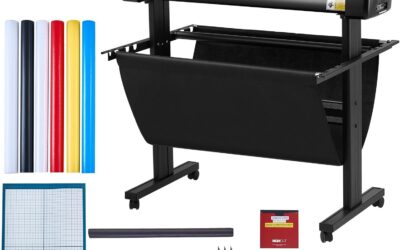
The VEVOR 34-inch vinyl cutter machine bundle is a budget-friendly plotter designed for DIY enthusiasts, small business owners, and crafters who need precise cuts for signs, labels, heat transfer vinyl, and more. With a maximum paper feed of 34.3 inches and a cutting width of 30.7 inches, it handles standard roll vinyl with ease.
Its standout features include a cutting precision of +/-0.01mm and adjustable pressure from 20 to 500g, allowing fine control for different materials. The digital control system with backlit LCD makes setting speed (20-800mm/s) and pressure intuitive. Real-world performance is bolstered by the D-typed motherboard and 4M cache memory, which help maintain smooth operation even with complex designs. However, some users note that the machine struggles with thin or very thick materials without careful adjustment.
Build quality is mixed: the double spring pinch-rollers and roughened steel roller provide good media tracking, but several reviews mention loose screws inside the unit and a few experienced electronic failures within six months. The included vinyl is widely criticized as poor quality, with insufficient backing thickness that leads to undesirable cut-through. Replacing it with branded vinyl like Oracal resolves most cutting issues.
Software setup requires downloading the included software via CD or a printed URL, which can be a hassle on modern computers without optical drives. Compatibility with SVG and PDF imports is a plus, but the software is not as polished as alternatives. For the price, the VEVOR cutter offers good value for beginners and occasional use, but professionals may want to invest in a more reliable brand.
Verdict: If you are on a tight budget and willing to experiment with settings and supplies, the VEVOR 34-inch vinyl cutter can deliver decent results for sign making and hobby projects. However, be prepared to replace the starter vinyl and handle potential quality control issues. It is a capable entry-level machine, but not without compromises.
How to Choose the Best Vinyl Machines
Before you add a vinyl cutter to your cart, consider these four factors. They separate a satisfying crafting experience from a frustrating one. And if you’re also working on home improvements, our furnace filter guides can help you maintain a comfortable workspace.
Cutting Width and Material Compatibility
The first decision is size. If you plan to make large signs, banners, or window decals, a wide-format machine like the VEVOR Vinyl Cutter Machine 34 inches Bundle Manual handles rolls up to 34 inches wide. For standard 12-inch mats, the Cricut Explore 5 Essential Bundle and the Silhouette America Cameo 5 Alpha (α) are versatile choices that cut vinyl, cardstock, iron-on, and even fabric.
Smaller machines like the Cricut Joy Xtra Cutting Machine and Smart Vinyl and the Likcut S41 Vinyl Cutter Machine with Print Then are perfect for stickers, labels, and small decals. They take up less space and are easier to store, which matters if you’re working in a corner of your living room.
Software and Connectivity
Your cutting machine is only as good as its software. Cricut uses the free Design Space app, which works on desktop and mobile via Bluetooth. Silhouette’s Studio software is known for its advanced design tools. For a budget-friendly option, the VEVOR Vinyl Cutting Machine, 12 includes design software with no subscription fees, a major plus for cost-conscious crafters.
Connectivity matters too. Most modern cutters support both USB and Bluetooth, but the Likcut S41 goes a step further with a dual-mode connection that keeps your cuts stable. It also features a small screen for one-touch control, so you don’t need to keep your phone in hand for every step.
Ease of Use and Beginner Friendliness
If you’re new to vinyl crafting, look for a machine that simplifies the process. The Cricut Joy Xtra is designed with beginners in mind: Smart Vinyl loads directly without a cutting mat, and the included tools cover everything from weeding to transfer. The Likcut S41 uses a three-step workflow and even generates designs from text or voice prompts, making it one of the most approachable options in 2026. Just as you’d research furnace filters for your home, comparing these features helps you get the best value for your budget.
Meanwhile, the Silhouette Cameo 5 Alpha balances beginner accessibility with professional control. Its Fast Sketch Mode and Intelligent Path Technology reduce material stress, which is helpful when you’re learning to weed intricate designs.
Precision and Speed
For small businesses and serious crafters, precision is non-negotiable. The Silhouette Cameo 5 Alpha uses a 4-point registration system for flawless print-and-cut accuracy, while the VEVOR 34-inch plotter offers a cutting precision of 0.01 mm. The Likcut S41 achieves a 0.2 mm tolerance with automatic calibration, enough for most sticker and decal projects.
Speed also varies widely. The Cameo 5 Alpha cuts at up to 400 mm per second with whisper-quiet operation, ideal for shared spaces. The VEVOR 12-inch model reaches 800 mm per second, though you’ll trade some noise for that pace. Think about your typical project volume and workspace before you decide. If you’re also improving your home’s air quality, our guide to allergy-friendly furnace filters is worth a read.
Final Thoughts
For most home crafters, the Cricut Joy Xtra Cutting Machine and Smart Vinyl is the easiest way to start creating labels, decals, and personalized gifts without a steep learning curve. If you need professional-grade accuracy and a broader material range, the Silhouette America Cameo 5 Alpha (α) is a worthy investment that will serve you for years.
Frequently Asked Questions
What is the best vinyl machine for beginners in 2026?
The Cricut Joy Xtra Cutting Machine and Smart Vinyl is our top pick for beginners because it bundles everything you need, including rainbow vinyl, transfer tape, and tools. Its Smart Vinyl works without a cutting mat, so you can focus on designing and cutting rather than setup. For a budget option, the VEVOR 12-inch model also includes free software and handles a wide range of materials.
Can vinyl cutting machines cut materials other than vinyl?
Yes. Most modern vinyl cutters handle cardstock, iron-on (HTV), adhesive vinyl, printable sticker paper, and even thin fabric. The Cricut Explore 5 cuts over 100 materials, while the Silhouette Cameo 5 Alpha handles materials up to 3 mm thick. Always check the machine’s specifications for maximum thickness and recommended blades.
Do I need a computer to use a vinyl cutter?
Not necessarily. Many machines connect to your smartphone or tablet via Bluetooth, and some have built-in screens. The Likcut S41 features a small display for one-touch start and load functions, and its app works on both iOS and Android. The VEVOR models also support USB drives, so you can transfer design files without a computer.
How do I choose between Cricut and Silhouette?
Both brands make excellent machines, but the right choice depends on your priorities. Cricut’s Design Space is intuitive and beginner-friendly, while Silhouette Studio offers more advanced design tools for experienced users. If you’re torn, read our home and hobby guides for more comparisons and tips.
Write Your Review
No reviews yet. Be the first to share your experience!