

You have just finished designing a stunning vinyl decal for your laptop or water bottle. You load the printable vinyl into your inkjet printer, hit print, and wait. When the sheet comes out, the colors look washed out, the black registration marks are fuzzy, and your cutting machine cannot read them. Your project is ruined. This scenario happens more often than it should, and it is why choosing the right inkjet printer for use with vinyl cutting machines matters so much. Whether you are using a Cricut, Silhouette, or Brother ScanNCut, the printer you pick determines whether your cut lines are precise and your designs pop. In this guide, we break down the best inkjet printers for vinyl cutting in 2026, focusing on print quality, ink efficiency, and wireless convenience.
What to Look for in an Inkjet Printer for Vinyl Cutting
Not every inkjet printer is up to the task of printing on vinyl. You need a model that handles thicker media, produces sharp lines, and offers reliable color output. We evaluated the top contenders based on criteria that matter for crafters: print resolution, ink system, media handling, and connectivity. For more home maintenance tips, check out our guide on best 16x25x5 air filters.

Pros
- Extremely low running costs with refillable ink tanks
- Good print quality for text and photos
- Easy setup and maintenance with EcoFit bottles
- Reliable wireless printing and scanning
Cons
- Slower print speeds compared to some laser printers
- No automatic document feeder (ADF) for scanning multiple pages
- Some users report occasional connectivity issues over Wi-Fi
The Epson EcoTank ET-4800 is a supertank all-in-one printer designed for high-volume, low-cost printing. It replaces traditional ink cartridges with large, refillable ink tanks that cut ongoing ink expenses dramatically. This model is perfect for home offices, students, or small businesses that print frequently and want to avoid the high cost of replacement cartridges.
Standout features include Epson's Micro Piezo Heat-Free Technology, which delivers sharp text and vivid color prints on various paper types. The included flatbed scanner and copier work well for documents and photos, and the 2.7-inch color LCD simplifies operation. With included ink bottles, you can print up to 4,500 black or 6,500 color pages out of the box.
The printer's design is compact and sturdy, with a 100-sheet input tray and a 100-sheet output tray. Setup is straightforward, and the EcoFit bottles are designed to prevent spills with a unique keyed nozzle. Wireless connectivity via Wi-Fi and Ethernet works reliably for most users, while USB is available for direct connections.
Drawbacks include slower print speeds, especially for color documents, and the lack of an automatic document feeder (ADF), which means you must scan multi-page documents manually. Some users have reported occasional Wi-Fi dropouts, though this varies by network setup. Additionally, the printer lacks duplex (automatic two-sided) printing, which may be a downside for some.
Overall, the Epson EcoTank ET-4800 is a strong choice for budget-conscious users who print often and want to minimize waste. Its low cost per page, solid print quality, and eco-friendly design outweigh the minor speed and convenience compromises. It earns a solid recommendation for home and small office use.

Pros
- Excellent value: includes enough ink for up to 6,600 pages, significantly reducing per-page costs.
- Fast print speeds with no warm-up time, ideal for busy home offices.
- Auto duplex printing and a 250-sheet paper tray enhance convenience and efficiency.
- Reliable, durable printhead with PrecisionCore technology designed for long life.
- Easy, mess-free ink refilling with keyed bottles to prevent mistakes.
Cons
- Higher upfront cost compared to cartridge-based printers, though offset by long-term savings.
- Limited paper capacity (250 sheets) may require frequent refills for very high-volume printing.
- Some users report occasional connectivity issues with Wi-Fi, though Ethernet and USB options are available.
The Epson EcoTank ET-4950 is a feature-packed all-in-one printer designed for home offices and small businesses that demand high-volume, low-cost printing. It combines printing, scanning, copying, and faxing in a single device, making it a versatile addition to any workspace. With its cartridge-free supertank system, it eliminates the recurring cost and hassle of traditional ink cartridges.
Standout features include the included ink bottles that print up to 6,600 black and 5,500 color pages, which is equivalent to about 80 cartridges. This translates to substantial savings over time. The printer also offers fast print speeds of 18 ppm black and 9 ppm color, with zero warm-up time, ensuring quick output for busy schedules. The PrecisionCore Heat-Free technology ensures consistent print quality and a durable printhead that lasts the life of the printer.
Design and build quality are solid, with a compact footprint that fits well on a desk. The 2.4-inch color display simplifies navigation, and the refillable ink tanks are easily accessible, making maintenance straightforward. The Auto Document Feeder and auto duplex printing enhance productivity, allowing for efficient two-sided printing and easy multi-page scanning or copying.
Potential drawbacks include the higher initial investment compared to cartridge printers, though the long-term ink savings typically offset this. The paper tray holds 250 sheets, which may be insufficient for very high-volume users, but is adequate for most home office needs. Some users have reported occasional Wi-Fi connectivity issues, but the Ethernet and USB options provide reliable alternatives.
Overall, the Epson EcoTank ET-4950 is an excellent choice for anyone seeking a cost-effective, high-performance printer. Its low running costs, fast speeds, and robust feature set make it a top contender in the supertank category. For home offices and small teams that print regularly, this printer offers exceptional value and reliability.
Printer Type: Inkjet, All-in-One (Print, Copy, Scan, Fax).
Print Speed: 18 ppm black, 9 ppm color (ISO).
Resolution: Up to 4800 x 1200 dpi.
Paper Capacity: 250 sheets input, 250 sheets output.
Media Sizes: 3.5" x 5", 4" x 6", 5" x 7", 8" x 10", 8.5" x 11", 8.5" x 14".
Connectivity: Wi-Fi, Ethernet, USB 2.0.
Scanner Type: Flatbed, Sheetfed with Auto Document Feeder.
Display: 2.4" Color LCD.
Ink System: EcoTank with 502 ink bottles (Black, Cyan, Magenta, Yellow).
Dimensions: 14.8" W x 13.7" D x 9.4" H.
Weight: 16.1 pounds.
Warranty: 1-Year Limited.

Pros
- Exceptional photo print quality praised in user reviews
- Compact design with ample paper handling for a home office
- Reliable wireless setup and mobile printing flexibility
- Automatic duplex printing reduces paper waste
- Versatile media sizes including 12x12 and 11x17 for creative projects
Cons
- Some users report error code 5100 issues, often related to objects placed on top of the scanner lid
- Learning curve for scanning file destinations compared to simpler models
- Not suited for high-volume printing; more for moderate home use
The Canon PIXMA TS9521Ca is a wireless all-in-one inkjet printer designed for home users who demand high-quality color output and media flexibility. It replaces older HP models with a smaller footprint and easy wireless connectivity. This printer is perfect for crafters, scrapbookers, and home office workers who need to print photos, banners, and documents up to 11x17 inches.
Standout features include a 4.3-inch touchscreen for simple navigation, fast print speeds up to 15 ppm black and 10 ppm color, and an automatic document feeder that handles multi-page copying. Users consistently praise the photo print quality, with one reviewer noting that an 8x10 print was frame-worthy. The five individual ink cartridges let you replace only the empty color, reducing waste and cost.
Design-wise, the printer has a compact body (18.5x14.5x7.6 inches) with a fold-down touchscreen and dual paper trays totaling 200 sheets. The auto duplex printing is a welcome convenience for double-sided documents. Setup is straightforward, and Wi-Fi connectivity works reliably with both computers and mobile devices via the Canon PRINT app.
One drawback reported by a minority of users is the occasional error code 5100, often caused by placing objects on top of the printer that misalign the internal carriage. Additionally, scanning file destinations can be confusing at first compared to older models. However, once learned, the system becomes intuitive.
Overall, the Canon PIXMA TS9521Ca offers excellent value for home users who prioritize photo quality and media versatility. Its combination of features, print speed, and ease of use makes it a strong choice for creative projects and everyday printing needs. Backed by a 1-year warranty and Canon's support network, it is a reliable addition to any home office.
Printer Type: Wireless All-in-One Inkjet
Print Speeds: Up to 15 ppm black, 10 ppm color
Resolution: Up to 4800 x 1200 dpi
Paper Capacity: 200 sheets total (100 bottom cassette + 100 rear tray), plus 20-sheet ADF
Media Sizes: 3.5x3.5 to 11x17, Legal, envelopes, banners
Connectivity: Wi-Fi, Ethernet, USB, SDXC card slot
Display: 4.3-inch touchscreen LCD
Duplex: Automatic 2-sided printing
Scanner: Sheetfed, 20-sheet ADF
Dimensions: 18.5 x 14.5 x 7.6 inches
Weight: 25.4 pounds
Warranty: 1-year limited
Pros
- Exceptional print quality with deep blacks, vibrant colors, and accurate gradations straight out of the box.
- Excellent paper handling with a wide range of supported sizes and borderless printing capabilities.
- Reliable anti-clogging technology and robust build quality for long-term professional use.
- Comprehensive software suite that integrates seamlessly with common photo editing tools like Lightroom and Photoshop.
- Large 80mL individual ink tanks reduce the frequency of replacements and lower per-print cost over time.
Cons
- Heavy at 83 pounds, requiring two people to set up and a sturdy dedicated table or stand.
- The accompanying mobile app has reported connectivity issues, limiting wireless convenience for monitoring ink levels and maintenance.
- Initial setup can be time-consuming, especially for users unfamiliar with professional printer calibration and ICC profiles.
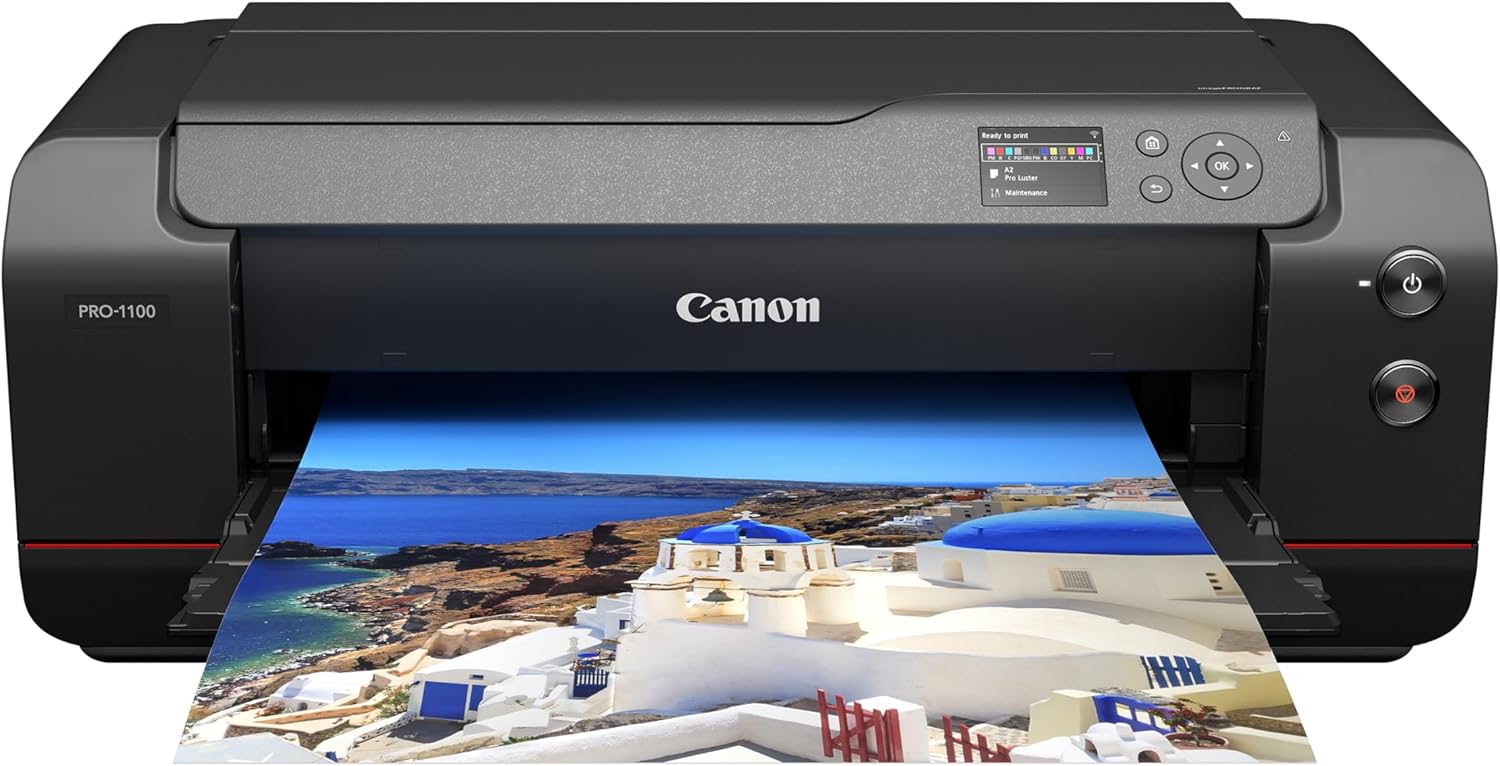
The Canon imagePROGRAF PRO-1100 is a 17-inch professional photo printer designed for serious photographers and fine-art printers who demand the highest quality output. It replaces the popular PRO-1000 with a refined 11-color pigment ink system that includes a dedicated Chroma Optimizer for enhanced gloss uniformity and anti-bronzing. This printer is targeted at studios, galleries, and advanced hobbyists who regularly print large-format images for exhibitions, portfolios, or client proofing.
The standout feature is the new LUCIA PRO II ink formulation, which delivers a noticeably wider color gamut and deeper blacks than its predecessor. In real-world use, prints on glossy and luster paper show incredible detail in shadows, smooth transitions in skies, and vibrant yet natural skin tones. The Chroma Optimizer coat also reduces gloss differential, making the final print look more uniform under direct light. The anti-clogging print head and air feeding system work reliably, even after weeks of idle time.
Build quality is typical of Canon's Pro series: a heavy, sturdy chassis that weighs 83 pounds and requires dedicated desk space. The paper path is well-designed, handling thick fine-art papers up to 0.7mm without jams. Duplex printing is automatic, and the 250-sheet tray is generous for a printer in this class. The included software suite (Print Studio Pro, Media Configuration Tool, Color Calibration) integrates smoothly with Lightroom and Photoshop, although the initial setup process can be involved if you need to install custom profiles.
One potential drawback is the mobile app experience. Several users report that the Canon PRINT app sometimes fails to detect the printer on wireless networks, limiting remote monitoring of ink levels and maintenance. Additionally, the printer is heavy and requires a dedicated workstation. Ink costs are high upfront (a full set of 12 80mL tanks costs over half the printer's price), but the per-print cost is competitive for the quality delivered.
Overall, the imagePROGRAF PRO-1100 is arguably the best 17-inch photo printer Canon has ever made. It produces outstanding prints that rival lab-quality output, and its robust feature set makes it a worthy investment for professionals who rely on consistent, archival-quality results. If you can manage its size and weight and are willing to invest in ink, this printer will serve you for years.
Printer Type: Inkjet, color output
Max Print Resolution: 4800 x 2400 dpi (color), 2400 x 1200 dpi (B&W)
Max Media Size: 17 x 22 inches (borderless up to 17x25)
Paper Sizes Supported: A5, A4, A3, A2, B5, B4, B3, Letter, Legal, Ledger, Hagaki, A3+, L, 2L, 4x6, 5x7, 9x13, 11x14, 13x19, Super B, 16x20, 17x22, 17x25, and more
Ink System: 11 pigment-based inks plus Chroma Optimizer (PGI-4100 series, 80mL each)
Duplex Printing: Automatic
Input Tray Capacity: 250 sheets
Connectivity: Wireless (Wi-Fi), USB, Ethernet
Weight: 83 lbs
Dimensions: 28.5 x 17.1 x 11.2 inches (WxDxH)
Warranty: 1-year limited

Pros
- Very affordable price for an all-in-one color printer
- AI formatting saves paper and ink on web prints
- Easy wireless setup and mobile printing via HP App
- Compact footprint fits small home offices or desks
- Eco-friendly construction with recycled materials and ENERGY STAR certified
Cons
- Print speeds are slow (7.5 ppm black, 5.5 ppm color) not for high volume
- Manual duplex printing requires flipping pages manually
- 60-sheet input tray is small for larger jobs
The HP DeskJet 2955 is an entry-level all-in-one inkjet printer designed for home users with basic printing, scanning, and copying needs. It is best suited for students, remote workers, or families who print occasional documents, lists, and school assignments.
Standout features include AI-assisted web page and email formatting that removes unwanted content for cleaner prints. The included 3-month Instant Ink trial helps manage ink costs, and dual-band Wi-Fi ensures reliable wireless connections. Print speeds are modest at up to 7.5 ppm black and 5.5 ppm color, adequate for light use.
Design is compact and made with at least 70% recycled plastics, fitting easily on a desk. The flatbed scanner works well for documents and photos. The 60-sheet input tray limits capacity but suits low-volume households. Setup is straightforward using the HP App for mobile printing.
Drawbacks include manual duplex printing (flip pages yourself) and relatively slow speed for larger jobs. After the Instant Ink trial, subscription costs apply unless you cancel. Some users report connectivity hiccups, though HP's dual-band Wi-Fi aims to resolve them.
Verdict: The HP DeskJet 2955 delivers solid value for budget-conscious home users who need a simple, space-saving printer. Its AI formatting and Instant Ink trial add convenience, but it is not built for heavy or fast printing.

Pros
- Affordable all-in-one solution for home or small office.
- Easy wireless setup and reliable mobile connectivity.
- Auto duplex printing works seamlessly and quickly.
- Starter ink cartridges included, reducing initial cost.
- Compatible with Amazon Alexa for ink reorder notifications.
Cons
- Slow print speeds, especially for color documents (approx. 4.4 ipm).
- Small LCD screen can be hard to read; menu navigation is basic.
- Some users report reliability issues after limited use, such as paper feed problems.
The Canon PIXMA TR4720 is a budget-friendly 4-in-1 inkjet printer designed for home users and small offices who need occasional printing, scanning, copying, and faxing. With its wireless connectivity and mobile app support, it aims to replace the need for trips to print shops or using multiple devices.
Standout features include a 20-sheet auto document feeder for multi-page jobs, automatic duplex printing to save paper, and borderless photo printing up to 8.5x11 inches. The printer also integrates with Amazon Alexa, so you can receive low-ink alerts and reorder supplies hands-free. Real-world performance is adequate for light use: black document prints at 8.8 ipm, but color is slower at 4.4 ipm, which may frustrate users with larger print volumes.
Design-wise, the TR4720 is compact and front-loading, fitting neatly on a desk. Setup is generally straightforward, though some users find the small flat LCD screen difficult to read and the Wi-Fi setup less intuitive than expected. Build quality feels adequate for the price point, but a few reviews mention mechanical failures after a few weeks of use.
The main drawbacks are slow color print speeds and a somewhat dated interface. Additionally, the printer uses two ink cartridges (black and tri-color) which can be costly to replace if you print frequently. For light, occasional use, these limitations may be acceptable, but heavy users should consider a faster model.
Verdict: The Canon PIXMA TR4720 offers excellent value for its price, with versatile functionality and mobile-friendly features. It is best suited for students, home offices, or anyone who prints a few pages per week. If you need high-speed color printing or a more robust build, look elsewhere.

Pros
- Incredible value with 2 years of ink included, drastically reducing ongoing costs.
- Mess-free refill system eliminates the hassle of cartridges and avoids spills.
- AI-driven formatting saves paper and time when printing web content.
- Wireless connectivity and smart app support for flexible printing from any device.
- High page yield (up to 6,000 pages) means fewer interruptions for refills.
Cons
- Print speed is limited to 10 pages per minute for black and white copies, which may be slow for high-volume office use.
- No automatic duplex printing for two-sided documents, requiring manual flipping for double-sided prints.
- A relatively bulky design (14.2 pounds) may take up more desk space than compact printers.
The HP Smart Tank 5000 is a wireless all-in-one ink tank printer designed for home and home office users who need low-cost, high-volume printing. It includes 2 years of Original HP Ink in the box, making it an exceptional value for families, students, or anyone who prints frequently. With print, scan, and copy capabilities, it covers all the basics while keeping operational costs to a minimum.
Standout features include a mess-free refill system that uses spill-proof ink bottles, plus AI-enabled printing that automatically formats web pages and emails to eliminate wasted pages and awkward layouts. The cartridge-free design means no more replacing expensive cartridges, and the high page yield (up to 6,000 pages) ensures you print for months without worry. In real-world use, this printer delivers crisp text and vibrant colors, especially on photo paper.
Build quality is solid for its price point, with a clean white/Portobello finish and a compact flatbed scanner. The wireless connectivity works seamlessly with the HP Smart app, and it supports voice control via Amazon Alexa. The LCD display is simple but functional, and the setup process is straightforward even for non-techies.
However, there are some trade-offs. The black and white copy speed tops out at 10 pages per minute, which is slower than many laser printers. Also, the printer lacks automatic duplex printing, so double-sided documents require manual effort. At 14.2 pounds, it is a bit heavy and bulky for tight desks.
Overall, the HP Smart Tank 5000 is an excellent choice for budget-conscious users who prioritize low running costs and ease of use over speed. If you need high-volume color printing at home and want to avoid expensive cartridge replacements, this printer delivers exceptional value. It earns a strong recommendation for families and home offices.

Pros
- Easy setup: Users report taking only 15 minutes from unboxing to printing, thanks to the guided setup and intuitive app.
- Compact and lightweight: At just 11.2 pounds and a small footprint, it fits easily in home offices or tight spaces.
- High-quality output: Produces sharp text and vibrant photos, with a maximum color resolution of 4800 x 1200 DPI.
- Ink savings: The included 3-month Instant Ink trial delivers ink before you run out, potentially saving up to 50% on ink costs.
- Reliable performance: Positive reviews highlight its consistency and durability, with one user noting it lasted 12 years in a previous model.
Cons
- No fax function: Unlike some all-in-ones, this model lacks fax capability, which may be a drawback for users needing that feature.
- Limited paper capacity: The 100-sheet input tray may require frequent refilling for high-volume printing tasks.
- Ink cartridge restrictions: The printer only works with original HP cartridges with chips, and firmware updates may block non-HP cartridges, limiting third-party options.
The HP Envy 6155 is a versatile all-in-one inkjet printer designed for home users who need reliable printing, scanning, and copying. It's a great fit for students, remote workers, and families who print homework, documents, and photos regularly. With its compact size and wireless connectivity, it easily integrates into any home office or study space.
One of its standout features is the AI-capable print formatting, which automatically cleans up web pages and email content before printing. This saves ink and paper, and ensures your prints look professional without extra effort. The 2.4-inch touchscreen makes navigation intuitive, and the dual-band Wi-Fi ensures stable connections, reducing the frustration of dropped signals.
In terms of design, the printer is compact and lightweight, making it easy to place on a desk or shelf. The build quality feels solid, and the use of recycled plastic is a positive step for sustainability. The paper tray holds 100 sheets, which is adequate for moderate use, but may need frequent refills for heavier printing jobs.
While the printer excels in many areas, it does have some drawbacks. There's no fax functionality, which could be a dealbreaker for users who need that. Additionally, the printer is restricted to original HP cartridges, and firmware updates may block third-party options, increasing long-term ink costs. However, the included 3-month Instant Ink trial can help mitigate this initial expense.
Overall, the HP Envy 6155 offers excellent value for home users seeking a reliable, feature-rich printer. Its ease of setup, high-quality output, and smart features like AI formatting and mobile printing make it a strong choice. Despite minor limitations, it's a solid investment for everyday printing needs.
Key Buying Criteria for Vinyl Cutting Printers
Print Resolution and Line Sharpness
For vinyl cutting, your printer must produce crisp, dark registration marks. If the black lines are blurry or faint, your cutting machine will misalign the cuts. Look for a printer with a high DPI (dots per inch) rating, ideally 4800 x 1200 or higher. The Canon imagePROGRAF PRO-1100, with its professional-grade LUCIA PRO II ink system, delivers exceptional sharpness and color accuracy, making it a top choice for intricate designs.
Even budget-friendly models like the HP DeskJet 2955 can handle basic vinyl projects if you use the right settings. However, for consistent results, a dedicated photo printer like the Canon PIXMA TS9521Ca offers a five-ink system that produces vibrant colors and fine details.
Ink System and Cost Efficiency
Printing on vinyl can consume a lot of ink, especially if you are producing multiple decals. Cartridge-based printers are convenient but can be expensive in the long run. Supertank models like the Epson EcoTank ET-4950 and the HP Smart Tank 5000 come with refillable ink tanks that offer thousands of pages before needing a refill. These are ideal for high-volume crafters who print frequently.
If you prefer individual cartridges, the Canon PIXMA TR4720 lets you replace only the color that runs out, reducing waste. For occasional use, the HP Envy 6155 includes a trial of HP Instant Ink, which can save money if you print regularly.
Media Handling and Paper Feed
Vinyl sheets are thicker than standard paper, so your printer needs a straight paper path or an adjustable tray. The Canon PIXMA TS9521Ca has a rear tray that handles cardstock and vinyl smoothly. The Epson EcoTank ET-4800 also features a rear paper feed that minimizes curling and jams.
For large-format projects, the Canon imagePROGRAF PRO-1100 supports up to 17 inches wide, giving you more flexibility for bigger decals. If you only need standard letter-size, most all-in-one printers will work, but check the input tray capacity to avoid frequent reloading.
Wireless Connectivity and Mobile Printing
Modern crafters often design on tablets or phones. A printer with robust wireless options, such as Wi-Fi, Bluetooth, and AirPrint, makes it easy to print from any device. The HP Envy 6155 and the Epson EcoTank ET-4950 both offer seamless mobile printing through their respective apps. The Canon PIXMA TR4720 includes a built-in fax, which is a bonus for home offices.
Make sure the printer supports the file formats you use, like PDF or PNG, and that the companion app allows you to adjust print settings for vinyl. Some apps even include templates for common vinyl projects, saving you time.
Frequently Asked Questions
Can I use any inkjet printer with a vinyl cutting machine?
Most inkjet printers can print on printable vinyl, but for best results, choose one with high resolution and a rear paper feed. The printer must produce dark, sharp registration marks so your cutting machine can read them. Models like the Canon PIXMA TS9521Ca are specifically recommended for this purpose.
What is the best inkjet printer for Cricut vinyl?
For Cricut users, the Epson EcoTank ET-4800 is a popular choice due to its low running costs and reliable output. It prints crisp lines and vibrant colors, and the rear paper feed handles vinyl sheets without jamming. You can also use the Cricut Design Space app to print directly from your phone.
Do I need a special printer for printable vinyl?
No, you can use any inkjet printer, but avoid laser printers because they melt the vinyl. For best results, use a printer with pigment-based inks, like the HP Smart Tank 5000, which are more water-resistant and durable. Always check the vinyl manufacturer’s recommendations for printer compatibility.
How do I prevent smudging when printing on vinyl?
Allow the ink to dry completely before handling the printed vinyl. Use the printer’s highest quality setting and choose the “plain paper” or “photo paper” setting depending on the vinyl type. You can also apply a clear laminate over the printed vinyl to protect it from scratches and smudges.
Choosing the right printer for your vinyl cutting setup can save you time, money, and frustration. Whether you are a hobbyist or a small business owner, the models we reviewed offer a range of features to suit different needs. For more home improvement tips, check our guide on best 16x25x4 furnace filters for allergies. Happy crafting!
Write Your Review
No reviews yet. Be the first to share your experience!