

You have a stack of craft projects waiting, from personalized vinyl decals to custom cards and home organization labels. But without the right cutting machine, turning your ideas into reality can feel frustrating. Whether you are a beginner looking for an easy entry point or a seasoned maker tackling complex materials, choosing one of the best cutting machines for crafts is the first step. In this guide, we have reviewed four top-rated Cricut models to help you decide which one fits your creative needs. For more on home maintenance essentials, see our guide on the best 16x25x4 furnace filters for allergies.

Pros
- Compact and portable design saves space and is easy to store or travel with
- Mat-free Smart Vinyl cutting speeds up workflow and simplifies setup
- Bundle includes essential tools and vinyl, so you can start right away
- High customer satisfaction with a rating of 4.6 out of 5 stars
- Versatile for various projects from labels to iron-on designs
Cons
- Smart Vinyl is required for mat-free cutting, which can be more expensive than regular vinyl
- Limited cutting width compared to larger Cricut models, may not suit oversized projects
- Some users may find the Cricut Design Space app has a learning curve
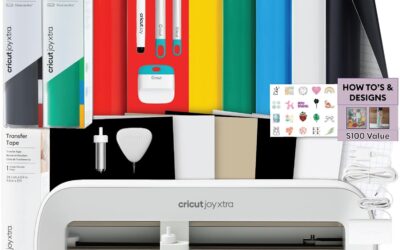
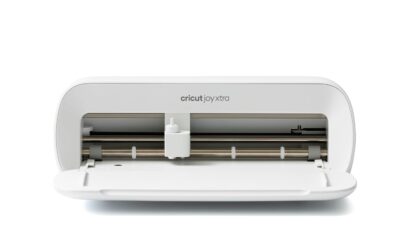
The Cricut Joy Xtra Cutting Machine Bundle is an all-in-one solution for hobbyists, teachers, and DIY enthusiasts who want to create custom labels, decals, and personalized gifts without a steep learning curve. This compact machine is designed for small spaces and is perfect for those who craft occasionally or on the go.
Its standout feature is the ability to cut Smart Vinyl without a cutting mat, which simplifies the process and allows for longer continuous cuts. The included rainbow vinyl sampler and transfer tape let you start projects immediately, while the essential tools (weeder, spatula, etc.) make weeding and applying designs a breeze. Users praise the machine's precision and the vibrant colors of the vinyl.
Build quality is solid, with a sleek, space-saving design that fits neatly on a desk. The setup is quick, and the Cricut Design Space app offers a library of designs and fonts, though some beginners may need a short time to familiarize themselves with the software. The machine is also portable, making it easy to take to craft nights or workshops.
Potential drawbacks include the need to purchase Smart Vinyl for mat-free cutting, which can be pricier than standard vinyl, and the limited cutting width (about 5.5 inches) compared to larger Cricut models. However, for most small-to-medium projects, this is not a limitation.
Overall, the Cricut Joy Xtra bundle is an excellent choice for beginners and experienced crafters alike who value convenience and portability. Its ease of use, versatility, and included accessories make it a great value, earning a strong recommendation from satisfied users.

Pros
- Compact and stylish design fits in small spaces.
- Easy to use with no prior design experience required.
- Versatile functionality: cuts, writes, draws, and foils.
- Print-Then-Cut enables full-color sticker creation.
- Large library of free and subscription-based content.
Cons
- Requires a computer, tablet, or smartphone to operate via the Design Space app.
- Some advanced features require a paid Cricut Access subscription.
- Maximum cutting width may be smaller than larger Cricut models, limiting project size.
The Cricut Joy Xtra is a compact smart cutting machine designed for crafters who want versatility without taking up much space. It cuts, writes, draws, and foils, making it perfect for creating stickers, cards, T-shirt designs, vinyl decals, and more. This bundle includes 30 digital images to get you started, and the machine works seamlessly with the free Design Space app on your smartphone, tablet, or computer.
Standout features include the Print-Then-Cut capability, which lets you print full-color designs on your inkjet printer and then have the machine cut them out precisely. The machine handles over 50 materials, from vinyl and iron-on to cardstock and sticker paper. It also foils and draws, adding a professional touch to your projects without needing separate tools.
The design is sleek and white, with an alloy steel construction that feels sturdy yet lightweight at just 250 grams. It fits easily on a desk or shelf, and the setup is straightforward. The bundle includes a fine-point blade, pen, weeder, and a practice cut material, so you can start creating right out of the box.
One drawback is that the machine relies entirely on the Design Space app for operation, which means you need a compatible device and internet connection for most tasks. Additionally, while the free library offers thousands of images, unlocking the full 1.5 million images requires a paid Cricut Access subscription. The cutting area is also smaller than larger Cricut models, so it may not suit oversized projects.
Overall, the Cricut Joy Xtra is an excellent choice for beginners and intermediate crafters who want a versatile, space-saving machine. Its ease of use, wide material compatibility, and Print-Then-Cut feature make it a standout in its category. If you are looking for a reliable, all-in-one cutting machine for small to medium projects, this is a solid investment.
Brand: Cricut
Model: 8002490
Color: White
Material: Alloy Steel
Item Weight: 250 g
Active Surface Area: 95.94 sq in
Compatible Devices: Inkjet printers, Computers, Tablets, Smartphones
Operation Mode: Automatic
Warranty: 1-year Manufacturer Warranty
Included Components: Cricut Joy Xtra Smart Cutting Machine, Fine-Point Blade, Fine Point Pen, Mini Weeder, Welcome Card, USB Cable, Power Adapter, Free trial subscription to Cricut Access, Materials for a practice cut, 30 bonus images in Design Space app

Pros
- Fast and precise cutting up to 2X faster than older models
- Works with an extensive variety of materials for endless creativity
- Easy to set up and use, even for beginners with no design experience
- Includes bonus digital content to jumpstart projects
- Beautiful Seashell color that looks great in any craft room
Cons
- Cutting mat may arrive bent in the box due to packaging, requiring careful flattening
- Design Space app requires internet connection for full functionality
- Some advanced features like engraving need additional tools sold separately
The Cricut Maker 4 is the latest smart cutting machine from Cricut, designed for crafters of all skill levels who want to personalize projects with professional results. It handles over 300 materials, from delicate cardstock to tough leather and wood, making it perfect for hobbyists, small business owners, and anyone who loves DIY.
Standout features include a cutting speed that is twice as fast as the previous model, thanks to enhanced motor and blade technology. The Print-Then-Cut feature works seamlessly with most inkjet printers, allowing you to create full-color stickers and labels. Users praise its precise, clean cuts and easy connection to the Design Space app, which provides a vast library of images and fonts.
Design and build quality are top-notch, with a sturdy plastic construction and an attractive Seashell color that brightens any workspace. The included materials sampler and bonus 30 images help beginners get started quickly. However, some users have noted that the cutting mat can arrive bent due to packaging, which may require flattening before first use.
Potential drawbacks include the need for an internet connection to use Design Space fully, and advanced capabilities like engraving require additional tools. Despite these minor issues, the machine is highly reliable and versatile, with a 4.4 out of 5 star rating from over 630 customer reviews.
Overall, the Cricut Maker 4 is an excellent investment for serious crafters or those looking to monetize their creations. It combines speed, precision, and versatility in a user-friendly package, making it a top choice in die-cut machines. Whether you are making custom T-shirts, home decor, or personalized gifts, this machine delivers professional-grade results.

Pros
- Cuts cleanly and quickly on a wide variety of materials including vinyl, cardstock, and iron-on
- Bundle includes ample supplies for up to 65 projects, ideal for starting multiple projects right away
- Compact and stylish design fits easily on a desk and can be moved around with ease
- Intuitive software with free content library and helpful tutorials (though some users find initial setup complex)
- Great value for the price, offering professional-looking results even for novice crafters
Cons
- Blade and tool compatibility: Explorer 5 series tools (like markers) are not interchangeable with older Explore models, which may require additional purchases
- Machine lacks a dust cover, so a separate bag or cover is recommended to protect it when not in use
- Some users report a learning curve with the Design Space software, requiring time to troubleshoot calibration and cut settings
The Cricut Explore 5 Essential Bundle is the latest evolution of Cricut’s popular 12-inch cutting machine, designed for crafters who want to create personalized projects quickly and easily. Whether you’re a scrapbooking enthusiast, a small business owner making custom decals, or a beginner looking to explore DIY crafting, this bundle offers a complete starter kit that includes tools and materials for up to 65 projects. Its compact size and modern Taupe finish make it a stylish addition to any workspace.
Performance-wise, the Cricut Explore 5 excels with top-tier precision cutting speeds that handle over 100 materials from vinyl and iron-on to cardstock and printable media. Users consistently praise the clean, professional cuts and the ability to create full-color stickers by printing from a home inkjet then letting the machine cut around the designs automatically. The Bluetooth connectivity and free Design Space app (with 3,000+ images, 100+ fonts, and 1,000+ projects) make it easy to start crafting right out of the box, though some beginners note a learning curve with the software
Design and build quality are standout features. The machine is 30% more compact than previous models, with a sleek, simplified interface and a snap-in pen holder that eliminates hassle. It works with six tools, including a deep cutting option for thicker materials like foam and rubber, but note that tools are specific to this series and not backward-compatible with older Explore machines. Additionally, the machine does not come with a dust cover, so you may want to purchase a bag or cover for storage.
Drawbacks include a few compatibility quirks: markers labeled for “Explorer 5” are required (older Explorer series markers won’t fit), and the debossing tool is not supported. Some users also report initial frustration with calibration and cut alignment, but this is often resolved by researching online tutorials. The limited warranty covers basic issues, but Cricut’s customer service is generally responsive.
Overall, the Cricut Explore 5 Essential Bundle delivers exceptional value for crafters of all skill levels. Its speed, precision, and generous supply kit make it a smart investment for anyone looking to create professional-quality projects at home. While there is a small learning curve and some tool compatibility constraints, the versatility and ease of use far outweigh these drawbacks. Highly recommended for scrapbooking, apparel decoration, and sticker making.
Below, we compare four of the best cutting machines for crafts: the Cricut Joy Xtra Cutting Machine and Smart Vinyl Bundle, the Cricut Joy Xtra – Smart Cutting Machine, the Cricut Maker 4 – Smart Cutting Machine (Seashell), and the Cricut Explore 5 Essential Bundle. Each offers unique features suited to different skill levels and project types.
Buying Guide: What to Look for in a Cutting Machine
Material Compatibility
Different cutting machines handle different materials. The Cricut Joy Xtra works with over 50 materials, including vinyl, cardstock, and iron-on. The Cricut Explore 5 handles over 100 materials, while the Cricut Maker 4 is the most versatile, cutting over 300 materials like balsa wood, leather, and fabric. If you plan to work with specialty materials, the Maker 4 is worth the investment. For keeping your craft room air clean, check out our best Air 3000 furnace filters.
Project Size and Portability
The Cricut Joy Xtra has a compact design perfect for small spaces, but its cutting width is limited to 9 inches. The Cricut Explore 5 and Maker 4 both offer a 12-inch cutting width, allowing larger projects. The Explore 5 is 30% more compact than previous models, making it a good middle ground. Consider where you will use the machine and how much room you have. For home air quality, see our top furnace filters for pet owners.
Ease of Use and Software
All Cricut machines work with the free Design Space app, which is beginner-friendly. The Cricut Joy Xtra is the most intuitive, with Smart Materials that eliminate the need for a cutting mat. The Explore 5 features a simplified interface, while the Maker 4 offers more advanced settings but remains accessible through Design Space. For related home maintenance, explore our best 16x20x4 furnace filters.
Tool Versatility
Beyond cutting, some machines can draw, foil, score, engrave, and deboss. The Cricut Maker 4 supports six tools including engraving and debossing, while the Explore 5 works with six tools as well but lacks the high-force capabilities. The Joy Xtra focuses on cutting, drawing, and foiling. For keeping your home comfortable, check out our best 16x20x1 furnace filters.
Final Thoughts
After reviewing these top Cricut models, we recommend the Cricut Joy Xtra – Smart Cutting Machine for beginners and small-space crafters who want a simple, effective machine for vinyl and stickers. For advanced makers who need to cut a wide range of materials like leather and wood, the Cricut Maker 4 – Smart Cutting Machine (Seashell) is the ultimate choice. Both machines deliver excellent performance and will help you bring your creative visions to life.
Frequently Asked Questions
What is the best cutting machine for beginners in 2026?
The Cricut Joy Xtra is widely considered the best cutting machine for beginners due to its compact size, easy setup, and compatibility with Smart Materials that do not require a cutting mat. It is perfect for learning the basics of vinyl crafting, card making, and sticker creation. For more on home essentials, see our best 16x15x4 furnace filters.
Can I use a cutting machine for fabric and leather?
Yes, but you need a machine designed for thicker materials. The Cricut Maker 4 can cut fabric, leather, and even wood with the right blade. The Cricut Joy Xtra and Explore 5 are better suited for lighter materials like vinyl, cardstock, and iron-on. For home air filtration, check out our top 16x25x1 furnace filters.
How do I choose between Cricut Joy Xtra and Cricut Maker 4?
Choose the Cricut Joy Xtra if you primarily make small projects like labels, decals, and cards and want a budget-friendly, space-saving machine. Choose the Cricut Maker 4 if you need to cut over 300 materials, including leather and wood, and want the ability to engrave and deboss. For related home maintenance, see our best 1-inch furnace filters.
Do cutting machines work with inkjet printers for full-color stickers?
Yes, all four Cricut models featured here support Print-Then-Cut, which lets you print full-color designs from your inkjet printer and then have the machine precision-cut around them. This feature is great for creating custom stickers, labels, and decals with intricate shapes.
Write Your Review
No reviews yet. Be the first to share your experience!