

You have a stack of plain tote bags, a pile of jeans that need personality, and a growing Pinterest board full of embroidered designs. You want to add custom stitches to your projects, but you do not know where to start. The challenge is finding a machine that works for you, not against you. This guide covers the best embroidery machines for beginners in 2026 with a focus on ease of use, built-in designs, and helpful features that make your first stitches enjoyable. Whether you prefer a combo sewing and embroidery machine or a dedicated embroidery unit, we have options that suit your needs. For more on our approach to home hobby gear, check out our Home and Hobby category.

Pros
- Versatile 2-in-1 machine for both sewing and embroidery, saving cost and space.
- Wireless design transfer makes it easy to upload patterns from PC without cables.
- User-friendly LCD touchscreen for easy on-machine editing of designs and stitches.
- Generous collection of 135 embroidery designs and 103 sewing stitches out of box.
- Quiet operation and smooth stitching, as noted in positive buyer reviews.
Cons
- There is a learning curve for users switching from mechanical to electronic machines, as noted by some buyers.
- Machine is relatively bulky and heavy, which may require a dedicated workspace.
- Thread holding before sewing is still necessary, somewhat outdated for a modern machine.
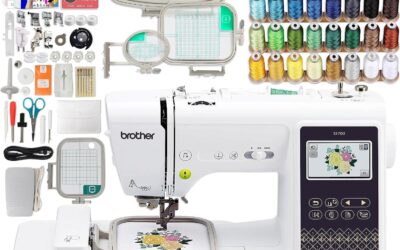
The Brother SE700 Combo Embroidery & Sewing Machine is the natural successor to the popular SE600, tailored for creative hobbyists and beginners ready to explore embroidery. With a compact 4x4-inch embroidery hoop and a vast library of 135 built-in designs, this machine lets you personalize quilts, clothing, and gifts. It is ideal for anyone who wants to dive into embroidery without a dedicated single-purpose machine, all while maintaining robust sewing capabilities.
Standout features include the wireless LAN connectivity that allows you to transfer designs from a computer directly to the machine without USB or fuss. This streamlines the workflow for users who get designs online or from software like PE-Design. The 3.2-inch LCD color touchscreen makes redesigning, rotating, or editing patterns effortless, and the 500 bonus designs from Artspira app expand your creative possibilities. In practice, the machine runs quietly and stitches smoothly, earning consistent high ratings and positive feedback for its beginner-friendliness.
Design and build quality are typical Brother reliable: a metal and plastic frame with a clean white finish. It is a bit bulky and heavy, but the large workspace provides ample room for quilters and garment makers. The bundle includes 40+ accessories, from multiple feet to bobbins and scissors, minimizing immediate additional purchases. The instructional guide and YouTube tutorials help flatten the learning curve mentioned by some users.
Potential drawbacks are minor: the learning curve when switching from mechanical to electronic is real, but manageable with online resources. Some users note that holding threads before stitching remains a manual step, and the machine could be less bulky. However, these are typical trade-offs for an affordable combo machine offering advanced features. The reviews confirm it is an excellent value for its price range.
Overall, the Brother SE700 is a top-tier mid-range combo machine for beginners and hobbyists. It earns a 4.7-star rating from verified buyers, who love its versatility, ease of use, and generous feature set. If you want one machine that does both embroidery and sewing plus connects wirelessly, this is a winner.
Brand: Brother
Model: SE700
Dimensions: 16 x 12 x 8 inches (DxWxH)
Weight: 15 pounds
Embroidery Area: 4x4 inches (10cm x 10cm)
Built-in Designs: 135 embroidery + 103 sewing stitches
Display: 3.2 x 1.8 inch LCD color touchscreen
Connectivity: Wireless LAN enabled
Included: Machine, 4x4 hoop, 40+ accessories including extension table, feet, needles, bobbins, and Case
Compatible Software: Artpira, PE-Design, iBroidery

Pros
- Extensive built-in designs and stitches provide ready-to-use options for various projects
- Wireless connectivity simplifies transferring designs from a computer
- Touchscreen interface makes editing and navigation easy for all skill levels
- Comprehensive bundle includes threads, hoops, and accessories, so little extra purchase needed
- Excellent customer feedback highlights its ease of use and quality stitching
Cons
- Embroidery field limited to 4x4 inches, restricting larger designs
- Does not include embroidery stabilizer, which beginners may need to buy separately
- Some users may find the learning curve steep for advanced features
The Brother SE700 is a powerful combination sewing and embroidery machine designed for hobbyists and beginners who want to explore both crafts without investing in two separate machines. Replacing the popular SE600, this model boasts a refined modern look and a larger workspace while keeping the compact footprint of its predecessor. It comes bundled with four embroidery hoops, a 40-spool thread set, and a variety of presser feet, making it a turnkey solution for anyone starting their sewing and embroidery journey.
With 135 built-in embroidery designs and 103 sewing stitches, the SE700 offers ample creative options for monogramming, decorative patches, and garment construction. The color LCD touchscreen allows for easy on-screen editing, including resizing, rotating, and combining designs. Wireless LAN connectivity enables direct transfer of designs from a PC using free Design Database Transfer software, eliminating the need for USB drives. Real-world users praise the quiet operation and consistent stitch quality across both sewing and embroidery modes.
The machine feels solid with a metal internal frame and plastic housing, weighing 15 pounds for stability during use. The included accessories bundle adds significant value: snap-on feet for various techniques, bobbins, needles, and a detailed manual. The 4x4 embroidery field is the standard for home machines, suitable for most DIY projects like tote bags, pillowcases, and shirts. The foot controller and thread spool net are thoughtful touches that enhance usability.
One drawback is the 4x4 embroidery hoop size, which limits the area for larger designs without re-hooping. Additionally, the SE700 does not include embroidery stabilizer, a necessary consumable for best results. Beginners may need to research stabilizer types and practice hooping technique. The sewing machine interface, while intuitive for embroidery, has its own learning curve for those transitioning from basic mechanical machines.
Overall, the Brother SE700 is an excellent choice for anyone seeking a reliable, feature-rich combo machine without a huge investment. The bundle saves money and time, and the wireless connectivity adds modern convenience. Whether you are personalizing gifts, starting a small business, or just exploring a new hobby, this machine delivers impressive value and performance. We recommend it for its ease of use, comprehensive features, and strong customer satisfaction.

Pros
- Easy to use, even for beginners with no embroidery experience.
- Wireless connectivity for convenient design transfer without cables.
- Large touchscreen makes editing, previewing, and positioning designs simple.
- Great value with many built-in designs, fonts, and included accessories.
- Durable construction and positive user reviews highlight reliability and performance.
Cons
- Embroidery-only machine; it does not function as a sewing machine.
- 4x4 inch hoop size may be limiting for larger projects like jackets or large towels.
- Requires 120V outlet and is intended for US use only, which voids warranty if used elsewhere.
The Brother PE545 is a dedicated wireless embroidery machine designed for beginners and hobbyists who want to add personalized touches to clothing, accessories, and home decor. With a 4x4 inch embroidery field, 135 built-in designs, and a large color touchscreen, it offers a straightforward and enjoyable embroidery experience right out of the box.
Standout features include wireless connectivity via the Artspira mobile app and Design Database Transfer software, allowing you to send custom designs from your phone or computer without USB cables. The 3.7-inch LCD touchscreen lets you drag and drop patterns, make edits, and preview your design in color before stitching. Built-in tutorial videos and an easy needle threading system further lower the learning curve for new users.
The machine is built with a durable metal frame and weighs only 14.1 pounds, making it sturdy yet portable. The included accessory kit is generous, with needles, bobbins, scissors, a seam ripper, and more. Users consistently praise its ease of use, reliability, and value, with many noting they started a small business after mastering the basics.
However, the PE545 is an embroidery-only machine, so it cannot sew seams or perform other sewing tasks. The 4x4 inch hoop is ideal for small projects like monograms and patches but may feel restrictive for larger items. Additionally, it is designed for 120V outlets in the US, and using it elsewhere voids the warranty.
Overall, the Brother PE545 delivers excellent performance and convenience for its price point. It is a smart investment for anyone looking to explore embroidery as a hobby or start a small personalization business. With its wireless capabilities, intuitive touchscreen, and wealth of built-in designs, it makes embroidery accessible and fun.

Pros
- Versatile 2-in-1 machine saves space and money compared to buying separate units.
- Wireless design transfer is quick and convenient, no USB hassle.
- Large touchscreen makes editing and selecting designs intuitive.
- Built-in stitches and designs cover a wide range of projects, from repairs to decorative sewing.
Cons
- Embroidery area is limited to 4x4 inches, which may be too small for larger projects.
- Some users report the touchscreen can be slow to respond at times.
- The included manual lacks detailed instructions for advanced embroidery techniques.
The Brother SE700 is a computerized sewing and embroidery combo machine designed for crafters who want to explore both sewing and embroidery without buying two separate machines. It is an excellent choice for beginners stepping into embroidery as well as intermediate sewists looking for a reliable upgrade.
With 135 built-in embroidery designs, 103 sewing stitches, and wireless LAN capability, the SE700 offers great creative freedom. The wireless feature works seamlessly with the Artspira app and Design Database Transfer software: you can send patterns from your phone or PC directly to the machine. The 3.7-inch color touchscreen allows you to edit, rotate, and preview designs on the fly.
Build quality is typical Brother: sturdy metal frame with durable plastic casing, weighing 15.6 pounds. The automatic needle threader and jam-resistant bobbin are time-savers. The included 8 sewing feet and 4x4 inch embroidery hoop cover most common projects like monogramming, patches, and home decor items.
One drawback is the 4x4 inch embroidery field, which can be limiting for larger designs without a larger hoop accessory. Also, the touchscreen can feel a bit laggy compared to higher-end models. The user manual could be more detailed for advanced embroidery techniques.
Overall, the Brother SE700 delivers excellent value for its price point. It is a versatile, user-friendly machine that grows with your skills. For anyone wanting a reliable sewing and embroidery combo with modern connectivity, the SE700 is a top recommendation.

Pros
- Beginner-friendly with an intuitive interface and guided video tutorials.
- Two hoop sizes provide versatility for small and slightly larger projects.
- WiFi design transfer and free software let you create truly custom embroidery.
- Comprehensive starter kit saves you from buying extra supplies separately.
- Active user community and one-on-one engineer support help you learn and troubleshoot.
Cons
- The 3.9-star average rating suggests some users may experience occasional quality or performance hiccups.
- Embroidery area maxes out at 4x9.25 inches, which may be limiting for larger designs or bulky items.
- As a relatively new brand, long-term reliability and parts availability are less proven than established competitors.
The PooLin EOC03 embroidery machine is purpose-built for beginners who want to dive into home embroidery without the complexity of professional-grade equipment. With a 4x4 and 4x9.25 inch embroiderable area, it balances project variety and ease of use. The included starter kit, WiFi design transfer, and 130 built-in designs mean you can start personalizing clothing and accessories right out of the box.
Standout features include the Institch operating system, which offers clear on-screen navigation and simple editing controls. The wireless design transfer works reliably through the companion software, allowing you to import your own artwork or text. Real-world performance is solid for light-to-medium use, with consistent stitch quality on cotton, polyester, and stabilizer-backed fabrics. The machine runs smoothly and quietly for a home model.
Build quality feels sturdy thanks to the metal frame, yet the machine remains portable at 15 pounds. The hoop change mechanism is straightforward, and bobbin winding is automated. However, the plastic components on the thread stand and thread guide may feel less premium. The included accessories (stabilizers, bobbins, threads) are a nice bonus for absolute beginners.
Potential drawbacks include a learning curve for sizing and positioning designs across different hoop sizes, and the occasional need to adjust tension for thicker fabrics. The customer reviews average 3.9 stars, indicating some reports of software glitches or inconsistent stitch density, though most low ratings relate to user error or expectations. The brand's support team is responsive, offering one-on-one online help, which mitigates these issues.
Overall, the PooLin EOC03 delivers excellent value for hobbyists and first-time embroiderers. If you're looking for an approachable machine with room to grow into custom designs, this model is a strong choice. It may not satisfy advanced users needing large embroidery fields or high-speed production, but for home DIY projects, it hits the right notes of simplicity, versatility, and support.
Brand: Poolin
Model: EOC03
Embroidery Area: 4x4 inches and 4x9.25 inches
Built-in Designs: 130
Built-in Fonts: 8
Connectivity: WiFi design transfer
Dimensions: 15.35 x 18.11 x 16.54 inches
Weight: 15 pounds
Power Source: Corded electric, 110V
Included Components: Machine, table, thread stand, 6 threads, 20 stabilizers, 25 prewound bobbins, tool kit
This machine is ideal for beginners, but consider your typical project size: the 4x9.25 hoop works well for small to medium items like shirt pockets, towels, and bags. If you plan to embroider larger or bulky items (e.g., hoodies back panels), you may need a machine with a bigger hoop. Also, be sure to use quality stabilizers to avoid puckering. The WiFi transfer feature requires a stable network; offline USB transfer is not available. Finally, check that the included threads and bobbins match your preferred colors or purchase additional supplies for diverse projects.

Pros
- unique Bluetooth app integration simplifies design creation and transfer
- narrow free arm makes it easy to embroider on shirts and ready made clothing
- magnetic hoop system reduces damage to fabrics and eliminates hoop marks
- good entry point for beginners who want a modern compact embroidery machine
Cons
- heavy reliance on the Artspira app with limited free features and costly subscription for full functionality
- reported mechanical issues including bobbin housing problems and needle breakage
- slow 400 spm stitch speed and small 4x4 hoop limit project scope and productivity
The Brother Skitch PP1 is a single-needle embroidery machine designed for casual crafters and beginners who want a modern app driven experience. It connects via Bluetooth to the free Artspira mobile app, which serves as the brain for designing and transferring patterns. This machine is best suited for those looking to personalize ready made items like jeans towels and shirts without needing a full size industrial unit.
Its standout feature is the wireless Bluetooth connection that lets you send designs directly from your phone or tablet. The included magnetic 4x4 hoop secures fabric without leaving marks, and the free arm allows you to embroider on sleeves and cuffs easily. With 400 stitches per minute and the ability to import your own embroidery files (PES DST etc.), it offers flexibility for small projects.
However real world performance receives mixed feedback. Many users report reliability issues such as bobbin housings breaking and needles snapping frequently. The machine relies entirely on the Artspira app, and the free version limits you to 20 imported designs. For advanced features like digitizing and cross stitch you must pay for the Artspira+ subscription which adds ongoing cost.
Build quality feels more like a toy than a serious tool according to some reviewers. The small 4x4 hoop limits project size, and the 400 spm speed is slower than dedicated embroidery machines. Positive reviews praise its narrow arm and ease of use for beginners, but the number of negative experiences suggests inconsistencies in quality control.
Verdict: The Brother Skitch is a decent entry level choice if you value app integration and a compact footprint, but be prepared for potential mechanical issues and ongoing subscription costs. It is best for occasional hobbyists who want to dip their toes into embroidery without a large investment, but serious embroiderers should look elsewhere for more robust machines.
Buying Guide
Ease of Setup and Operation
As a beginner, you want a machine that gets you stitching quickly without a steep learning curve. Look for clear on-screen instructions, automatic needle threaders, and simple threading paths. The Brother models we reviewed excel here with intuitive touchscreens and built-in tutorials. The Brother SE700 Sewing and Embroidery Machine features a large 3.7-inch color touchscreen that lets you edit and preview designs before stitching. That kind of clarity reduces mistakes and builds confidence.
Machines like the PooLin EOC03 and the Brother Skitch rely on mobile apps for design transfer. While this makes updates easy, you need to be comfortable with app usage. If you prefer a standalone experience, the Brother PE545 offers a wireless LAN connection but also a USB port for direct file transfer. Consider your comfort level with technology before choosing.
Built-in Designs and Fonts
Having a library of built-in designs means you can start creating right out of the box. Most beginner machines include dozens of patterns, from floral motifs to holiday themes. The Brother PE545 Wireless Embroidery Machine 4×4 Hoop comes with 135 built-in designs and 10 fonts, including Japanese characters. This variety lets you personalize gifts, monogram towels, or add decorative touches without buying additional designs.
For those who enjoy creating their own patterns, the ability to import designs via Wi-Fi or USB is key. The PooLin EOC03 offers 130 built-in designs and 8 fonts, plus Wi-Fi transfer from free embroidery software. The Brother SE700 combo machines include the Artspira app for customizing designs on your mobile device. Evaluate how much you want to rely on pre-made content versus creating your own.
Hoop Size and Flexibility
The standard embroidery area for beginners is 4×4 inches, which works well for monograms, small patches, and pocket details. However, if you want to embroider larger items like towels or the back of a jacket, consider machines that offer additional hoop sizes. The PooLin EOC03 Embroidery Machine 4×4 and 4×9.25 includes a larger hoop option, giving you more creative room. The Brother SE700 bundles come with multiple hoops (from 1×2.5 to 4×6.75 inches), letting you tackle projects of various sizes.
Think about the types of projects you want to make. If you mainly plan to embroider on ready-made clothing like t-shirts and jeans, a standard 4×4 hoop is enough. If you dream of embroidering long banners or entire towel ends, look for machines that support larger frames. Remember that larger hoops require more stabilizer and careful hooping techniques, which come with practice.
Support and Learning Resources
Every beginner needs guidance. Look for machines backed by robust support communities, video tutorials, and responsive customer service. Brother machines come with extensive online resources, and the PE545 includes built-in tutorial videos on the touchscreen. The PooLin EOC03 offers access to a private Facebook community of over 12,000 users, plus YouTube tutorials for setup and beginner projects. These resources can save you hours of frustration. For more tips on maintaining your home equipment, you might find our guide to filters useful for understanding how small parts make a big difference in performance.
Final Thoughts
Choosing the best embroidery machine for beginners comes down to what you value most: versatility, ease of use, or design flexibility. For a powerful combo that grows with your skills, we recommend the Brother SE700 Sewing and Embroidery Machine, which offers sewing and embroidery in one unit with a generous design library and wireless connectivity. If you prefer a dedicated embroidery machine that is simple to use and has a supportive community, the PooLin EOC03 stands out with its larger hoop option, beginner-friendly interface, and active learning resources. Whichever you choose, you are about to unlock a rewarding hobby that lets you personalize everything you own.
Frequently Asked Questions
What is the best embroidery machine for a complete beginner in 2026? The Brother SE700 series is a top choice because it combines sewing and embroidery, includes a large touchscreen, and has 135 built-in designs. For a budget-friendly dedicated embroidery machine, the Brother PE545 offers wireless connectivity and tutorial videos, making it very approachable.
Do I need a separate sewing machine for embroidery? Not necessarily. Combo machines like the Brother SE700 let you sew and embroider with one device. If you already own a sewing machine or only want to embroider, a dedicated embroidery machine like the Brother PE545 or the PooLin EOC03 works well and is often more compact.
Can I use my smartphone to transfer designs to an embroidery machine? Yes, several modern machines support wireless transfer via apps. The Brother SE700 and PE545 work with the free Artspira app, while the PooLin EOC03 uses its own Wi-Fi transfer software. You can also use a USB cable or flash drive on models that have a USB port. For more on connecting devices at home, see our tips on home connectivity.
How large of a design can I embroider with a 4×4 hoop? A 4×4 inch hoop creates designs up to 3.9 x 3.9 inches. That is ideal for monograms, small logos, and patches on shirts, hats, and bags. If you need larger designs, look for machines that support additional hoop sizes, like the PooLin EOC03 with its 4×9.25 inch option, or consider machines that allow you to re-hoop and stitch multi-position designs.
Write Your Review
No reviews yet. Be the first to share your experience!