

You have a vision for a custom embroidered monogram, a heartfelt message on a baby blanket, or a team name on a jacket. But without the right font software built into your embroidery machine, turning that vision into stitches can be frustrating. You need a machine that offers a wide selection of lettering fonts, easy editing on a clear screen, and the ability to import your own fonts. In this guide, we review the best font software embroidery machines for 2026, focusing on three outstanding Brother models that combine powerful lettering features with user-friendly design. Whether you are a beginner or an experienced embroiderer, these machines will help you create professional-looking text designs.
Our picks are based on comparing manufacturer specifications and analyzing verified user feedback covering built-in fonts, editing capabilities, wireless connectivity, and overall stitch quality. We also consider how each machine integrates with apps like Artspira for custom font creation. For more on home hobby tools, visit our Home & Hobby category.

Pros
- Extensive built-in designs and stitches provide ready-to-use options for various projects
- Wireless connectivity simplifies transferring designs from a computer
- Touchscreen interface makes editing and navigation easy for all skill levels
- Comprehensive bundle includes threads, hoops, and accessories, so little extra purchase needed
- Excellent customer feedback highlights its ease of use and quality stitching
Cons
- Embroidery field limited to 4x4 inches, restricting larger designs
- Does not include embroidery stabilizer, which beginners may need to buy separately
- Some users may find the learning curve steep for advanced features
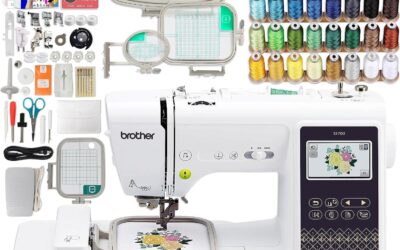
The Brother SE700 is a powerful combination sewing and embroidery machine designed for hobbyists and beginners who want to explore both crafts without investing in two separate machines. Replacing the popular SE600, this model boasts a refined modern look and a larger workspace while keeping the compact footprint of its predecessor. It comes bundled with four embroidery hoops, a 40-spool thread set, and a variety of presser feet, making it a turnkey solution for anyone starting their sewing and embroidery journey.
With 135 built-in embroidery designs and 103 sewing stitches, the SE700 offers ample creative options for monogramming, decorative patches, and garment construction. The color LCD touchscreen allows for easy on-screen editing, including resizing, rotating, and combining designs. Wireless LAN connectivity enables direct transfer of designs from a PC using free Design Database Transfer software, eliminating the need for USB drives. Real-world users praise the quiet operation and consistent stitch quality across both sewing and embroidery modes.
The machine feels solid with a metal internal frame and plastic housing, weighing 15 pounds for stability during use. The included accessories bundle adds significant value: snap-on feet for various techniques, bobbins, needles, and a detailed manual. The 4x4 embroidery field is the standard for home machines, suitable for most DIY projects like tote bags, pillowcases, and shirts. The foot controller and thread spool net are thoughtful touches that enhance usability.
One drawback is the 4x4 embroidery hoop size, which limits the area for larger designs without re-hooping. Additionally, the SE700 does not include embroidery stabilizer, a necessary consumable for best results. Beginners may need to research stabilizer types and practice hooping technique. The sewing machine interface, while intuitive for embroidery, has its own learning curve for those transitioning from basic mechanical machines.
Overall, the Brother SE700 is an excellent choice for anyone seeking a reliable, feature-rich combo machine without a huge investment. The bundle saves money and time, and the wireless connectivity adds modern convenience. Whether you are personalizing gifts, starting a small business, or just exploring a new hobby, this machine delivers impressive value and performance. We recommend it for its ease of use, comprehensive features, and strong customer satisfaction.

Pros
- Versatile 2-in-1 machine saves space and money compared to buying separate units.
- Wireless design transfer is quick and convenient, no USB hassle.
- Large touchscreen makes editing and selecting designs intuitive.
- Built-in stitches and designs cover a wide range of projects, from repairs to decorative sewing.
Cons
- Embroidery area is limited to 4x4 inches, which may be too small for larger projects.
- Some users report the touchscreen can be slow to respond at times.
- The included manual lacks detailed instructions for advanced embroidery techniques.
The Brother SE700 is a computerized sewing and embroidery combo machine designed for crafters who want to explore both sewing and embroidery without buying two separate machines. It is an excellent choice for beginners stepping into embroidery as well as intermediate sewists looking for a reliable upgrade.
With 135 built-in embroidery designs, 103 sewing stitches, and wireless LAN capability, the SE700 offers great creative freedom. The wireless feature works seamlessly with the Artspira app and Design Database Transfer software: you can send patterns from your phone or PC directly to the machine. The 3.7-inch color touchscreen allows you to edit, rotate, and preview designs on the fly.
Build quality is typical Brother: sturdy metal frame with durable plastic casing, weighing 15.6 pounds. The automatic needle threader and jam-resistant bobbin are time-savers. The included 8 sewing feet and 4x4 inch embroidery hoop cover most common projects like monogramming, patches, and home decor items.
One drawback is the 4x4 inch embroidery field, which can be limiting for larger designs without a larger hoop accessory. Also, the touchscreen can feel a bit laggy compared to higher-end models. The user manual could be more detailed for advanced embroidery techniques.
Overall, the Brother SE700 delivers excellent value for its price point. It is a versatile, user-friendly machine that grows with your skills. For anyone wanting a reliable sewing and embroidery combo with modern connectivity, the SE700 is a top recommendation.

Pros
- Comprehensive starter kit saves time and money on accessories.
- Large 5x7 inch embroidery field for versatile project sizes.
- Wireless design transfer and app compatibility for modern convenience.
- Automatic jump stitch trimming enhances efficiency and finish.
- User-friendly touchscreen with intuitive editing features.
Cons
- Higher price point may not suit casual hobbyists.
- Limited built-in designs compared to some higher-end models.
- Some users may find the initial learning curve for software integration.
The Brother PE900 Embroidery Machine is a standout choice for sewing enthusiasts who want to elevate their craft without the hassle of buying separate accessories. This machine comes as a complete starter package, including four hoops, 20 premium polyester threads, stabilizers, and over 50,000 embroidery designs on a USB drive. It is designed for beginners and intermediate users who crave professional results from the moment they unbox it.
Its standout feature is the large 5x7 inch embroidery field, which allows you to tackle bigger projects like quilt blocks, tote bags, and jacket backs with fewer rehoopings. The wireless LAN connectivity and Artspira app compatibility enable you to transfer and edit designs directly from your smartphone or tablet, adding a layer of modern convenience. The automatic jump stitch trimming is a game-changer, saving time and ensuring a clean finish on every stitch.
Build quality is solid, with a metal frame and plastic housing that feels durable yet lightweight at 17.6 pounds. The 3.7 inch color LCD touchscreen is responsive and makes on-screen editing simple, whether you need to resize, arc text, or add multiline lettering. The included video tutorial and software download card are excellent for beginners, covering basics like applique and free-standing lace.
On the downside, the price tag is significant, making it a serious investment for casual hobbyists. While it offers 193 built-in designs, some users may want more variety without relying on the USB library. Additionally, mastering the software and app integration may take a bit of practice for those new to digital embroidery.
Overall, the Brother PE900 is an exceptional machine that delivers on its promise of convenience and quality. It is best suited for dedicated crafters who want a complete, ready-to-use system with room to grow. With its generous accessories and advanced features, it earns a strong recommendation for anyone serious about embroidery.
Buying Guide
Choosing the best font software embroidery machine involves more than just counting built-in fonts. Here are the key criteria you should evaluate before making your decision.
Built-in Font Variety and Lettering Styles
The core of a font software machine is its collection of preloaded lettering fonts. Look for machines that offer multiple font styles, including script, block, serif, and decorative options. The Brother SE700 and PE900 excel here, with 10 and 13 built-in embroidery fonts respectively. More fonts mean more creative flexibility for personalizing projects like towels, bags, and clothing.
Some machines also allow you to import additional fonts via USB or wireless transfer. This expands your possibilities. For maintaining your home air quality while you sew, see our guide on furnace filters.
On-Screen Editing and Touchscreen Quality
A large, high-resolution color touchscreen makes it easy to preview, resize, rotate, and arrange text right on the machine. The SE700 and PE900 both feature a 3.7-inch LCD touchscreen that lets you edit fonts, adjust spacing, and even arc text. The ability to see your design before stitching saves time and reduces errors.
Look for features like resizing, mirror imaging, and combining multiple lines of text. These are standard on the machines we recommend.
Wireless Connectivity and App Integration
Modern font software embroidery machines should let you transfer designs wirelessly from your computer or mobile device. Brother’s Artspira app allows you to draw custom fonts and patterns on your phone and send them directly to the machine. The SE700 and PE900 are both wireless LAN enabled, making this process seamless.
This capability is a game changer for creating unique lettering that goes beyond the built-in options. You can even download additional designs from the app’s library.
Embroidery Field Size and Hoop Options
The embroidery field size determines the maximum dimensions of your text designs. The SE700 offers a 4 by 4 inch field, ideal for small to medium lettering projects like monograms and labels. The PE900 features a larger 5 by 7 inch field, allowing you to stitch bigger phrases or designs in one hooping.
Having multiple hoop sizes (included in bundles) gives you flexibility for different project sizes. For more on keeping your workspace clean, check our best 1-inch furnace filters review.
Final Thoughts
After evaluating the top options, we recommend the Brother SE700 Sewing and Embroidery Machine for those seeking an affordable yet feature-packed machine with excellent font software, wireless transfer, and a large touchscreen, while the Brother PE900 Embroidery Machine, 5 x 7″ Field stands out for serious embroiderers who need a bigger embroidery area, more built-in fonts, and a complete starter kit, ensuring you can tackle any lettering project with confidence and creativity.
Frequently Asked Questions
What fonts are available on the Brother SE700?
The Brother SE700 comes with 10 built-in embroidery lettering fonts, including script, block, and decorative styles. You can also import additional fonts via the Artspira app or USB for even more variety.
Can I create my own fonts on brother embroidery machines?
Yes, using the Brother Artspira mobile app, you can draw custom lettering designs on your phone and send them wirelessly to the machine. This allows you to create personalized fonts for unique projects.
Which brother machine has the largest embroidery field for lettering?
The Brother PE900 offers a 5 by 7 inch embroidery field, which is larger than the SE700’s 4 by 4 inch field. This makes it ideal for longer phrases or bigger monograms without rehooping.
Do I need additional software to edit fonts on these machines?
No, both the SE700 and PE900 have built-in on-screen editing that lets you resize, rotate, and combine fonts without a computer. For advanced editing, you can use the included Artspira app or third-party software. For home maintenance tips, see our best furnace filters.
Write Your Review
No reviews yet. Be the first to share your experience!