

You have a great idea for custom stickers, labels, or decals, but you need a machine that can print and cut them with precision. Whether you are starting a small business or just want to personalize your water bottles and laptop, a print and cut vinyl machine turns your digital designs into real, durable products. In this guide, we review the best print and cut vinyl machines of 2026, covering models from Cricut, VEVOR, and Likcut. We help you choose the right one for your projects and skill level. If you are new to this hobby, check out our Craft & Cutting Machines category for more resources.

Pros
- Fast cutting speed (2x faster than previous models) saves time on large projects
- Versatile material compatibility handles over 300 materials for diverse crafting
- All-inclusive bundle with essential starter materials eliminates guesswork
- High precision print-then-cut ensures professional sticker quality
- Durable waterproof sticker paper included for long-lasting results
Cons
- Requires Cricut Design Space subscription for advanced features and cloud access
- Some specialized tools (e.g., engraving, foiling) are sold separately
- Initial purchase price may be high for casual hobbyists
The Cricut Maker 4 Ultimate Sticker Making Bundle is a comprehensive kit designed for crafters and small business owners who want to create custom stickers and decals. It includes the Seashell-colored Maker 4 machine, printable sticker paper, adhesive vinyl, and essential tools, making it a ready-to-use solution for print-then-cut projects.
The Maker 4 cuts up to two times faster than its predecessors, handling over 300 materials from vinyl to leather. Its print-then-cut functionality works seamlessly with Cricut Design Space and an inkjet printer, delivering precise cuts around printed designs. The included waterproof sticker paper ensures durable, long-lasting results suitable for water bottles and packaging.
The machine boasts a sturdy build and a sleek Seashell color. It supports 13+ tools for writing, scoring, foiling, and engraving, though some are sold separately. Smart Materials allow matless cuts up to 12 feet, expanding creative possibilities. The bundle provides everything needed to start immediately.
One potential drawback is the reliance on Cricut Design Space software, which requires a subscription for advanced features. Additionally, the initial investment may be steep for casual hobbyists. Some users may need to purchase extra tools for specialized tasks.
Overall, the Cricut Maker 4 Ultimate Sticker Making Bundle delivers exceptional value for those serious about sticker making. Its speed, versatility, and all-in-one package make it a top choice for Etsy sellers and DIY enthusiasts. Highly recommended for its ease of use and professional results.
Brand: Cricut, Model: z20-11084-N4, Operation Mode: Automatic, Compatible Devices: Computers, Mobile Devices, Inkjet Printers, Included Components: Cricut Maker 4 Ultimate Sticker Making Bundle with Variety Materials, Warranty: 1 Year Against Manufacturer Defects.

Pros
- Easy setup and user-friendly for beginners.
- Compact and portable design for small spaces.
- Versatile: can cut, write, draw, foil, and score.
- Works with your printer for full-color sticker projects.
- Bundle includes a wide variety of materials to get started.
Cons
- Requires a home inkjet printer for full-color sticker functionality.
- Some users reported a slight learning curve with material loading.
- The machine may occasionally need a reset if it stops feeding material.
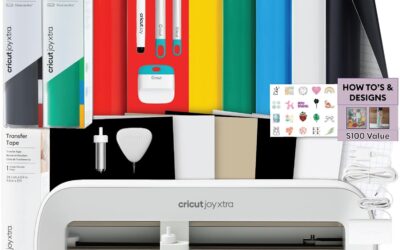
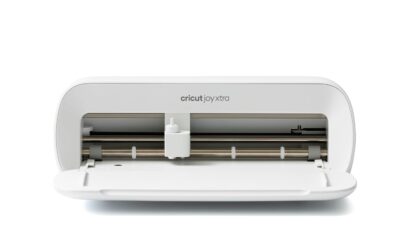
The Cricut Joy 2 Essential Bundle is the next generation of Cricut's ultra-compact cutting machine, designed for quick, everyday projects. It's ideal for beginners and hobbyists who want to create custom cards, simple decals, labels, and full-color stickers without a steep learning curve.
Standout features include its ability to work with any home inkjet printer to produce precision-cut full-color stickers. The machine automatically recognizes printed images and cuts around them accurately. Real-world performance from user reviews highlights easy setup and reliable operation after a short adjustment period, with many users praising the bundle's material variety for immediate project creation.
Design and build quality are typical of Cricut: the machine is lightweight at just over 2 pounds and highly portable. The compact footprint fits easily on a desk or shelf. Build materials are sturdy plastic, and the bundled tools feel durable for regular use.
Potential drawbacks include a slight learning curve when loading materials, and occasional hiccups like material feeding issues that require a simple reset. Some customers have reported receiving used units sold as new, so buy from reputable sellers. The machine also requires a printer for full-color stickers, which may add cost if you don't already have one.
Overall, the Cricut Joy 2 Essential Bundle offers excellent value for beginners and occasional crafters. Its portability, ease of use, and the generous starter materials make it a smart choice for anyone wanting to explore die-cut crafting without a large investment.
Brand: Cricut
Model: Joy 2 (Essential Bundle + Rainbow Sampler)
Cutting Width: 4.5 inches (11.4 cm)
Machine Weight: 2 lbs (0.91 kg)
Dimensions (D x W x H): 8.75 x 16.3 x 7.25 inches
Connectivity: Bluetooth wireless
Compatible Materials: 75+ materials including vinyl, iron-on, cardstock, printable materials
Included Components: Cricut Joy 2 machine, Smart Vinyl, Smart Iron-On, Value Cardstock, Insert Card Sets, Printable Vinyl, and essential tools
Warranty: 1 Year Limited Manufacturer Warranty on machine
System Requirements: Mobile phone, tablet, or computer with Bluetooth and high-speed internet

Pros
- Includes free design software with no subscription needed
- Large built-in design library (20,000+ resources)
- Cuts, writes, and scores in one device
- Wireless and wired connectivity options
- Works with various materials for diverse projects
Cons
- Some users report needing a cutting mat for best results
- Included software may have limited Mac/Linux support (third-party alternatives work)
- Pen holder may not accommodate larger pens without modification
The VEVOR 12-inch vinyl cutting machine is a feature-rich die-cut machine designed for crafters, hobbyists, and small business owners who want to create custom stickers, cards, decals, and more. With over 20,000 built-in design resources and free design software, it eliminates the need for recurring subscriptions, making it an attractive option for budget-conscious creators.
Standout features include the included software that works online or offline, supporting PNG, JPG, SVG, and TIF files for easy image import. The 3-in-1 capability allows you to cut, write, and score with a simple switch, letting you handle detailed patterns and folded projects without extra tools. Its compatibility with Mac, Windows, Android, and iOS via USB, Bluetooth, or USB drive offers unmatched flexibility.
In real-world use, the machine delivers clean cuts on vinyl, cardstock, heat transfer paper, and more. Users praise its accuracy and ease of use, especially for large-scale projects. The 12-inch width handles most standard materials, and the button and screen interface makes operation straightforward for beginners.
Build quality is solid with ABS and Q235 materials, though the machine is relatively heavy at 18.1 pounds. Some users note that a cutting mat is recommended to prevent vinyl from wrapping around the roller bar, and the included pen holder may not fit larger pens without modifications. Additionally, while the software works well on Windows, Mac and Linux users may need third-party options like Sure-Cuts-a-Lot or InkCut.
Overall, the VEVOR vinyl cutter offers excellent value for its price, combining a huge design library, versatile connectivity, and multi-functionality. It is best suited for crafters who want a reliable, cost-effective machine for everyday DIY projects, though those needing advanced software support or larger pen compatibility should consider potential workarounds.
Brand: VEVOR
Model: Smart3
Cutting Width: 12 inches
Active Surface Area: 144 square inches
Connectivity: USB, Bluetooth, USB drive
Compatible Operating Systems: Mac, Windows, Android (5.1+), iOS (11.0+)
Supported File Formats: PNG, JPG, SVG, TIF
Included Software: Free design software (online/offline)
Built-in Design Resources: 20,000+
Material Compatibility: Vinyl, heat transfer paper, cardstock, foil, specialty paper
Functions: Cut, write/draw, score
Product Dimensions: 22.8 x 7.36 x 6.61 inches
Weight: 18.1 pounds
Material: ABS, Q235
Color: Blue
Input Voltage: 240 volts

Pros
- AI text-to-design saves beginners from learning graphic software.
- Exceptional cut accuracy (0.2mm) for professional-looking stickers.
- Simple 3-step process reduces time from idea to finished product.
- Wide 8.5-inch cutting width handles standard paper and larger projects.
- Reliable wired and wireless connections for flexible workspace setup.
Cons
- AI design generation requires a stable internet connection for cloud processing, limiting offline use.
- The included vinyl starter bundle is small; additional materials are needed for larger projects.
- Plastic construction may feel less robust than metal machines, though it keeps the weight manageable.
The Likcut S41 is a vinyl cutter machine that brings AI-powered sticker making to crafters of all skill levels. With its ability to turn voice commands or text prompts into custom designs, it targets anyone who wants to create personalized stickers, room decor, or HTV projects without mastering complex software. The machine is especially suited for adults who enjoy DIY crafts and want quick, professional results.
The standout feature is the 3-step workflow: design in the app, cut with micro-precision, and peel. The AI generation works surprisingly well for simple prompts, though it relies on an internet connection. The cut accuracy of 0.2mm is reliable for intricate patterns, and the expanded 8.5-inch width handles US letter materials in one pass, saving time on large stickers. Dual-mode connectivity (USB-C and Bluetooth 5.0) ensures a stable link during cutting, reducing the risk of errors.
Build quality is a mixed bag. The light blue plastic body keeps the machine lightweight at 3.9 kg, but it doesn't feel as premium as metal alternatives. The included vinyl sample pack is basic, so plan to buy more for serious projects. The one-touch control screen is intuitive and provides clear feedback, making operation straightforward even for first-time users.
Potential drawbacks include the internet dependency for AI features and the limited starter materials. The plastic construction may also raise durability concerns for heavy use, though it's fine for most home crafters. Additionally, the print-then-cut function works best with compatible materials like back print film and glossy sheets.
Overall, the Likcut S41 is a solid choice for crafters who value speed and simplicity. Its AI design tool and precise cutting make it a time-saver for creating custom stickers and decor. While it has minor limitations, the combination of features at this price point offers excellent value for hobbyists and small business owners alike.
Buying Guide: What to Look For in a Print and Cut Vinyl Machine
Print Then Cut Capability
Not all vinyl cutters can print and cut. A true print then cut machine works with your home inkjet printer: you print your design onto special printable vinyl or sticker paper, then load it into the cutter. The machine uses registration marks to cut precisely around your design. This feature is essential for creating full-color stickers, labels, and decals. All four products in our list offer this function, but the implementation varies. The Cricut models integrate seamlessly with Cricut Design Space, while the Likcut S41 uses its own app with AI image generation.
Cutting Width and Material Compatibility
Consider the maximum material width you will use. The Cricut Maker 4 can cut up to 12 inches wide and handles over 300 materials, including fabric and leather. The Cricut Joy 2 is more compact at 4.5 inches, ideal for quick projects. The VEVOR machine offers 12 inches of cutting width and works with vinyl, cardstock, and heat transfer paper. The Likcut S41 has an 8.5-inch width, designed to handle US Letter size in one pass. Think about your typical projects: if you plan to make large decals or sell products, a wider machine saves time.
Ease of Use and Software
You want a machine that is easy to set up and use. The Cricut Joy 2 is the most beginner-friendly, with a simple app and Bluetooth connectivity. The Cricut Maker 4 offers more advanced features but still uses the intuitive Design Space software. The VEVOR machine includes free design software with no subscription, and it works with multiple file formats. The Likcut S41 stands out with a 3-step workflow and voice-to-design AI. For those who prefer offline work, the VEVOR model supports USB drive access. If you want to explore more home hobby tools, visit our Home & Hobby section.
Build Quality and Support
Durability matters when you cut frequently. The Cricut machines are known for robust build and excellent customer support. VEVOR offers a solid machine with a button and screen interface, and Likcut provides micro-precision control with a 0.2mm accuracy tolerance. Check the warranty and online community before buying. A vibrant user community can help you troubleshoot and find project ideas. For maintaining a clean workspace, you might also appreciate our guide on best air filters for home furnace to keep dust away from your crafts.
Final Thoughts
Choosing the right print and cut vinyl machine depends on your project scale and budget. For a comprehensive bundle that includes everything you need to start a sticker business, we recommend the Cricut Maker 4 Cutting Machine Ultimate Beginner with its wide material support and print then cut functionality. If you prefer a compact, affordable machine for quick projects and occasional use, the Cricut Joy 2 Essential Bundle + Rainbow Sampler is a great choice. Both offer reliable performance and access to a huge library of designs. Whichever you pick, you will enjoy turning your ideas into custom stickers and decals in no time.
Frequently Asked Questions
Can I use any printer with a print and cut vinyl machine?
Yes, you need a standard home inkjet printer. Laser printers may not work because the registration marks require inkjet printing. The machines are designed to work with printable vinyl or sticker paper that you feed through your printer first.
Do I need a subscription to use these machines?
Not necessarily. Cricut machines offer a free basic Design Space account with thousands of images and fonts. A paid Cricut Access subscription unlocks more content. The VEVOR machine includes free design software with no recurring fees. The Likcut S41 app is free to use with its AI features.
What materials can a print and cut machine handle?
Most machines cut vinyl, cardstock, iron-on, and printable materials. The Cricut Maker 4 can cut over 300 materials including fabric, leather, and wood veneer. Always check the manufacturer’s material list for your specific model.
Are these machines suitable for small businesses?
Yes, many Etsy sellers use print and cut machines to produce custom stickers, labels, and decals. The Cricut Maker 4 bundle is especially designed for small business use with bulk cutting capabilities. For more tips on setting up your craft business, explore our Craft & Cutting Machines category.
Write Your Review
No reviews yet. Be the first to share your experience!