

You have invested in a Brother embroidery machine, but you quickly realize the built-in designs only go so far. Without the right software, you are stuck with the same motifs and fonts, unable to customize or create something truly personal. Whether you want to add monograms to baby blankets, digitize your own logo, or edit existing patterns, the right embroidery software is the key to unlocking your machine’s full creative potential. In this guide, we have evaluated the top software options to help you choose the best tool for your needs in 2026.
We understand the challenges of navigating the world of embroidery software, especially with terms like “digitizing” and “lettering.” That is why we have assessed each program based on ease of use, feature set, and compatibility with Brother machines. For more on choosing the right hardware, check out our Home & Hobby category. Now, let’s dive into the best software for Brother embroidery machines this year.

Pros
- Easy learning curve with intuitive interface and plenty of YouTube tutorials.
- Affordable modular pricing compared to traditional embroidery software.
- Excellent customer support with quick and helpful responses.
- Powerful resizing and lettering capabilities that preserve stitch integrity.
- Compatible with a wide range of machine formats and cutting machines.
Cons
- Does not convert JPG or other graphics to embroidery designs (requires separate StitchArtist software).
- Official website can be confusing for new users when navigating software versions and tutorials.
- Price may feel high for occasional hobbyists, though justifiable by the features offered.
Embrilliance Essentials is a modular embroidery software designed for both Mac and PC users who want to take full control of their machine embroidery projects. It is specifically built for those who already have embroidery stitch files and need a powerful yet approachable tool to resize, add lettering, and combine designs. Whether you are a seasoned embroiderer or a beginner, this software provides the essential features to customize your work without the complexity and cost of traditional programs.
The standout capability is the ability to resize any embroidery stitch file with automatic stitch recalculation. This means your designs scale up or down smoothly without distorting the stitching quality. The lettering tools are equally impressive, offering Multi-Line, Monogram, Circle, and Spiral modes, plus 21 quality fonts out of the box. You can also purchase additional BX fonts from a wide community of creators online, making your projects truly unique. Overlapping designs with automatic removal of underlying stitching is another time-saving feature that works flawlessly.
In real-world use, the software proves to be highly intuitive. Many users report a quick learning curve, partly thanks to the abundance of YouTube tutorials and responsive customer support. Saving designs in your specific machine format is straightforward, and exporting appliques for ScanNCut or Silhouette cutting machines adds extra versatility. Free, downloadable updates ensure you stay current with the latest OS versions without extra cost.
A notable limitation is that Embrilliance Essentials does not convert JPG or other graphic images into embroidery designs. For that, you would need the company's StitchArtist series. Some users have also found the official website confusing when trying to differentiate software versions or locate version-specific tutorials. While the price is reasonable for the features offered, occasional hobbyists may find it a bit steep compared to free or basic alternatives.
Overall, Embrilliance Essentials is a must-have addition for anyone serious about machine embroidery. It delivers professional results with minimal hassle, backed by strong community support and a modular approach that lets you grow your toolkit as needed. If you already have designs to work with and want to personalize them with ease, this software is an excellent investment.
Brand: Embrilliance
Product Name: Essentials
Compatibility: Windows and MacOS (current operating systems)
Included Components: 21 fonts, disk-free installer
Key Features: Resize with stitch recalculation, Multi-Line/Monogram/Circle/Spiral lettering, overlap with auto removal, export to machine formats and cutting machines
Note: Does not convert JPG or graphics to embroidery designs
Manufacturer: Briton Leap
Model Number: ABCD (Part B1510)

Pros
- Extensive built-in designs and stitches provide ready-to-use options for various projects
- Wireless connectivity simplifies transferring designs from a computer
- Touchscreen interface makes editing and navigation easy for all skill levels
- Comprehensive bundle includes threads, hoops, and accessories, so little extra purchase needed
- Excellent customer feedback highlights its ease of use and quality stitching
Cons
- Embroidery field limited to 4x4 inches, restricting larger designs
- Does not include embroidery stabilizer, which beginners may need to buy separately
- Some users may find the learning curve steep for advanced features
The Brother SE700 is a powerful combination sewing and embroidery machine designed for hobbyists and beginners who want to explore both crafts without investing in two separate machines. Replacing the popular SE600, this model boasts a refined modern look and a larger workspace while keeping the compact footprint of its predecessor. It comes bundled with four embroidery hoops, a 40-spool thread set, and a variety of presser feet, making it a turnkey solution for anyone starting their sewing and embroidery journey.
With 135 built-in embroidery designs and 103 sewing stitches, the SE700 offers ample creative options for monogramming, decorative patches, and garment construction. The color LCD touchscreen allows for easy on-screen editing, including resizing, rotating, and combining designs. Wireless LAN connectivity enables direct transfer of designs from a PC using free Design Database Transfer software, eliminating the need for USB drives. Real-world users praise the quiet operation and consistent stitch quality across both sewing and embroidery modes.
The machine feels solid with a metal internal frame and plastic housing, weighing 15 pounds for stability during use. The included accessories bundle adds significant value: snap-on feet for various techniques, bobbins, needles, and a detailed manual. The 4x4 embroidery field is the standard for home machines, suitable for most DIY projects like tote bags, pillowcases, and shirts. The foot controller and thread spool net are thoughtful touches that enhance usability.
One drawback is the 4x4 embroidery hoop size, which limits the area for larger designs without re-hooping. Additionally, the SE700 does not include embroidery stabilizer, a necessary consumable for best results. Beginners may need to research stabilizer types and practice hooping technique. The sewing machine interface, while intuitive for embroidery, has its own learning curve for those transitioning from basic mechanical machines.
Overall, the Brother SE700 is an excellent choice for anyone seeking a reliable, feature-rich combo machine without a huge investment. The bundle saves money and time, and the wireless connectivity adds modern convenience. Whether you are personalizing gifts, starting a small business, or just exploring a new hobby, this machine delivers impressive value and performance. We recommend it for its ease of use, comprehensive features, and strong customer satisfaction.

Pros
- Versatile 2-in-1 machine saves space and money compared to buying separate units.
- Wireless design transfer is quick and convenient, no USB hassle.
- Large touchscreen makes editing and selecting designs intuitive.
- Built-in stitches and designs cover a wide range of projects, from repairs to decorative sewing.
Cons
- Embroidery area is limited to 4x4 inches, which may be too small for larger projects.
- Some users report the touchscreen can be slow to respond at times.
- The included manual lacks detailed instructions for advanced embroidery techniques.
The Brother SE700 is a computerized sewing and embroidery combo machine designed for crafters who want to explore both sewing and embroidery without buying two separate machines. It is an excellent choice for beginners stepping into embroidery as well as intermediate sewists looking for a reliable upgrade.
With 135 built-in embroidery designs, 103 sewing stitches, and wireless LAN capability, the SE700 offers great creative freedom. The wireless feature works seamlessly with the Artspira app and Design Database Transfer software: you can send patterns from your phone or PC directly to the machine. The 3.7-inch color touchscreen allows you to edit, rotate, and preview designs on the fly.
Build quality is typical Brother: sturdy metal frame with durable plastic casing, weighing 15.6 pounds. The automatic needle threader and jam-resistant bobbin are time-savers. The included 8 sewing feet and 4x4 inch embroidery hoop cover most common projects like monogramming, patches, and home decor items.
One drawback is the 4x4 inch embroidery field, which can be limiting for larger designs without a larger hoop accessory. Also, the touchscreen can feel a bit laggy compared to higher-end models. The user manual could be more detailed for advanced embroidery techniques.
Overall, the Brother SE700 delivers excellent value for its price point. It is a versatile, user-friendly machine that grows with your skills. For anyone wanting a reliable sewing and embroidery combo with modern connectivity, the SE700 is a top recommendation.
Pros
- Spacious 5x7 inch hoop for larger designs.
- Wireless LAN connectivity for convenient file transfer.
- Extensive built-in design library with 193 patterns and 13 fonts.
- User-friendly touchscreen with editing capabilities.
- Reliable Brother quality backed by a 25-year warranty on the chassis.
Cons
- Embroidery-only machine, does not function as a sewing machine.
- Requires firmware update and USB drive (not included) to access free Artspira designs.
- Designed for 120V US electrical systems; use elsewhere may void warranty.
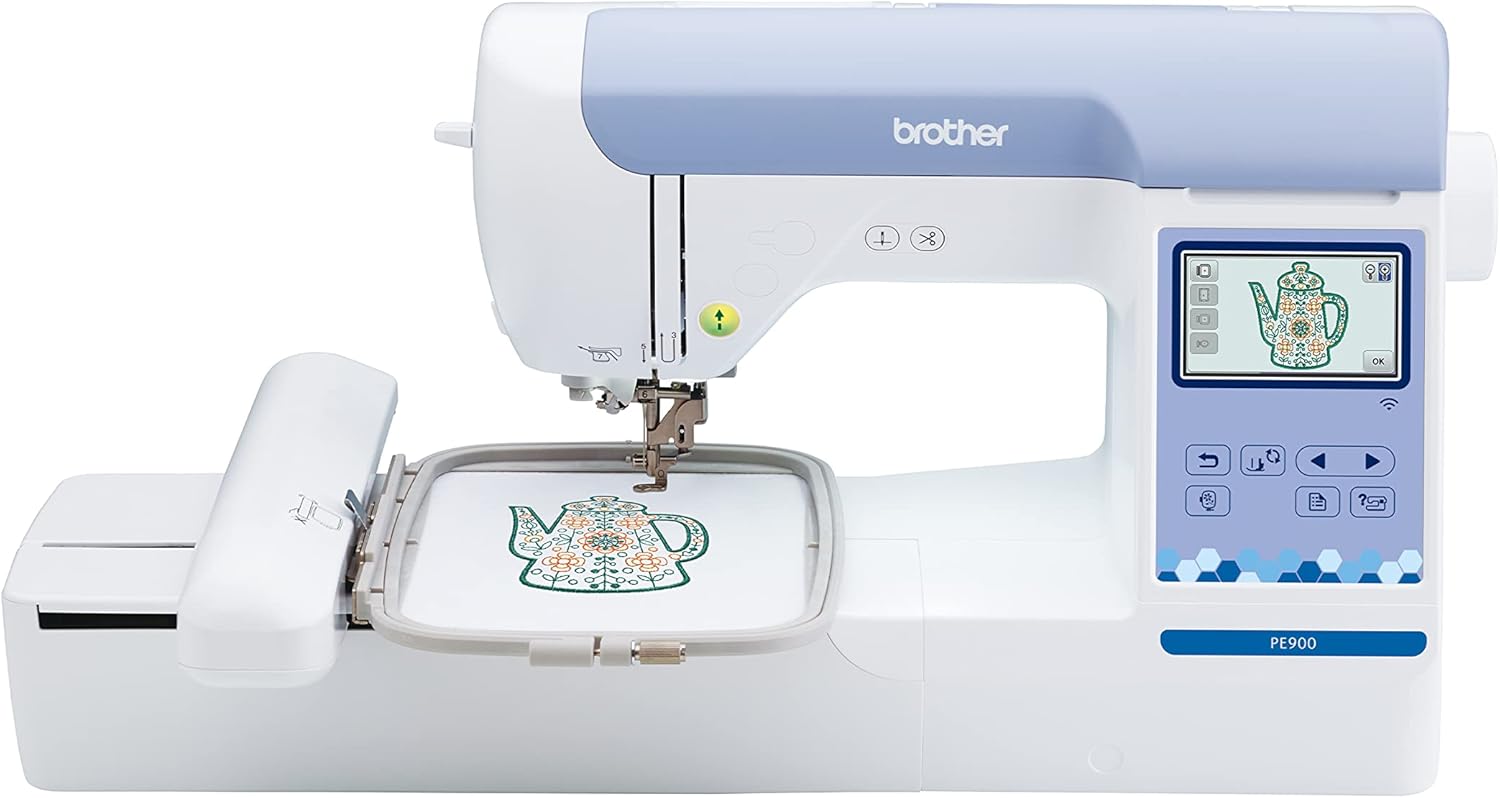
The Brother PE900 is a dedicated embroidery machine that focuses solely on stitching beautiful designs. It is perfect for home embroiderers who want a reliable, easy-to-use machine for larger projects like jackets, bags, and quilts. With its 5x7 inch embroidery field, you have plenty of room to create impressive pieces without being limited to small hoops.
Standout features include wireless connectivity via WLAN, which lets you transfer designs from your PC or the Artspira mobile app without needing a USB drive. The 193 built-in designs and 13 fonts give you a great starting point, and the 50 free bonus designs from the app expand your options. The large 3.7 inch color touchscreen makes editing intuitive: you can rotate, resize, mirror, and combine designs before stitching. Real-world performance is excellent, with users praising the automatic needle threader, color sort function, and jump stitch trimming that save time and reduce frustration.
Build quality is solid, typical of Brother machines. The machine is lightweight at 21 pounds and easy to set up. The included accessories like multiple bobbins, needles, and a dust cover add value. The 25-year warranty on the chassis and lifetime technical support provide peace of mind.
One drawback is that the PE900 is an embroidery-only machine, so if you need a sewing machine as well, you will need a separate unit. Also, to access the free Artspira designs, you must update the firmware using a USB drive (not included) and download the app. Some users might find the initial setup slightly involved, but the on-screen tutorials help.
Overall, the Brother PE900 offers an excellent balance of features, ease of use, and value for home embroiderers. It is a workhorse that can handle frequent use and larger projects. If you are looking for a dedicated embroidery machine with wireless convenience and a generous hoop size, the PE900 is a top choice.
Brand: Brother
Model: PE900
Machine Type: Dedicated embroidery machine
Embroidery Field: 5 x 7 inches (13 x 18 cm)
Built-in Designs: 193 (including 10 frame designs) plus 50 free from Artspira app
Built-in Fonts: 13 (9 English, 3 Japanese, 1 Cyrillic)
Display: 3.7 inch color LCD touchscreen
Connectivity: Wireless LAN, USB port
Special Features: Automatic needle threader, color sort, jump stitch trimming, on-screen editing
Dimensions: 17 x 10 x 12 inches (DxWxH)
Weight: 21 pounds
Power: 120V, 60Hz (US only)
Warranty: 25 years on chassis, 2 years on electronics, 1 year on parts and labor

Pros
- Large embroidery field accommodates sizable projects
- Comes with valuable software and magnetic hoop
- Wireless design transfer eliminates need for cards or USB drives
- Automatic thread trimming saves time and reduces manual work
- User-friendly touchscreen with intuitive editing options
Cons
- Software may have a learning curve for beginners
- Some users report occasional software compatibility issues
- Plastic construction may feel less premium than metal machines
The Brother NQ1700E is a single-needle embroidery machine designed for crafters and small business owners who need a larger work area. With a 6x10 inch embroidery field, it can handle projects that smaller machines cannot, such as jacket backs, tote bags, and quilt blocks. It comes bundled with the BES Blue software (valued at $399) and a magnetic sash frame hoop (valued at $299), making it a comprehensive package for serious embroiderers.
Standout features include a 4.85 inch full-color LCD touchscreen that allows you to position, rotate, reflect, and trace designs directly on the screen. The wireless connectivity lets you send designs from your computer without cables or memory cards. The automatic thread trimming function cuts both upper and lower threads at each color change, reducing manual trimming and saving time. The machine includes 258 built-in designs and 199 fonts, with access to additional licensed patterns via iBroidery.
Real-world performance is strong: users report precise, even stitches and a relatively easy learning curve for those familiar with sewing or embroidery. The magnetic hoop simplifies hooping of materials up to 2mm thick, making it great for delicate fabrics. The machine is quiet and operates smoothly, though some users note that stitch quality depends on the digitized design file.
Build quality is solid but the machine is constructed primarily of plastic, which may not feel as durable as metal-framed competitors. The included BES Blue software is powerful but has a learning curve, and one user expressed frustration with its complexity. The machine is also relatively heavy at 27 pounds, so it is not highly portable.
Overall, the Brother NQ1700E is an excellent choice for embroiderers who need a large field and value the included software and accessories. It offers professional-grade features at a competitive price point, making it a smart investment for those ready to expand their creative capabilities.
Brand: Brother
Model: NQ1700E
Embroidery Field: 6 x 10 inches
Built-in Designs: 258
Built-in Fonts: 199
Display: 4.85 inch full-color LCD touchscreen
Connectivity: Wireless (WiFi)
Thread Trimming: Automatic jump stitch cutting
Included Software: BES Blue (retail value $399)
Included Hoop: Magnetic Sash Frame SAMF180 (5 x 7 inch, retail value $299)
Weight: 27 pounds
Dimensions: 17.62 x 29.3 x 13.87 inches
Power Source: Battery powered
Color: Blue
Material: Plastic

Pros
- Easy to learn and use, even for beginners
- Large library of fonts and designs provides instant creative options
- Compatible with Brother and many other embroidery machine brands
- Word Collage and monogram tools offer unique creative possibilities
Cons
- Limited ability to create original designs or add shapes to existing ones
- Basic editing tools may not satisfy advanced users seeking full design control
- Only a few customer reviews available, limiting feedback depth
The Brother BES Blue Edition is embroidery and lettering software designed for hobbyists and home embroiderers who want to add text and decorative elements to their projects without a steep learning curve. It is best suited for those who prefer ready-made designs and fonts rather than building artwork from scratch.
Standout features include 199 built-in digitized fonts, 800+ embroidery designs, and a Word Collage tool that generates text-based patterns. The monogram designer is intuitive, allowing users to combine fonts, layouts, and thread colors effortlessly. Real-world performance is reliable, with smooth file imports and exports across multiple formats like .pes, .jef, and .dst.
The software interface is clean and straightforward, making navigation simple even for first-time users. Editing tools such as resize, reshape, and merge work well for basic adjustments. However, the software does not support creating original shapes or adding elements like boxes around designs, which limits its use for custom digitizing.
Drawbacks are notable for advanced users: the software is more about customization of existing assets than full design creation. The negative review highlights this limitation. Additionally, with only a few reviews available, long-term reliability is less documented.
Overall, the Brother BES Blue Edition is a solid choice for embroiderers who prioritize ease of use and a vast library of fonts and designs over deep creative control. It offers good value for its price point, especially for monogram and lettering projects.

Pros
- Beginner-friendly wizard guides design creation.
- Large library of built-in line art and fill patterns.
- Compatible with large hoop sizes for bigger projects.
- Allows adding text and creating appliqué patches.
- Affordable entry-level digitizing software.
Cons
- Not Mac compatible; PC only.
- Some users report activation code confusion and initial download issues.
- Limited editing capabilities; cannot draw custom shapes, only convert line art.
Brother Stitch Express Auto Digitizing Software is designed for embroidery beginners who want to create custom designs without a steep learning curve. The built-in wizard guides you through converting line art into embroidery files compatible with Brother machines and hoops up to 10x16 inches.
With over 60 built-in line art images and 14 fill patterns, the software offers a solid starting point for simple logos, monograms, and appliqué patches. Users can also import their own line art, though bold lines and high contrast work best. The ability to add text with three fonts and modify design dimensions adds flexibility.
The software interface is straightforward, but some users find the icons and workflow less intuitive than premium alternatives. The physical package includes a disc and activation code, but initial setup may require contacting customer support if the code is not recognized. The software is PC only, which limits Mac users.
A notable drawback is the lack of advanced editing features; you cannot draw custom shapes or adjust stitch density in detail. Some customers report that the automatic digitizing produces a 'scribble' effect on curves. Additionally, the activation process has caused frustration for a few buyers.
Overall, Brother Stitch Express is a cost-effective entry point for hobbyists wanting to digitize simple designs quickly. It delivers on its promise of ease for novices, but experienced users may find it limiting. For basic embroidery projects and learning the digitizing process, it is a reasonable choice.
Brand: Brother
Model: SAEXPRESS
Compatibility: PC only (Windows)
Hoop Size: Up to 10 x 16 inches
Included: Software, 60+ line art designs, 14 fill patterns
UPC: 012502655626
Item Dimensions: 0.1 x 6.2 x 9.55 inches
Buying Guide: What to Look for in Embroidery Software for Brother Machines
Compatibility with Your Brother Machine
Not all software works with every Brother model. Some programs, like Embrilliance Essentials, Embroidery Software, are designed to work across Mac and PC and can save designs in multiple formats (.pes, .dst, .jef) that Brother machines read. Others are specifically tuned for Brother’s ecosystem. Always check that the software supports your machine’s native file format and connectivity (USB or wireless).
For wired models, a simple USB transfer works. For newer machines like the Brother SE700 and PE900 with wireless LAN, look for software that supports file transfer via Wi-Fi for a cable-free workflow.
Digitizing Capabilities: Creating Your Own Designs
If your goal is to turn images into stitch files, you need digitizing software. Options range from basic auto-digitizing tools like Brother SAEXPRESS – Stitch Express, which guides you through converting line art, to advanced suites like Brother BES Blue Edition Embroidery & Lettering that give you full control over stitch types, underlay, and sewing order. For beginners, a wizard-driven approach is ideal. For professionals, manual digitizing offers limitless precision.
Lettering and Monogramming Features
Adding text to projects is one of the most common uses for embroidery software. Look for programs with multiple fonts, the ability to curve text, and monogram modes. Embrilliance Essentials, for example, includes 21 fonts and supports monogram, multi-line, and circle text. Advanced options like BES Blue offer 199 built-in digitized fonts and a word collage feature for creative layouts. If lettering is your priority, a dedicated lettering module saves time and frustration.
Editing, Resizing, and Design Management
You might want to combine designs, resize them, or change colors. The best software for Brother embroidery machines includes intuitive editing tools. Key features to look for: automatic stitch recalculation when resizing (so stitches do not distort), the ability to overlap designs and remove hidden stitches, and color sort functions to reduce thread changes. For more on maintaining your equipment, see our guide to best furnace filters for clean air in your workspace.
Final Thoughts
Choosing the best software for your Brother embroidery machine depends on your experience level and creative goals: for beginners and hobbyists who want an easy way to resize designs and add lettering without a steep learning curve, Embrilliance Essentials, Embroidery Software is a fantastic choice, while those ready to digitize their own artwork or design custom monograms will appreciate the powerful tools in Brother BES Blue Edition Embroidery & Lettering. Both programs will transform your Brother machine into a true creative powerhouse.
Frequently Asked Questions
Can I use free embroidery software with my Brother machine?
Yes, Brother offers a free Design Database Transfer software for sending designs wirelessly to compatible machines. However, free tools often lack digitizing and advanced editing features. For creating or customizing designs, paid programs like those in this guide are recommended for 2026.
What file format do Brother embroidery machines use?
Brother machines primarily use the .pes format. Most good software can save in .pes, as well as .dst, .jef, and other common formats. Check that your software exports .pes for seamless compatibility.
Is Embrilliance Essentials compatible with Mac and Windows?
Yes, Embrilliance Essentials, Embroidery Software works on both current Windows and macOS operating systems, with free updates and a disk-free installer. This makes it a versatile choice for users on either platform.
Do I need digitizing software if I buy a machine with built-in designs?
If you only use built-in designs, you may not need additional software. But to resize, combine, or add text to those designs, or to import designs from other sources, embroidery software is essential. Even basic software expands your creative options significantly.
Write Your Review
No reviews yet. Be the first to share your experience!